Professional Security Camera System Expert Guide

Expert Guide • Professional-Grade Surveillance

Professional Security Camera Systems

A complete, plain-English guide to choosing a professional security camera system that actually performs: wired PoE IP cameras, reliable NVR recording, correct lens selection, storage sizing, installation best practices, and the key differences between pro and consumer cameras.

No Monthly Fees • Lifetime Support • Since 2008
Table of Contents
Tip: These sections are designed to rank for “professional security camera systems” while sending shoppers to your SureVision system categories.

Professional vs Consumer Security Camera Systems

The biggest difference isn’t “4K vs not 4K.” It’s the architecture. Professional systems use wired PoE cameras and an on-site NVR for stable recording, real evidence, and long-term ownership. Consumer systems often rely on Wi-Fi, batteries, and app-first ecosystems—fine for casual monitoring, but not ideal for dependable 24/7 coverage.
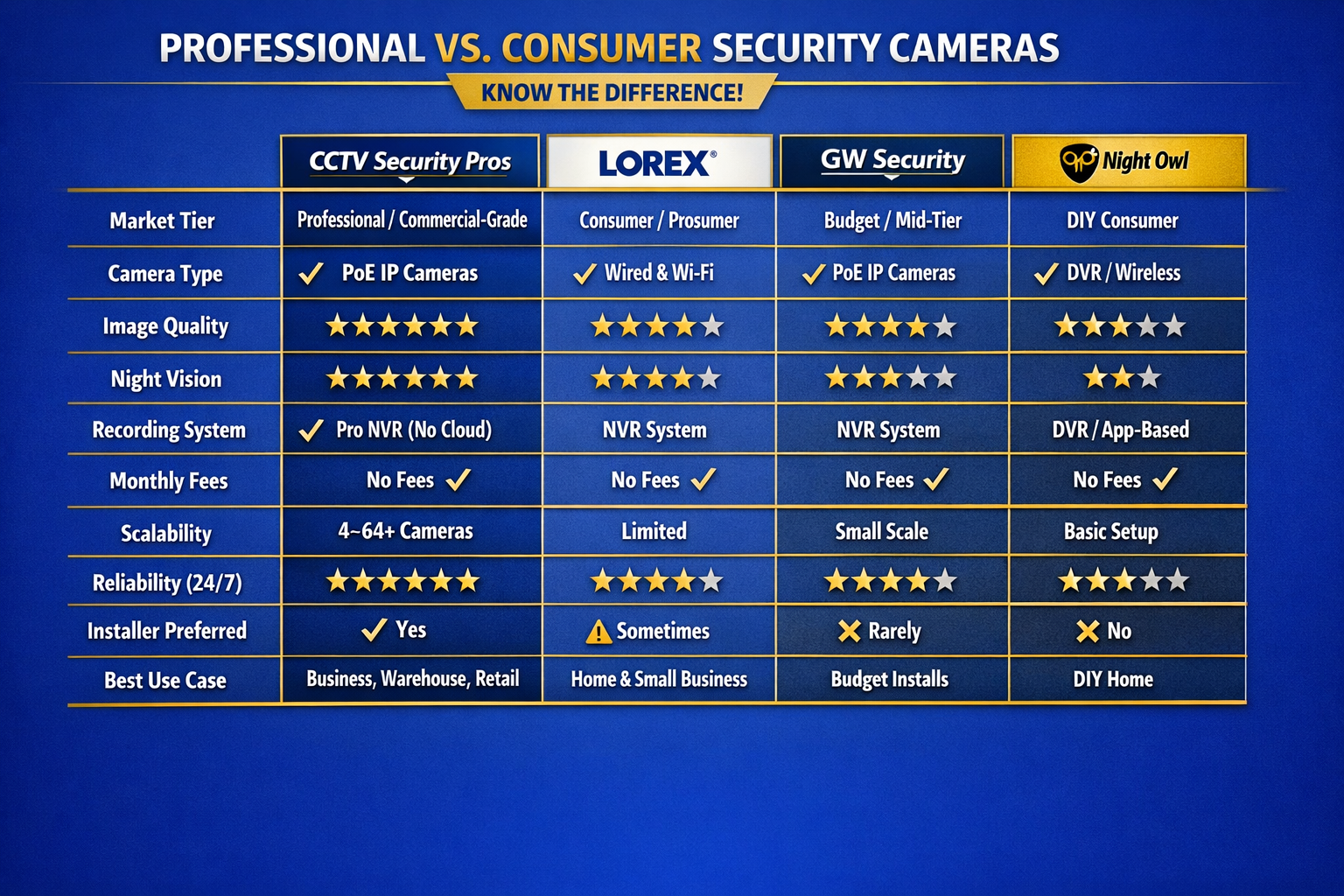
Professional security camera systems vs consumer security cameras comparison chart showing PoE IP cameras, NVR recording, scalability, reliability, and best use cases
Comparison of professional PoE NVR systems vs consumer Wi-Fi and DVR camera systems.
When wired is possible, wired wins
Start with a complete professional system here: IP Security Camera Systems

Core Components: IP Cameras, NVR, PoE Cabling

  • PoE IP Cameras: deliver high-resolution video over Ethernet and get reliable power through the same cable.
  • NVR Recorder: stores your video on-site and gives you fast playback, export, and remote viewing.
  • PoE Cabling: one cable per camera for power + data—stable, scalable, and installer-friendly.
Pro tip: Label both ends of every cable (Front Door, Dock 2, Register) for faster support and maintenance.

Camera Types & Best Use Cases

Bullet Cameras
Perimeters, parking lots, and longer views. Easy to aim and excellent outdoors.
Dome / Turret Cameras
Entrances and interiors. Clean look with strong tamper resistance.
Varifocal (Zoom) Cameras
Dial-in the exact field of view for doors, aisles, docks, and gates.
PTZ Cameras
Best for active monitoring of large areas (parking, yards, campuses).
LPR Cameras
Purpose-built for license plates when installed with correct angle and distance.
Wide-Angle Coverage
Great coverage—pair with zoom cameras for identification detail at distance.

Lens / Distance “Clarity” (Why Some 4K Footage Still Looks Useless)

Resolution matters—but lens choice and distance matter more. A wide-angle camera can be “4K” and still fail at identification if the subject is too far away. Professionals solve this with a simple strategy: wide coverage + zoom detail.

Pro Strategy: Wide Coverage + Zoom Detail
Use one camera for the full scene, and a second camera to capture identification detail at the choke point.
Wide Coverage Camera
  • Shows the whole area (context)
  • Best for monitoring and awareness
  • Less identification detail at distance
Zoom / Varifocal Detail Camera
  • Tight view on door, register, or gate
  • Best for faces and critical details
  • Turns “4K” into usable evidence
Tip: Layering coverage like this is how professional security camera systems capture both the full story and the identification detail.

Night Vision & Lighting (Real-World Fixes)

  • Avoid aiming directly into headlights or strong light sources.
  • Prevent IR reflection off nearby walls/soffits for clearer night images.
  • Use a varifocal camera for critical night detail zones (doors, gates, docks).
  • Use dedicated LPR cameras for reliable license plate capture at night.
Quick night vision tip
If night footage looks hazy, clean the lens/dome and check for IR “bounce” off nearby surfaces. Small aiming changes often make a big difference.

Storage & Retention (7 vs 14 vs 30+ Days)

Storage is sized from camera count, resolution, recording mode (24/7 vs motion), and how many days you want to keep video. Start by choosing a retention target—then size drives accordingly.

7 Days
Best for: smaller sites and quick incident discovery.
14 Days
Best balance: strong coverage without overspending on storage.
30+ Days
Best for: compliance, investigations, and slower discovery cycles.
Pro approach: set key cameras (entrances, registers, docks) to 24/7, then use motion zones for low-traffic areas to stretch retention.
Want us to size storage for you?
Tell us your camera count and desired retention days. We’ll recommend the right storage setup. Call (888) 653-2288.

Remote Viewing & Cybersecurity (Do This Like a Pro)

  • Use unique strong passwords (no defaults).
  • Create admin vs viewer users (least privilege access).
  • Keep firmware updated based on your environment.
  • Test playback and exports before you ever “need” them.
Best practice: document who has remote access, and remove access immediately when roles change.

Design & Placement (Avoid Blind Spots)

  • Cover every entrance (approach + at-the-door detail).
  • Overlap perimeter views so there’s no single point of failure.
  • Add zoom cameras anywhere distance matters (gates, docks, driveway).
  • Avoid harsh backlight (sun and headlights) when possible.
If you can run a wire, you can install a professional system
Want a quick expert confirmation of camera count and placement? Call (888) 653-2288.

Buyer Checklist (Copy/Paste This)

  • Camera count: ___ now / ___ later
  • Critical zones: doors, registers, docks, gates, driveway
  • Recording: 24/7 on ___ cameras, motion on ___ cameras
  • Retention goal: ___ days
  • Remote users: ___ viewers, ___ admins

FAQ

Are professional security camera systems better than Wi-Fi cameras?
For dependable 24/7 recording and usable evidence, wired PoE cameras with an on-site NVR are typically more stable than battery/Wi-Fi systems.
What’s the biggest mistake people make when choosing security cameras?
Thinking resolution alone guarantees clarity. Lens choice, distance, mounting height, and lighting determine whether you can identify a face or read a plate. Pros use wide cameras for coverage and zoom cameras for detail zones.
How many days of recording do I need?
Common targets are 7, 14, or 30+ days depending on how quickly incidents are discovered. Storage depends on camera count, resolution, and whether cameras record 24/7 or on motion.
Can I expand a professional system later?
Yes. Professional systems are designed to scale—add cameras, increase storage, or upgrade camera types as your coverage needs grow.
Get the right pro system the first time
Tell us your camera count and retention goal. We’ll help you choose cameras, NVR, and storage—no monthly fees.
Since 2008 • No Monthly Fees • Lifetime Support