


Professional property surveillance since 2008
Church Security Camera Systems: A Practical Plan for Entrances and Shared Spaces
Plan useful views for services, community activities and after-hours access with professional cameras, local NVR recording and free remote viewing.
✓ Free Viewing App ✓ No Monthly Viewing Fees ✓ 3-Year Warranty ✓ Unlimited USA Support
A church camera system should fit the way the congregation, staff and volunteers use the property. Begin with entrances, shared routes, parking approaches and service access. Give each view a specific purpose and make recorded video straightforward for the authorized team to find and use.
Complete 4K camera systems
Popular Business Systems
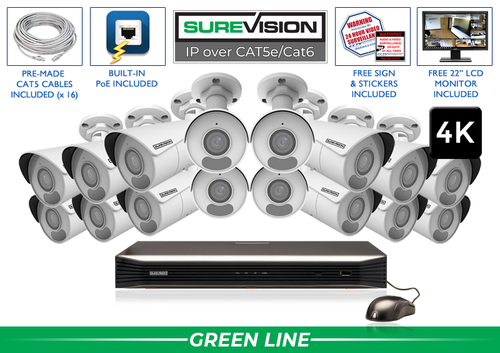
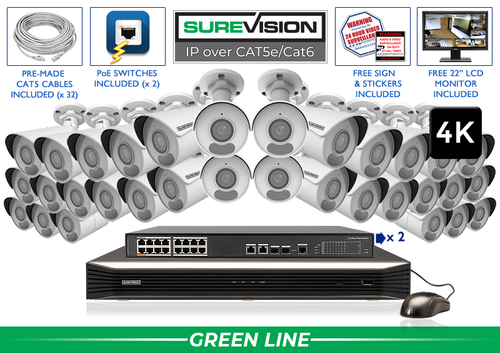
Start with a value-focused SureVision 4K PoE kit, then match the camera positions to your layout. These complete systems bring cameras, local recording, storage and camera cables together.
Choose cable lengths and storage for the job when ordering. Need different camera styles or a tighter view? Our team can help customize the kit around your business.
In this guide
- Popular Business Systems
- Plan around services and the weekly schedule
- Make arrivals and handoffs easy to review
- Connect parking areas with the building entrance
- Match camera style and framing to the space
- Give staff and volunteers a clear operating plan
- Choose NVR channels and recording history
- Use free remote viewing and test the full workflow
- Build a complete system around your layout
1. Plan around services and the weekly schedule
List the activities that change how the property is used: services, meetings, community events, deliveries and maintenance. Walk the routes from parking to the entrance and onward through approved shared spaces. Mark which doors are used for each activity and the locations an authorized reviewer would need to connect.
Write the purpose of each proposed camera before deciding the system size. A small church may have a compact entrance and shared route; a larger campus may need separate positions across buildings and parking areas. Keep the camera schedule with the floor plan and use location names the volunteer team will recognize.
A practical coverage plan
| Area | Camera job | Check during setup |
|---|---|---|
| Main entrance | Arrivals and movement into a shared lobby | Test open doors, backlighting and busy service times. |
| Shared corridor | The route between approved access points | Check corners, door swings and ordinary activity. |
| Parking approach | Movement from vehicles toward the entrance | Test parked vans and evening lighting. |
| Service or delivery door | An arrival and handoff at a selected access point | Use normal deliveries and the actual unloading position. |
| Office or equipment access | Use of an approved restricted doorway | Check the entrance without exposing private meetings. |
2. Make arrivals and handoffs easy to review
Check the main entrance when people arrive together, doors remain open and daylight enters the lobby. A general overview can explain the arrival while a separate view records the route that follows. Test a delivery or service visit at its normal handoff position.
Where the church has youth or childcare activities, have the responsible leadership approve any proposed views and access arrangements. Keep recordings focused on the stated security purpose and limit access to authorized people. Cameras support the organization’s supervision and response procedures; define who acts on a concern.
Next step: Record a normal test event and review the saved result before final mounting.
3. Connect parking areas with the building entrance
Trace the walk from parking to the main door, including covered approaches and side paths. Parked vans, landscaping and building corners may divide that route into several camera jobs. Test the views during an evening activity with the usual lights in use.
Keep fixed cameras on the entrances and routes that need continuous recording. A PTZ can add active observation across a larger open area while those fixed views remain available. If the project requires readable license plates, plan the controlled lane and suitable specialty equipment separately from a broad parking overview.
4. Match camera style and framing to the space
A compact dome or turret can fit a finished interior, while bullet cameras can suit exterior entrances and service approaches. The featured 4K kits include fixed 2.8mm bullet cameras. Choose each camera by its mounting position, subject distance, lighting and intended recorded detail.
Use motorized varifocal framing to refine a selected entrance or service approach after mounting. Check the saved image with a person standing at the intended location. Repeat the test with the door open and under evening lighting. Coordinate mounts and cable routes with the people responsible for the building’s finish and maintenance.
5. Give staff and volunteers a clear operating plan
Decide who needs live viewing, playback, clip export and configuration access. Use individual authorized accounts and assign responsibility for recovery information. Keep the recorder in a suitable secured location and show the responsible team how to check that recordings are available.
Set supported alerts for specific areas and hours, such as a selected service entrance outside scheduled activities. Confirm who receives notifications and what action they take. Run a short handover exercise, then repeat basic recording and camera-view checks after staffing, lighting or event-schedule changes.
Next step: List the events, responsible users and notification hours, then test recording and alerts separately.
6. Choose NVR channels and recording history
Choose a recording-history target around the church’s reporting and review process. Include weekends, infrequent building use and the delay before a concern reaches the responsible team.
Camera count, video settings, activity and the recording schedule affect retention. Count planned views and near-term additions before choosing recorder capacity. Check PoE ports and any separate switches as well as the channel count. Use the recording storage calculator, then confirm the history after the system has operated normally.
7. Use free remote viewing and test the full workflow
SureVision systems combine local NVR recording with a free viewing app and no required monthly viewing fees. Internet at the property supports access from outside the site. A properly configured local camera network can record independently of that internet connection.
Test an arrival from parking, a shared-route sequence and a service-door handoff. Have an authorized staff member or volunteer find and export a sample recording. Check remote access using cellular data, review recorded footage and open an exported clip on another device. Leave the owner with the account and recovery information needed to manage the system.
8. Build a complete system around your layout
A smaller property may start with four distinct jobs around the main door, shared lobby route, parking approach and service access. A multi-building campus needs more views where buildings and obstructions divide those routes. Compare 4, 8, 16 and 32-camera kits and the full range below, then build the final plan around the property.
For a new wired installation, start with matched SureVision IP cameras and an NVR. Choose storage, cable lengths, mounting accessories and powered connections together. CCTV Security Pros has supplied professional surveillance equipment since 2008, with a 3-year limited warranty and unlimited USA support for SureVision. Share a layout and your recording-history target for help selecting a complete system.
Look for the logo, expect the quality.
Continue with the lens guide, PoE installation guide and recording storage calculator.
Plan your church camera system with the Pros
Send your layout, important camera jobs and recording-history target. Our team can help match a complete system to the property.
888-653-2288