
Advice from the security pros Compare wide views, motorized zoom and specialty cameras while keeping the detail that matters. The right camera lens gives you the view your property needs. A wide view can show activity across a room or yard. A tighter view puts more of the camera’s available detail on a smaller area, such as an entrance or gate. Start with the subject and distance, then choose the lens. The original comparison images below are retained. They show a vehicle about 70 feet from a 2MP camera using different lenses. Use them to understand the change in framing. They are examples from that setup, rather than a guarantee of the result from every current camera. Focal length is expressed in millimeters, such as 2.8mm or 12mm. With the same sensor, a shorter focal length generally produces a wider view, while a longer focal length produces a narrower view. That is why a 2.8mm camera and a camera zoomed toward 12mm can serve different purposes at the same property. Field of view is the angle or scene width the camera captures. It depends on the lens, sensor and image format. Two cameras labeled with the same focal length can therefore have different stated viewing angles. Check the specifications for the exact model, and distinguish horizontal, vertical and diagonal angles when comparing them. Choose a view around the task. Watching movement across a parking area is different from seeing a person approach a door. A camera assigned to an overview does not automatically provide the close detail needed for every event in that overview. The following labels describe the original sample setup. Actual field of view and useful detail vary with the selected camera, position, resolution, lighting and settings. All 5 original images are preserved below in their original order. As the lens becomes tighter, the vehicle takes up more of the picture while less of the surrounding scene remains visible. That tradeoff is the practical point of the comparison. You gain a closer framing of a chosen area while giving up some coverage outside it. Do not assume that any 12mm camera will read a plate at 70 feet. Plate capture depends on the equipment and installation, including angle, speed, lighting and exposure. Plan vehicle identification as its own requirement when that result matters. A wide fixed lens is useful for lobbies, offices, rooms, yards and general approach views. It keeps the surrounding scene visible so you can understand where someone went and what happened around them. A fixed lens is set to its intended focal length. Choose the mounting location around that view. Moving a camera closer to the subject can improve the useful detail in the scene, provided it still gives the coverage and mounting conditions you need. For a business entrance, one wide view can show general movement while a second view focuses on the approach. For a home, a wide driveway view may work alongside a camera placed near a walkway. Design the combination instead of expecting the widest image to answer every question. A motorized varifocal lens lets you adjust optical framing within its supported range through the appropriate recorder or app controls. At the wider end you see more area. As you zoom in, the view narrows around the selected subject. This is useful when the final view needs to be adjusted after mounting. An installer can refine a gate, loading dock, stockroom aisle or entrance view from the screen rather than repeatedly changing a fixed-lens camera position. Set the view deliberately and test it in normal conditions. Zooming in on one door may remove a nearby approach from the image. Confirm that the new framing still answers the original coverage question and that focus is correct for the subject. Optical zoom changes the lens framing before the image is recorded. A tighter optical view can put more image detail on the chosen area. It works within the lens range and gives up some surrounding coverage as the view narrows. Digital zoom enlarges part of an existing image. It is useful for looking more closely at recorded footage, but it does not recover detail that the camera did not capture. Enlarging an indistinct face or plate does not guarantee identification. Higher resolution can provide more pixels across a useful scene. It still needs the right lens, distance, exposure and lighting. Compare the complete image rather than assuming that 4K alone makes every distant subject readable. A PTZ camera can pan, tilt and optically zoom within its supported controls. It is useful for looking around a larger area or examining a particular event. The camera records the direction it is aimed at; it does not provide a close view of every direction at once. Keep essential entrances and routes covered by fixed views when they need continuous coverage. Then use a PTZ as an additional tool for active observation or supported tracking, according to the selected model and configuration. A 180-degree camera provides a broad panoramic view for a different purpose: understanding activity across a wide scene. Consider the available detail at the far side of that scene. A panoramic overview can be paired with a closer camera at a priority doorway or access point. Have someone walk through the area you want to protect. Check the image where the person enters, pauses and leaves. For a receiving area, test the point where goods are handed over. For a gate, test the path and distance at which the view must be useful. Check height and angle. A high mounting point may show a broad area while providing an unhelpful view of a face. Position the camera so the target occupies enough of the frame and appears at a useful angle. Repeat important checks at night. Light sources, reflective surfaces, glare and moving subjects can change the result. A useful daytime view is only part of the plan when you also need after-hours recording. Write down each camera location, purpose, approximate subject distance and preferred view. Mark which locations need broad coverage, adjustable framing, panoramic coverage or PTZ control. This makes it easier to choose equipment consistently. Use the camera buyer’s guide for resolution, night vision, audio, AI detection and active deterrence. The lens shapes the view, while the rest of the camera and recorder determine how that view is captured, stored and used. Tell our team what you need to see and share a layout or photos of the scene. We can help choose SureVision cameras and a matched recorder for the project. Build Your System Your Way also lets you combine camera types for different areas in one equipment list. No. It is a common wide fixed lens for general surveillance, but panoramic and other camera designs can provide wider views. Compare the exact model’s stated field of view. Supported digital zoom can enlarge the image on screen. It does not change the fixed optical lens or add missing recorded detail. Select a motorized varifocal or PTZ camera when adjustable optical framing is part of the requirement. That depends on the scene and distances. A broad overview and a closer approach view often serve different jobs. Plan those jobs separately before reducing the camera count. Start with the view you need and the subject distance, then choose lens and resolution together. Include lighting, mounting and the desired recording result in the decision. Share your property layout, important views and recording needs. We’ll help you choose professional equipment for the job.Security Camera Lenses & Viewing Angles
In this guide
1. Understand focal length and field of view
2. Compare the original lens examples
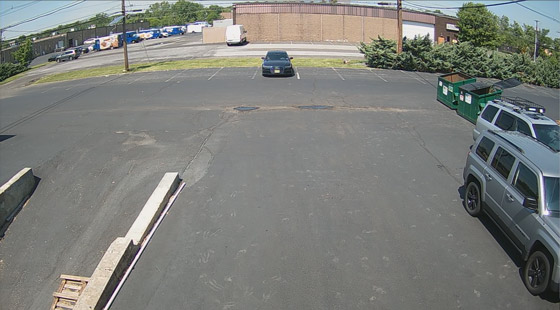
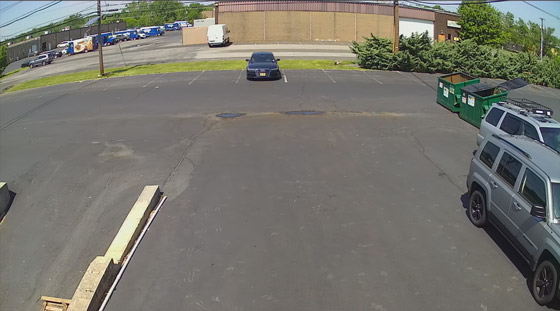
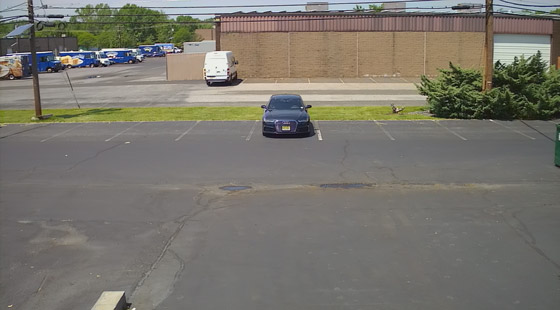
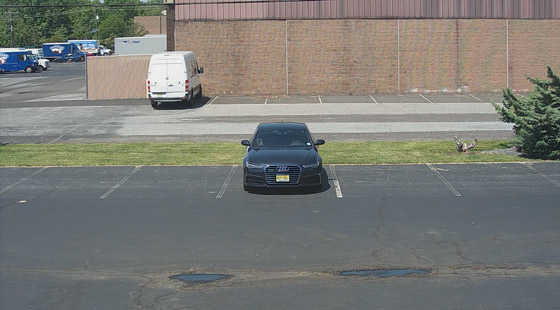
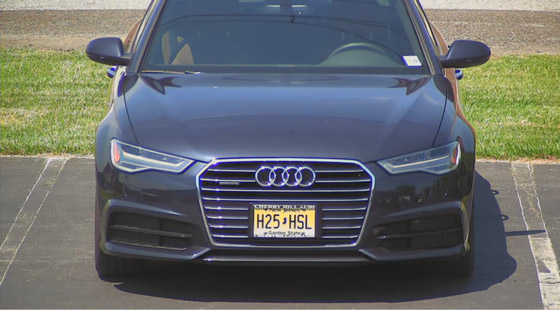
3. Use a 2.8mm fixed lens for broad coverage
4. Use motorized 2.8–12mm lenses to adjust framing
5. Understand optical and digital zoom
6. Choose a PTZ or 180-degree camera for its purpose
7. Test the view at the subject’s actual location
8. Turn the lens choice into a complete plan
Lens and viewing-angle questions
Is 2.8mm always the widest lens?
Can I zoom a fixed-lens camera?
Can one camera show the whole yard and identify everyone?
Should I choose resolution or lens first?
Related equipment and guides
Plan your system with the Pros
No monthly viewing fees3-Year Limited WarrantyUnlimited USA Support
