Security Camera System Buying Guide: Do It Once. Do It Right.
Oct 15, 2026
Advice from the security pros
Choose your security camera system with confidence.
Your people. Your property. Everything you’ve worked to build. The right security camera system starts with what you need to see: the people at your entrance, activity around your property and the details that matter when you review a recording.
Use this practical guide to choose professional cameras, the right lenses, reliable recording and useful features—with real USA experts ready to help you put it all together.
11 questions. Clear answers. A better system.
- How many cameras will my system support—and can I add more later?
- Which camera styles are right for my property?
- How much detail do I need—and which lens should I choose?
- How far will each camera be from the recorder?
- Who will install my security camera system?
- Should I record 24/7 or when motion is detected?
- Can I get alerts when something matters?
- Can multiple people use the system?
- Are there any extra or monthly fees?
- Which viewing and monitoring tools are included?
- What support and warranty come with my system?
A STRONG START FOR A NEW INSTALLATION
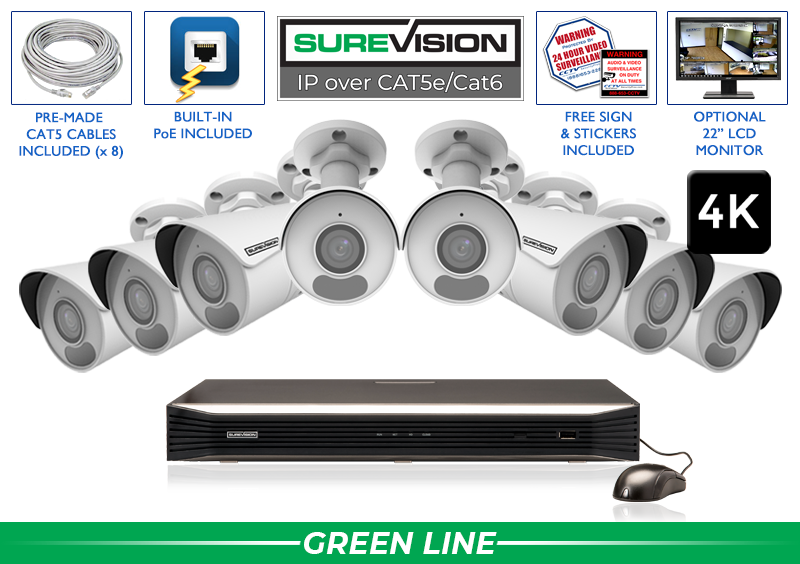
We recommend professional IP cameras with PoE.
PoE means Power over Ethernet. One Cat5e or Cat6 cable carries power and video to each camera, plus audio on cameras with a microphone. Connect the camera to the system’s PoE port or PoE switch—there is no separate power outlet needed at the camera.
You get a dependable wired connection, clear high-definition video, local NVR recording and convenient remote viewing. SureVision IP cameras are NDAA-compliant and ONVIF-compliant, with weatherproof housings for indoor and outdoor use.
Upgrading your CCTV coax system to HD? Explore HD-over-coax systems that work with existing suitable coax cabling.
Start with the views that matter.
A great system is planned around your property. Start with the important views, then choose the cameras and recorder that do those jobs well.
How many cameras will my system support—and can I add more later?
Count the views you want to cover: entrances, exits, driveways, parking areas, workspaces, registers, loading docks and inventory areas. Camera count comes from those views, rather than square footage alone.
A wide view can show activity across a parking area, while a separate camera at the entrance gives you a closer look at people coming and going. Plan both where you need them.
Each recorder channel supports 1 camera. For example, an 8-camera installation with a 16-channel NVR leaves room for 8 more cameras later. Choose your complete security camera system around today’s coverage and tomorrow’s growth.
Start with the views. Choose room to grow.
Which camera styles are right for my property?
You can mix camera styles on one SureVision system. Choose each camera for its location, the view you want and the way you want to use it.
Our professional SureVision IP cameras are weatherproof for indoor and outdoor use. Specialty choices include active deterrence with lights and warning sounds, wide panoramic views and license plate cameras.
How much detail do I need—and which lens should I choose?
Choose resolution for the detail you want. Professional 2K-class cameras provide clear everyday coverage. 4K security cameras capture more pixels, giving you more detail to review and more flexibility to enlarge part of a recording.
Choose the lens for the view. A fixed 2.8mm wide-angle lens is useful for rooms, yards and entrances. A motorized 2.8–12mm lens lets you adjust from a wide view to a closer view through the recorder or app.
Put the detail where it matters. A wide overview and a close view of a doorway do different jobs. Match resolution, lens and placement to each location. The actual images below show how much the lens changes the view.
Resolution captures the detail. The lens frames the view.
SEE THE DIFFERENCE
One scene. Two ways to see it.
A wider view covers more of the scene. A longer lens brings a smaller area closer. A motorized 2.8–12mm lens lets you adjust between the two from your compatible recorder or app.
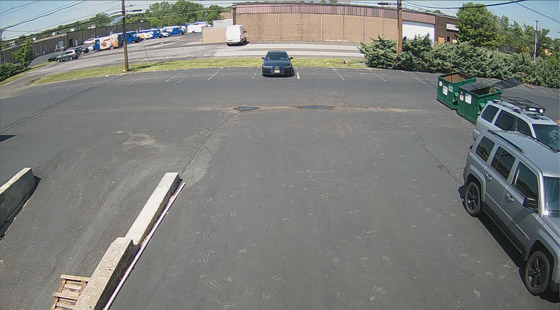
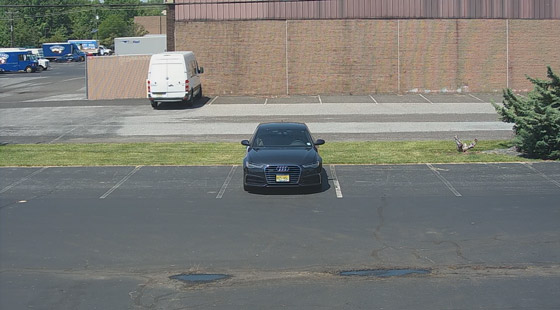
Motorized adjustable lens: fine-tune your view remotely within the lens range.
Actual comparison images from our existing lens guide: 2MP footage, with the vehicle 70 feet away. These illustrate field of view. Exact angles and lens options vary by camera model.
DON’T OVERLOOK NIGHT VISION
Your protection doesn’t stop at sunset.
Ask what you’ll see at night, how far you need to see and how much light is available. Match the camera to the view you need after dark.
Infrared night vision
Infrared LEDs illuminate dark areas for black-and-white video. Ask about the camera’s rated range and the detail needed at your target distance.
Color at night
Low-light color uses available lighting. Select models add visible white light to help keep clothing, vehicles and surroundings in color after dark.
Plan the nighttime view
Check the lighting, mounting angle and distance. Ask to see night footage, and tell us whether you need an overview or detail of people and vehicles.
We’ll help match infrared, low-light color or white-light options to each location. Compare night-vision options →
Plan the cables and installation.
Measure the runs, then choose who will install your system.
How far will each camera be from the recorder?
Measure the cable route, including corners, walls, ceilings and the path back to the recorder. Use the actual cable route rather than the straight-line distance between camera and recorder.
For a straightforward installation, choose pre-made cables in the lengths you need. Cable spools are useful when you want to cut runs to length or cover larger properties. Tell our team about longer runs or separate buildings so we can include the right connections.
Measure first. Order the right cable lengths.
Who will install my security camera system?
Install it yourself, work with your IT department or use an installer. PoE simplifies the camera connection because power and video travel through the same cable.
SureVision 4-, 8- and 16-channel PoE NVRs include camera ports built into the recorder. Larger systems use PoE switches to connect cameras around the property. We help you choose the right setup.
Our USA support team is here to help with equipment connections, system setup and remote viewing. You can also ask about independent installation options.
A straightforward installation, with help from the Pros.
Choose how you record and share access.
Decide when to record, which alerts matter and who needs access.
Should I record 24/7 or when motion is detected?
24/7 recording gives you a continuous timeline. Motion or event recording focuses on activity, while scheduled recording lets you choose the hours that suit your property.
The NVR recorder brings your cameras, recordings and playback together. SureVision NVRs include 4TB of preinstalled storage, with additional storage options for larger recording needs.
Tell us how many cameras you want and how many days of video you would like to keep. We help match storage to your system and recording schedule.
Your recordings stay at your property. Local recording can continue during an internet outage while the cameras, recorder and local connections remain powered. Internet access is needed for remote viewing and mobile notifications.
Choose the recording history you want. We’ll help with storage.
Can I get alerts when something matters?
Yes. Choose cameras and an NVR with the detection features you want. Human and vehicle detection can help distinguish useful activity from other movement, making notifications and event review more useful.
Set the areas you want to watch—such as an entrance, driveway or delivery area—and select the events that should notify you. Supported perimeter tools can monitor a defined area or line crossing.
For a more visible response, active-deterrence cameras can add warning lights, sounds or two-way talk. We’ll help you select the models with the tools you want.
Useful alerts, with features chosen for your property.
Can multiple people use the system?
Give family members, managers, employees or your IT team access through separate user accounts. Choose who can view cameras and who can manage system settings.
Have more than 1 location? Bring your systems into the viewing app so you can check your properties from one place. Our team can help set up the access that works for you.
The right views for the right people.
Know your costs, tools and support.
Ask what is included today and who will help throughout ownership.
Are there any extra or monthly fees?
There are no required monthly recording or viewing fees with our SureVision systems. Record to the NVR at your property and use the free viewing app and remote viewing software.
Your system includes free software updates and unlimited USA support. Choose the cameras, recorder, storage and cables you need up front, so you know what you are buying.
That is lasting value: professional equipment you own, recordings stored on your equipment and people ready to help you use it.
Buy your system. Keep your recordings. Skip required monthly fees.
Which viewing and monitoring tools are included?
Use the free SureVision app to check live cameras, review recorded activity and save an important clip. View your system from a phone, tablet or computer.
Choose cameras with the extra features you want: built-in microphones, two-way audio, motorized lenses, PTZ controls or active deterrence. Your camera selection determines which of those tools you can use.
Watch the app video below to see how remote viewing fits into everyday life—at work, at home or while you are away.
See live video. Find recordings. Save what matters.
What support and warranty come with my system?
CCTV Security Pros backs your purchase with a 3-year warranty, unlimited USA support and a 30-day money-back guarantee. Our specialists help before you order, during installation and long after setup.
Since 2008, we have served businesses, homeowners, installers, IT teams, schools and government facilities. Thousands of repeat customers have returned for our equipment and personal service.
Call 888-653-2288 for system advice, or visit our setup and support center.
Professional equipment. Real people behind it.
WHY CHOOSE CCTV SECURITY PROS?
What makes a system professional?
It is the way the cameras, recording, storage and support work together—day after day. Here is what that means for your property.
A system designed around your property
Mix camera styles and lenses, match the NVR and storage, and cover each important view. A complete kit gets you started; the custom builder lets you make it your own.
Professional equipment, made to our specifications
SureVision cameras and recorders are supplied exclusively by CCTV Security Pros. Weatherproof cameras, dependable recording and free viewing tools work together as one system.
Local ownership and lasting value
Keep recordings on your NVR, expand when you need more cameras and receive free software updates. No required monthly recording or viewing subscription.
An established company that answers
We have served more than 100,000 customers since 2008. Thousands of repeat customers trust our equipment and personal USA support. Your purchase includes a 3-year warranty and a 30-day money-back guarantee.

Let’s build the right system for you.
Choose a complete PoE kit or use our system builder to mix cameras, a recorder, storage and cables. Have a floor plan or a list of the areas you want to see? Send it to our team for a free system quote.
Talk to the Pros: 888-653-2288
Do it once. Do it right. Professional equipment from CCTV Security Pros.