
Wholesale Security Cameras: A Sourcing Guide for Installers
Posted by CCTV Security Pros on Oct 30, 2026
Build a Clear Equipment List Before Requesting a Project Quote
For installers and businesses buying several cameras, the right equipment mix and dependable project information matter as much as unit price. Prepare a quote request that connects each product to a real installation need.
Updated October 7, 2026 · CCTV Security Pros
What belongs in a professional camera quote request?
Provide the camera schedule, recorder requirements, cable routes, accessories and retention goal. Include the project timing and any documentation requirements. Ask for current quantities, pricing and availability rather than assuming a standard discount or delivery promise applies to every order.
Start with the site requirements
List each camera location and the view it needs to produce. Include mounting surface, viewing distance, lighting and environmental conditions. Separate wide overviews from tighter identification views and specialized tasks such as plate capture.
A repeatable camera schedule helps the supplier identify missing equipment and gives the installer a consistent reference during handover. Where several properties share a design, note the differences rather than assuming the same package will fit every site.
Check the complete bill of materials
Include cameras, recorder, drives, PoE equipment, cable, connectors, junction boxes, brackets and any local display required. Specify quantities and preferred cable arrangements. Small accessory omissions can delay work even when the main camera order is correct.
Review recorder channels, bandwidth and supported resolutions alongside power-port count and total PoE budget. Check that the selected mounting accessories fit the exact camera models. A product from the same brand or family is not automatically the right mechanical or electrical match.
Set the retention goal before selecting drive capacity. Include camera settings and recording schedules in the estimate, then plan to verify real retention after commissioning.
Confirm the features your customer expects
Document the requested workflow: local recording, mobile viewing, clip exports, audio, PTZ control or selected analytics. Verify those features for the final camera-and-recorder combination, particularly when retaining existing equipment.
Explain optional services and ownership costs clearly. A compatible SureVision system can record locally without required monthly cloud-storage fees, but that does not imply a staffed monitoring service or on-site installation is included.
Ask for current project terms
Request a written quote identifying model numbers, quantities and configuration options. Confirm availability, lead times, shipping arrangements and any proposed substitutions before scheduling the installation around the order.
Ask directly about project or volume pricing. This guide does not promise a particular wholesale discount, dealer status or approval. The useful comparison is the complete quoted configuration and the support behind it.
Review the current warranty and return terms, including how service requests are handled. Clarify responsibilities for troubleshooting, equipment returns and installation labor so expectations are clear between the customer, installer and supplier.
Standardize the handover and support record
Keep serial information, final model numbers, cable labels, camera names and a network diagram with the project record. Provide authorized users with the information needed to operate the system through the agreed access process.
Test the actual recordings, nighttime views, remote access and exported clips before handover. Demonstrate how to locate an incident and how to report a problem. Clear documentation makes a repeat project easier to support and helps separate equipment issues from installation or configuration changes.
Your planning priorities
SureVision products to include in a project comparison
These products are available from CCTV Security Pros. Match each model to the viewing task and confirm the final recorder, power, mounting and storage configuration before ordering.
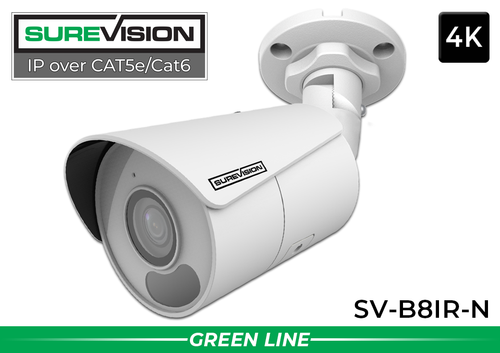
SureVision SV-B8IR-N 4K Bullet IP Camera
An 8MP fixed 2.8mm-lens model for appropriate wide-angle indoor or outdoor views. Use the exact model in the camera schedule and confirm its installation requirements and recorder compatibility.
View product details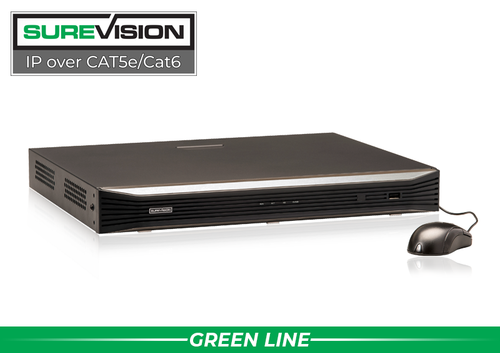
SureVision SV-NVR2P16-N 16-Channel PoE NVR
A recorder to consider for a supported 16-channel IP configuration. Specify the required drive capacity and check bandwidth, power and feature support against the project rather than treating channel count as the entire specification.
View product detailsWholesale sourcing questions
How do I request volume pricing?
Send the quantities, exact equipment requirements, project timing and destination details needed for a quote. Ask CCTV Security Pros to confirm current project pricing and availability.
Should I use one camera model everywhere?
Standardization can simplify purchasing and support, but different viewing tasks may need different lenses, housings or features. Use a small, well-matched set of models where the layout calls for it.
Can I promise an installation date based on the catalog?
Confirm the final configuration, stock and delivery expectations first. Product availability and project requirements can change, so coordinate the order with the installation schedule.
Request a Clear Project Equipment Quote
Send CCTV Security Pros your camera schedule, quantities, recorder requirements and planned timing. Our team can help match compatible equipment and identify the details needed for your project quote.
Get a Free System Quote Shop SureVision CamerasBuild a bill of materials that is ready for installation
For an installer, a good equipment price is only part of a successful order. The bill of materials should connect each camera to its lens, mount, cable route, power source and recorder channel. Missing brackets or insufficient powered ports can delay a project even when the main cameras and recorder arrive on time.
| Line item | Information to specify |
|---|---|
| Cameras | Exact model, quantity, viewing task and location. |
| Recorder | Channel capacity, supported streams and recording workload. |
| Storage | Installed capacity and the retention assumptions. |
| Networking | Switches, powered ports, uplinks and power budgets. |
| Installation materials | Cable lengths, terminations, compatible mounts and enclosures. |
| Handover | Account ownership, training, documentation and support roles. |
Use the custom security camera system builder to organize a proposed list. Review cables and connections and power and PoE accessories alongside the main equipment so the order represents a buildable system.
Separate product sourcing from the scope of your service
Document what the customer is buying from you: design, installation, network configuration, user training, maintenance or a defined subset. State who provides internet access, electrical work and any specialist mounting or cable infrastructure. A clear scope reduces disputes about work that was never included in the hardware order.
Before a large rollout, test the intended camera and recorder combination on a representative location. Verify the functions the client expects, including audio where approved, detection events, remote playback and exports. Do not treat basic video compatibility as proof that every advanced feature works in the planned configuration.
Ask CCTV Security Pros for current availability and project-specific terms through the free quote form or contact page. Avoid promising an unconfirmed discount, delivery date or reseller arrangement. Include the final model list, warranty information and customer acceptance results in the project record so future support starts with reliable documentation.
What to record at the final system check
Keep the acceptance check simple enough that the owner can repeat it later. Use the final camera positions and recording settings, and include the lighting and activity that make the important views difficult. A recorded test gives a useful baseline for future troubleshooting.
- Confirm that each camera name matches its actual location and purpose.
- Review a saved daytime event and, where relevant, a nighttime event with a moving subject.
- Check the recording history against the agreed retention goal after a representative operating period.
- Test the permissions and playback functions of an ordinary user account.
- Export a short sample and check it on the device that will be used for review.
- Record any unresolved issue and the person responsible for correcting it.
Repeat the relevant checks after a camera is moved, a major display or obstruction changes, or recording settings are adjusted. This keeps the system aligned with the property’s current needs and makes maintenance more predictable.
Turn the plan into a complete equipment list
After defining the required views, compare security camera systems. Match each camera to a recorder channel, a compatible power connection and a documented cable route. Keep the installation materials, storage assumptions and required user functions on the same list so a missing component is easier to spot before ordering.
Use our security camera buying guide for the next planning decision and the IP camera system guide for the related technical detail. These guides provide background for comparing the actual equipment rather than choosing solely by a camera count or a resolution label.
Bring the list together in the custom security camera system builder, or send the property layout and viewing goals with a free system quote request. Include the mounting locations, approximate subject distances and any existing equipment you want to keep. That information makes the proposed configuration more specific to the property.
Before accepting the installation, practice the tasks the owner will perform: checking a live view, finding a recorded event and preserving a usable export. Save the camera schedule, equipment model numbers and support information with the project records. Use the technical support center for model-specific setup resources and ask for help when a required function needs clarification.
