
Are Business Security Systems Tax Deductible? A Planning Guide
Posted by CCTV Security Pros on Oct 30, 2026
Plan the Security System First—and Confirm the Tax Treatment
Business security costs may be deductible, but the timing and method depend on the purchase and the business's circumstances. Prepare clear project records and ask your tax professional how the applicable rules treat your equipment and installation.
Updated October 7, 2026 · CCTV Security Pros
Can a business deduct a camera system?
Potentially, but buying cameras does not automatically create an immediate deduction for the full purchase price. Business use, asset classification, installation facts and the applicable tax rules affect the treatment. This is general planning information; have your tax professional determine the treatment for your return.
Understand immediate expenses and capital costs
Some business expenditures can be deducted currently, while equipment and improvements may need to be capitalized and recovered through the applicable rules. The IRS's tangible-property guidance explains that capitalization, repairs and available elections depend on the facts and requirements.
Provide your accountant with the whole project description rather than only the word security. A new camera system, a replacement component, installation labor and an ongoing service can raise different questions. An itemized invoice helps the professional evaluate the transaction accurately.
Ask how depreciation and available elections apply
The IRS discusses depreciation and Section 179 in Publication 946. It identifies certain security-system improvements to nonresidential real property as potentially eligible qualified Section 179 real property when the stated conditions are met. That does not establish that every camera purchase qualifies for the same treatment.
Ask your tax professional to determine the asset classification, applicable limitations and elections for your tax year. Do not rely on a retailer's product description to establish eligibility, and do not apply a prior year's dollar limits without checking current guidance.
Document when the system is ready for use
For depreciation, the IRS generally treats property as placed in service when it is ready and available for its intended use. The date an order is paid for or delivered may differ from the date installation makes the system ready.
Keep the project timeline: order, delivery, installation, configuration and acceptance. Record what was operational and when. This gives your accountant a factual basis for assessing timing rather than trying to reconstruct it from a credit-card statement alone.
Prepare a useful records package
- Itemized equipment quote and final invoice, with model numbers and quantities.
- Separate records for installation, cabling, accessories and any services.
- Payment records and dates for delivery and completion.
- The business location and a description of the system's business purpose.
- Details of any personal or mixed use, leases or shared ownership.
- Records of rebates, returned equipment or changes to the final project.
Give your accountant the underlying records and let them determine the appropriate allocation and reporting. Do not relabel a personal purchase as a business expense because the product could also be used at a workplace.
Choose the equipment for the business need
Start with the views and recording history the property actually needs. Match camera lenses, NVR capacity, storage and cabling to that plan. A possible tax benefit should not be the reason to purchase an unsuitable or unnecessarily large system.
Request a clear equipment configuration so the quote is useful for purchasing, installation and accounting. Keep changes documented if the camera count or storage is revised before delivery.
CCTV Security Pros can help identify equipment and provide product information. Your tax professional should confirm federal, state and local treatment for your specific circumstances before a deduction is claimed.
Your planning priorities
Equipment examples for an itemized business quote
These products are available from CCTV Security Pros. Match each model to the viewing task and confirm the final recorder, power, mounting and storage configuration before ordering.
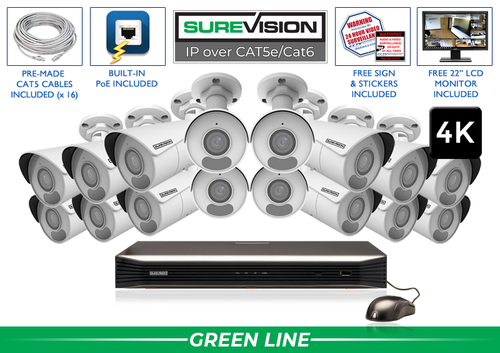
SureVision SV-16IPBIR8-N 16-Camera 4K System
This package combines 16 4K bullet cameras with a 16-channel NVR. Select the appropriate storage and cable configuration and retain the final itemized order. This product example is not a representation that the purchase qualifies for a particular tax deduction.
View product details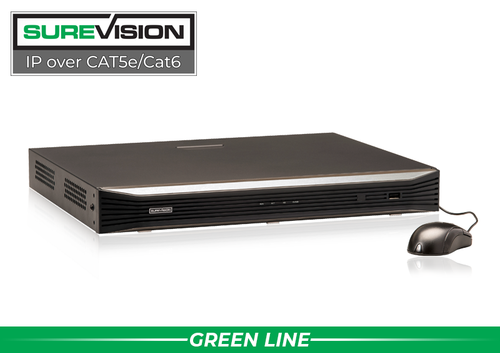
SureVision SV-NVR2P16-N 16-Channel PoE NVR
A recorder option for an appropriate compatible IP camera project. Include the selected drive capacity and related installation costs in the records supplied for professional tax review. Tax treatment depends on the transaction and use, not the model name alone.
View product detailsBusiness security purchase questions
Can I assume the entire system is deductible immediately?
No. Ask your tax professional whether the costs are currently deductible, capitalized or eligible for a particular election. Eligibility and timing depend on the facts and applicable rules.
Is the invoice date always the important tax date?
Not necessarily. The placed-in-service date can matter for depreciation. Keep both purchasing and installation records so the appropriate timing can be assessed.
Does CCTV Security Pros determine my tax deduction?
No. The company provides surveillance equipment and product information. A qualified tax professional should determine the treatment of your business purchase.
Request a Clear Equipment Quote for Your Project
Tell CCTV Security Pros what your business needs to see and record. Our team can help specify the equipment so you can review the project and its tax treatment with the appropriate professionals.
Get a Free System Quote Shop SureVision CamerasPrepare an itemized project file before the accounting review
The most helpful contribution a business owner can make is an accurate record of what was purchased and how it is used. Separate cameras, recorder, storage, networking, installation and other services in the equipment proposal where practical. Keep the accepted quote, invoice, payment documentation and installation records together so the accounting review is based on the actual transaction.
| Project record | What to document |
|---|---|
| Equipment list | Model numbers, quantities and component costs. |
| Installation | The work performed and the amounts charged. |
| Business purpose | The business areas and activities the system serves. |
| Use of the system | Any business and personal use that needs review. |
| Operational date | When the completed equipment was ready and available for its intended use. |
| Later changes | Added cameras, replacement components and related invoices. |
Use security camera systems to compare equipment approaches, then create an itemized configuration with the custom system builder or request a written project quote. Ask your tax professional which additional records are needed for your situation.
Evaluate the purchase before assuming a tax benefit
Start with the camera system the business needs. Identify the areas to cover, the detail required, the recording period and the people who will use the footage. Compare complete installed configurations, including storage and cabling. A potential tax treatment should not substitute for a system that meets the operational requirement.
Then give the project records to a qualified tax professional. Ask how the purchase and installation should be classified, when any eligible cost can be recognized, and what current federal and state rules apply. A purchase price is not automatically the amount of tax saved. The answer depends on the business’s circumstances and the applicable treatment.
For the equipment decision, our commercial camera planning guide covers the surveillance questions and the NVR buying guide covers recording capacity. Keep the accounting conclusion with the purchase records and update the file when the system changes. This guide supports project preparation; it does not determine a particular taxpayer’s deduction.
Questions to bring to the equipment and accounting review
- Which cameras and recording components serve the business areas identified in the plan?
- Does the written quote separate hardware, installation and other services clearly enough for the accounting review?
- When will the equipment be ready for its intended use, and who will record that date?
- What business-use facts and supporting documents does the tax professional need?
- How should later upgrades and replacement equipment be recorded?
Keep the equipment decision and the accounting decision connected through accurate records. The supplier can help specify a working camera system and provide purchase documentation; your qualified tax professional determines the applicable tax treatment for the business.
Turn the plan into a complete equipment list
After defining the required views, compare security camera systems. Match each camera to a recorder channel, a compatible power connection and a documented cable route. Keep the installation materials, storage assumptions and required user functions on the same list so a missing component is easier to spot before ordering.
Use our commercial camera planning guide for the next planning decision and the security camera buying guide for the related technical detail. These guides provide background for comparing the actual equipment rather than choosing solely by a camera count or a resolution label.
Bring the list together in the custom security camera system builder, or send the property layout and viewing goals with a free system quote request. Include the mounting locations, approximate subject distances and any existing equipment you want to keep. That information makes the proposed configuration more specific to the property.
Before accepting the installation, practice the tasks the owner will perform: checking a live view, finding a recorded event and preserving a usable export. Save the camera schedule, equipment model numbers and support information with the project records. Use the technical support center for model-specific setup resources and ask for help when a required function needs clarification.
