
Subscription-Free Security Camera Alternatives: How to Compare Options
Posted by CCTV Security Pros on Oct 30, 2026
Compare Local Recording Options Around Your Property
If you want to avoid a required cloud-storage plan, start with the recording you need and the equipment you already have. A PoE NVR system, a compatible DVR upgrade or supported camera storage can serve different projects.
Updated October 7, 2026 · CCTV Security Pros
What is the best alternative to a cloud-only camera plan?
For a new wired IP project, a compatible PoE camera and NVR system is a practical option. For an existing coaxial installation, a compatible DVR upgrade may preserve useful wiring. The right choice depends on the cameras, cable routes, recording history and functions the property needs.
Option 1: IP cameras with a local NVR
IP cameras send video across a network to a compatible NVR, which records to installed drives. PoE can supply power over the Ethernet connection when the camera and power source are compatible. This arrangement suits many new multi-camera installations.
Compare camera views, NVR bandwidth, power capacity and storage together. Confirm the supported remote-viewing tools and required analytics. Local recording without a required cloud plan does not establish that every possible feature or service is included.
Option 2: Keep useful coaxial wiring with a compatible DVR
If the property already has coaxial camera runs, inspect the wiring and existing equipment before starting over. A compatible HD-over-coax camera and DVR arrangement may be a practical upgrade where the cabling and installation conditions support it.
Verify camera signal format, resolution, power and recorder compatibility. The presence of a BNC connector does not guarantee every camera will work with every DVR. Have the existing cable condition and performance assessed before making promises about reuse.
Option 3: Supported storage within a camera
Some cameras support recording to a memory card. This can be useful for a limited deployment or as part of a supported secondary recording arrangement. Check endurance, capacity, recording behavior and how footage is retrieved.
Consider the consequences if the camera is stolen or damaged, and whether staff need centralized searches across several views. On-camera storage and centralized recording solve different management needs; neither should be selected only because the hardware initially looks inexpensive.
Consider whether a hybrid approach adds value
A business may want local continuous recording plus a separate supported method for preserving selected incidents off site. That can protect against some risks affecting equipment at the property, but the available features and any service costs must be checked.
Local storage is not automatically immune to theft, fire, failed drives or unauthorized access. Cloud storage is not automatically unsuitable for every project. Compare the actual retention, image settings, connectivity and recovery workflow of the options being considered.
Use the same requirements for every comparison
Write a short list of required views, recording schedules, retention days, remote devices and permitted users. Add the installation and maintenance work the property will need. Compare alternatives against that same list.
Ask whether a trial is involved, what stops working without a subscription and whether exports remain available. Include power, internet service and future drive replacement in ownership costs. Then test a sample recording and export workflow before treating a system as ready.
Your planning priorities
SureVision options for local IP recording
These products are available from CCTV Security Pros. Match each model to the viewing task and confirm the final recorder, power, mounting and storage configuration before ordering.
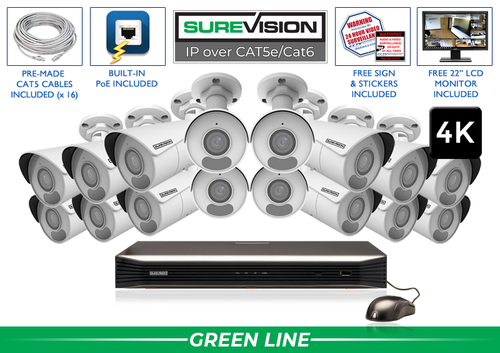
SureVision SV-16IPBIR8-N 16-Camera 4K System
A matched camera-and-recorder starting point for a 16-view fixed-camera layout. Review storage, cables and accessories against the property plan rather than assuming the standard configuration fits every project.
View product details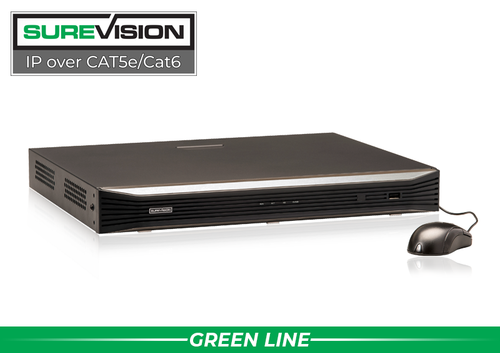
SureVision SV-NVR2P16-N 16-Channel PoE NVR
Consider this NVR when the project calls for up to 16 compatible IP cameras and its recording and power specifications fit the workload. Verify compatibility before reusing existing cameras or comparing it with a coaxial DVR.
View product detailsSubscription-alternative questions
Do I have to replace all my old cables?
Not always. Assess the existing wiring and compatible equipment first. A useful coaxial installation and a new PoE installation may justify different upgrade paths.
Is the lowest upfront price the lowest total cost?
Not necessarily. Compare installation, storage, required services, power and maintenance over the period you expect to use the system.
Can local recording still support remote viewing?
Yes, compatible systems can provide both. Verify the supported devices and access functions, and remember that remote connectivity is separate from where recordings are stored.
Compare the Right Options for Your Property
Send CCTV Security Pros your existing equipment details, cable layout and recording goals. Our team can help compare a compatible upgrade with a new IP camera system.
Get a Free System Quote Shop SureVision CamerasChoose the recording approach around the existing property
The most useful alternative to a required subscription depends on the wiring, number of views and review workflow. A new wired installation can be designed around IP cameras and an NVR. A property with suitable coaxial cable may have an upgrade path using compatible HD-over-coax cameras and a DVR. Supported camera-based storage may fit a limited standalone requirement, but its capacity and review tools should be checked separately.
| Approach | Good question to ask | What to verify |
|---|---|---|
| IP cameras and NVR | Are new Ethernet runs practical? | Camera compatibility, channels, storage and remote access. |
| HD over coax and DVR | Can the existing cable be reused? | Cable condition and supported camera/recorder signal formats. |
| Supported camera storage | Is a standalone view sufficient? | Card support, capacity, overwrite behavior and export process. |
| Local recording with an optional extra service | Is there a specific off-site requirement? | The exact service, supported equipment and recurring cost. |
Compare HD-over-coax systems with current security camera systems using the same coverage goals. Our guide to upgrading an older CCTV system explains the questions to ask before reusing existing infrastructure.
Use a transition plan when replacing a system
Inventory the existing cameras, cable routes, power supplies and recorder before ordering. Record the functions people actually use: live view, playback, alerts, audio where approved, and export. A replacement can look better on paper while omitting a workflow that matters to the business.
Preserve any recordings the organization needs before retiring old equipment. Confirm who owns the old accounts and who can remove obsolete remote access. Where coverage is important during the changeover, plan installation in stages so an entire area does not go unrecorded while the new equipment is configured.
After installation, repeat the same viewing and export exercises on the new system. The NVR planning guide helps with recording requirements, and the custom system builder helps organize an IP configuration. If the decision depends on reusing cable or mixing old and new equipment, contact CCTV Security Pros with the model numbers and cable details before purchasing.
What to record at the final system check
Keep the acceptance check simple enough that the owner can repeat it later. Use the final camera positions and recording settings, and include the lighting and activity that make the important views difficult. A recorded test gives a useful baseline for future troubleshooting.
- Confirm that each camera name matches its actual location and purpose.
- Review a saved daytime event and, where relevant, a nighttime event with a moving subject.
- Check the recording history against the agreed retention goal after a representative operating period.
- Test the permissions and playback functions of an ordinary user account.
- Export a short sample and check it on the device that will be used for review.
- Record any unresolved issue and the person responsible for correcting it.
Repeat the relevant checks after a camera is moved, a major display or obstruction changes, or recording settings are adjusted. This keeps the system aligned with the property’s current needs and makes maintenance more predictable.
Turn the plan into a complete equipment list
After defining the required views, compare HD-over-coax systems. Match each camera to a recorder channel, a compatible power connection and a documented cable route. Keep the installation materials, storage assumptions and required user functions on the same list so a missing component is easier to spot before ordering.
Use our CCTV upgrade guide for the next planning decision and the wired camera guide for the related technical detail. These guides provide background for comparing the actual equipment rather than choosing solely by a camera count or a resolution label.
Bring the list together in the custom security camera system builder, or send the property layout and viewing goals with a free system quote request. Include the mounting locations, approximate subject distances and any existing equipment you want to keep. That information makes the proposed configuration more specific to the property.
Before accepting the installation, practice the tasks the owner will perform: checking a live view, finding a recorded event and preserving a usable export. Save the camera schedule, equipment model numbers and support information with the project records. Use the technical support center for model-specific setup resources and ask for help when a required function needs clarification.
