
Retail Surveillance Systems: A Practical Store Security Guide
Posted by CCTV Security Pros on Oct 27, 2026
Updated October 7, 2026 · CCTV Security Pros
PROFESSIONAL SECURITY FOR YOUR STORE
See Your Store Clearly. Keep Your Recording Under Your Control.
A useful retail surveillance system helps you review transactions, monitor entrances and understand what happened when an incident occurs. Start with the views your store needs, then choose cameras, recording storage and remote access to support them.
The right retail security camera system gives you practical visibility into your business: who entered, what happened at the counter, when a delivery arrived and where an incident took place. A well-planned system brings those views together on one recorder and makes important footage easier to find.
This guide explains how to plan camera locations, select professional wired equipment and set up a recording routine that works for your store. CCTV Security Pros offers SureVision IP cameras and local NVR recording with free remote viewing and no required monthly subscription fees.
Start With the Questions Your Video Should Answer
Before selecting a camera count, walk through the store and list your priorities. A small shop with tall shelves may need more carefully placed cameras than a larger open showroom. Square footage alone does not determine the right system.
- Entrances and exits: Capture a useful view of people approaching and leaving, while considering sunlight through glass doors.
- Checkout and returns: Frame the counter, merchandise exchange and surrounding activity. Test the view with real transactions before finalizing the installation.
- Sales floor and valuable inventory: Cover aisles and displays without letting shelves or signs block the view.
- Stockrooms and receiving: Document deliveries and movement between public and staff areas.
- Exterior approaches: Consider employee doors, loading areas and parking near the building.
Give each camera a specific job. A broad overview helps explain the sequence of events, while a more focused view can capture the detail needed at a doorway or checkout. Combining both is often more useful than trying to see everything with one camera.
Choose the Camera Style and Lens for Each Location
Wide-Angle Turret and Dome Cameras
Wide-angle cameras are popular for open sales floors, lobbies and stockrooms because they cover a broad area. A camera mounted near a corner can provide a useful overview across a room. Position it above easy reach where practical, while checking that the viewing angle still captures the detail you want.
For locations where tampering is a concern, compare the impact rating of the specific dome model. Turret and dome describe the housing style; resolution, lens, night vision and impact resistance are separate specifications to evaluate.
Bullet Cameras and Adjustable Lenses
Bullet cameras provide a visible presence at exterior doors, receiving areas and building approaches. An adjustable motorized lens is useful when you need to tighten the view on a particular doorway or delivery zone. Choose the lens around the width and distance of that scene.
PTZ Cameras for Active Monitoring
A pan-tilt-zoom camera can help a manager or security operator look more closely at activity across a larger area. Keep fixed cameras on locations that need a continuous view: a PTZ records the direction it is pointing at that moment.
Plan for Storefront Lighting and After-Hours Conditions
Bright windows, glossy floors and reflections can make camera placement challenging. Compare wide dynamic range features for entrances where a bright exterior meets a darker interior. Test a person entering and leaving during the hours when sunlight is strongest.
After closing, test the same views with your normal overnight lighting. Infrared supports nighttime surveillance, while color performance depends on the camera and available or supplemental light. Check the recorded footage as well as the live view, paying attention to moving people rather than only an empty, still scene.
Build Around a Compatible PoE Recorder
Power over Ethernet allows a compatible IP camera to receive power and transmit video over one Ethernet cable. This simplifies wiring and gives you a central place to manage recording. A SureVision NVR stores footage on local hard drives and supports playback, export and remote viewing.
Choose enough channels for the cameras you need now and any planned expansion. Also confirm recording bandwidth, supported resolutions and the power requirements of the selected cameras. An NVR's channel count and number of built-in PoE ports are different specifications.
When cameras, the recorder and their local connections remain powered and working, local recording can continue during an internet outage. Remote viewing requires a working internet connection. A properly sized backup power supply can help support the recorder and camera power equipment through brief power interruptions.
PRODUCT TO EXPLORE
SureVision 16-Camera 4K IP System
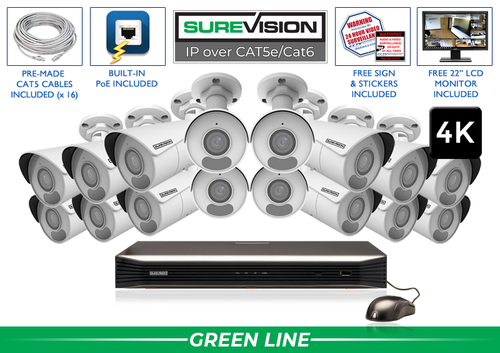
A complete system can be a useful starting point for stores with several entrances, interior zones and exterior views. Compare the current camera, recorder, storage and cable options on the product page, then match the configuration to your floor plan.
Need a different layout? Compare 16-camera systems or request a customized camera mix.
Choose Storage Around Your Retention Goal
Decide how far back you need to review footage, then size the hard drives accordingly. Retention depends on camera count, bitrate, recording schedule, scene activity and usable drive capacity. There is no single number of recording days that applies to every system.
Continuous recording provides a full timeline during selected hours. Event recording can reduce storage use, but needs careful testing so relevant activity is captured. Ask our team to help compare the options and surveillance hard-drive capacities for your goals.
Set a routine for exporting important clips promptly. Check that the recorder's date, time and camera labels are correct, and verify that an exported clip plays on the device used for review.
Make the System Easy to Use Every Day
- Label cameras clearly. Use names such as Front Entrance, Register 1 and Receiving Door.
- Set appropriate access. Give authorized staff the functions they need and protect accounts with strong, unique passwords.
- Test alerts. Adjust supported detection zones around useful activity, then test them during business hours and after closing.
- Check playback regularly. Confirm cameras are recording and that your actual video history matches your retention goal.
- Review changes to the store. Shelving, seasonal displays and new signs can block previously useful views.
Coordinate camera placement, audio settings, staff access and footage handling with your store's privacy policies and applicable requirements. Keep cameras out of private changing and restroom areas.
Retail Surveillance Questions
How many cameras does my store need?
Count the views you need to answer your key questions, including entrances, checkout, aisles, stockrooms and exterior access. Use a floor plan to check obstructions and overlap. We can help turn that plan into a system recommendation.
Can I view my store from my phone?
Yes. Supported SureVision systems provide remote viewing through compatible apps with no required monthly viewing fee. The recorder and your viewing device need internet access for remote connections.
Is 4K the right choice for every location?
4K provides additional image detail, but the best result also depends on lens selection, lighting, distance and placement. Select each camera for the scene it needs to record.
Build a System Around Your Store
Tell us about your floor plan, entrances, checkout areas and recording goals. CCTV Security Pros can help you choose a professional SureVision system with free remote viewing, a 3-Year Warranty and Unlimited USA Support.
A practical camera plan for a small retail store
Consider a store with one customer entrance, two registers, a stockroom and a rear delivery door. Begin with a drawing that includes shelving height and the direction shoppers face at each register. An overview camera can explain movement through the shop, while a separate, tighter view records the entrance or cash-handling area. Treat this as an example layout to adapt, not a fixed number of cameras per square foot.
| Area | Useful view | Test before handover |
|---|---|---|
| Customer entrance | Face detail plus direction of travel | Walk in with the exterior much brighter than the interior. |
| Registers | The transaction area and staff/customer interaction | Check that signs, displays and the operator do not block the view. |
| Sales floor | Routes through aisles and high-value displays | Repeat the walk-through after changing a display. |
| Rear door and stockroom | Deliveries, inventory handoffs and staff access | Review a recorded delivery with the door both open and closed. |
Once you have counted the required views, compare 8-camera IP systems with 16-camera IP systems. Leave capacity for the next display area or exterior door. A camera count describes the hardware package; it does not prove that the layout captures the detail your staff needs. Our commercial security camera planning guide explains how to connect the coverage plan with recording and staff access.
Build an incident-review routine around the footage
A useful retail system helps a manager find an event quickly. Name cameras by location, synchronize the recorder clock and give reviewers a simple incident form: date, approximate time, register or aisle, and the reason for the review. A report such as “front register, Tuesday around 3:15 p.m.” is much easier to investigate than an unspecified request to check yesterday’s video.
During training, ask a manager to find a staged transaction, review the entrance view and export the relevant clips. Include enough time before and after the event to retain context, and check playback on the device used for sharing. Keep the original recording and a record of who exported the file. Do not wait for a real loss investigation to discover that staff have only practiced live viewing.
Schedule another camera check when shelves, promotional displays or checkout equipment move. A good installation can develop a blind spot after an ordinary merchandising change. The custom security camera system builder lets you organize the equipment list; a free system quote can help turn a marked-up floor plan into a coordinated package.
What to record at the final system check
Keep the acceptance check simple enough that the owner can repeat it later. Use the final camera positions and recording settings, and include the lighting and activity that make the important views difficult. A recorded test gives a useful baseline for future troubleshooting.
- Confirm that each camera name matches its actual location and purpose.
- Review a saved daytime event and, where relevant, a nighttime event with a moving subject.
- Check the recording history against the agreed retention goal after a representative operating period.
- Test the permissions and playback functions of an ordinary user account.
- Export a short sample and check it on the device that will be used for review.
- Record any unresolved issue and the person responsible for correcting it.
Repeat the relevant checks after a camera is moved, a major display or obstruction changes, or recording settings are adjusted. This keeps the system aligned with the property’s current needs and makes maintenance more predictable.
Turn the plan into a complete equipment list
After defining the required views, compare 8-camera IP systems. Match each camera to a recorder channel, a compatible power connection and a documented cable route. Keep the installation materials, storage assumptions and required user functions on the same list so a missing component is easier to spot before ordering.
Use our commercial camera planning guide for the next planning decision and the security camera buying guide for the related technical detail. These guides provide background for comparing the actual equipment rather than choosing solely by a camera count or a resolution label.
Bring the list together in the custom security camera system builder, or send the property layout and viewing goals with a free system quote request. Include the mounting locations, approximate subject distances and any existing equipment you want to keep. That information makes the proposed configuration more specific to the property.
Before accepting the installation, practice the tasks the owner will perform: checking a live view, finding a recorded event and preserving a usable export. Save the camera schedule, equipment model numbers and support information with the project records. Use the technical support center for model-specific setup resources and ask for help when a required function needs clarification.
