
PoE Injectors for Security Cameras: Compatibility and Setup Guide
Posted by CCTV Security Pros on Oct 30, 2026
Power a Compatible IP Camera from a Non-PoE Network Port
A PoE injector adds power to an Ethernet connection so a compatible camera can receive data and power through one cable. Choose it by the camera's standard and power requirements, not simply by the connector shape.
Updated October 7, 2026 · CCTV Security Pros
When do you need a PoE injector?
Use a compatible injector when a camera supports PoE but the network connection you want to use does not supply suitable PoE power. If a compatible NVR or switch already provides the required power, a separate injector is usually unnecessary.
Understand the data and power path
An injector sits between the network and the powered device. Its data input connects to the network, and its powered output connects to a compatible PoE camera. The injector also needs its own specified power supply or AC connection.
It provides power; it does not add recorder channels, storage or camera compatibility. A camera that turns on still needs a valid network connection and configuration on a compatible recorder or viewing system.
Match the PoE standard and power requirement
Check the exact camera specification for its supported power input and maximum demand. IEEE 802.3af, 802.3at and 802.3bt identify different PoE capabilities. An injector must support the standard and power level the camera needs, including operation of features such as infrared illumination or motorized movement.
Power stated at the source is not necessarily the same as the usable power available at the far end of the cable. Cable losses and the applicable standard matter. Avoid selecting an injector solely because its headline wattage looks close to a camera's demand.
Standards-based active PoE equipment detects compatible powered devices. Passive power devices operate differently and should not be treated as interchangeable. Confirm compatibility before connecting equipment rather than assuming that matching RJ45 sockets are sufficient.
Choose an injector, switch or PoE NVR deliberately
A single-port injector is convenient for adding power to one compatible camera on an existing non-PoE connection. It may also solve a specific power requirement without replacing an entire network switch.
For several cameras in one area, a PoE switch can simplify power distribution and cable organization. Compare per-port capability and total switch power budget. A switch with enough ports can still lack enough power for all connected devices at their highest demand.
A compatible PoE NVR combines recording and camera power for supported direct connections. Confirm its channel, power and recording limits. Choose the arrangement around cable routes and system requirements rather than a fixed rule about how many cameras always require one option.
Check cable routes and installation conditions
Use Ethernet cable and terminations appropriate to the equipment, run length and environment. An ordinary injector does not automatically extend the permitted Ethernet link distance. Long runs and connections between buildings may need a designed extension or different network arrangement.
Keep the injector within its documented environmental limits. An indoor injector should not be installed exposed outdoors simply because the camera is weather rated. Protect exterior connections and have the installer address appropriate grounding and surge protection for the site.
Verify the connection before finishing the job
Follow the injector's port labels and the camera's installation instructions. Confirm the network side, powered output and supported input power before connection. Test the camera, recording and all required features under normal and nighttime operation.
If the camera restarts when infrared or motorized functions operate, investigate power capability, cable condition and terminations. If it powers on but no video reaches the NVR, check network addressing, connection and recorder compatibility rather than assuming the injector is the only cause.
Document the injector model and camera it powers. Include it in any backup-power plan needed to keep recording during an outage.
Your planning priorities
Power options available from CCTV Security Pros
These products are available from CCTV Security Pros. Match each model to the viewing task and confirm the final recorder, power, mounting and storage configuration before ordering.
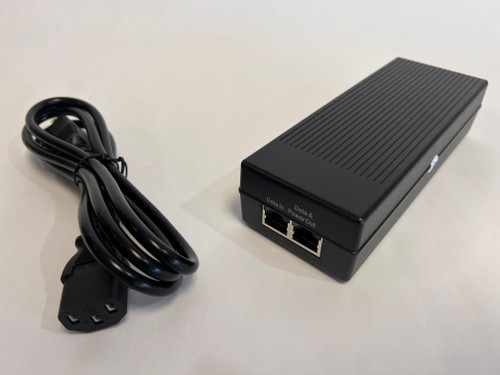
CSP-POEINJECTOR 30W Gigabit PoE Injector
The current product specification lists IEEE 802.3af/at support, a 30W rating and 10/100/1000Mbps networking. It is an option for compatible devices when a suitable PoE source is missing. Verify the camera's requirement; this is not a universal power source for every PTZ or high-power camera.
View product details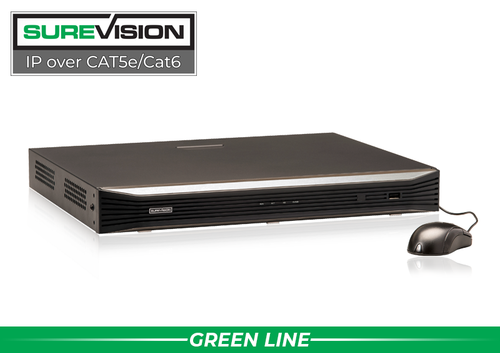
SureVision SV-NVR2P16-N 16-Channel PoE NVR
If the project also needs recording, compare an integrated PoE NVR with separate injectors or switches. This model supports up to 16 compatible IP camera channels. Check per-port and total power limits as well as recording capacity for the selected cameras.
View product detailsPoE injector questions
Does an injector give my NVR another channel?
No. It supplies power to a compatible connection. The recorder still needs an available supported camera channel and sufficient recording capacity.
Will a 30W injector power every PTZ camera?
No. Check the exact model's required PoE standard and power demand. Some cameras need a higher-power source or a different approved supply.
Can an injector power any wireless camera?
Only if the camera explicitly supports the relevant PoE input. A wireless camera with a different power requirement cannot be assumed to accept PoE.
Does an injector double Ethernet cable reach?
An ordinary injector should not be treated as a distance extender. Design the total link within the equipment and cabling limits or choose a supported extension method.
Confirm the Right Power Source Before You Order
Share your camera model, recorder or switch, cable route and installation location. CCTV Security Pros can help confirm an appropriate injector or PoE equipment arrangement.
Get a Free System Quote Shop SureVision CamerasUse a compatibility checklist before adding a PoE injector
An injector introduces compatible power onto an Ethernet connection. It does not automatically add recording, increase the camera’s resolution or extend Ethernet beyond the limits of the selected equipment. Start with the camera’s documented PoE requirement, then check the injector’s output standard, supported data speed and installation environment.
| Check | Information to match |
|---|---|
| PoE requirement | The camera’s stated standard and maximum power requirement. |
| Injector output | The supported standard and power available to the device. |
| Data connection | The network speed needed by the camera and link. |
| Cable channel | Suitable cable, connectors, route and supported length. |
| Environment | Temperature, moisture protection and installation location. |
| Recording path | How the powered camera reaches a compatible recorder. |
Compare PoE power accessories and network cables and connections together. The IP camera system guide explains how the network and recording components fit into the wider setup.
Diagnose the whole link when a camera drops offline
A camera that works during the day but restarts when night illumination activates may need a power-path investigation. Check the exact equipment specifications, the cable and connectors, and the camera’s operating conditions. Do not assume that a higher-wattage label will fix an unsuitable cable or an incompatible power standard.
Begin with a short, known-good cable and the documented injector connection. Connect the network device to the data input and the camera to the combined data-and-power output as labeled by the manufacturer. Confirm camera discovery and recording before introducing the final cable route. Then repeat the test with the camera’s supported illumination or moving functions active.
For several cameras, a compatible PoE switch or a recorder with built-in powered ports may provide a simpler layout than multiple individual injectors. Browse SureVision NVRs and review recorder capacity planning before choosing the topology. If the requirements are unclear, contact the support team with the camera and injector model numbers.
What to record at the final system check
Keep the acceptance check simple enough that the owner can repeat it later. Use the final camera positions and recording settings, and include the lighting and activity that make the important views difficult. A recorded test gives a useful baseline for future troubleshooting.
- Confirm that each camera name matches its actual location and purpose.
- Review a saved daytime event and, where relevant, a nighttime event with a moving subject.
- Check the recording history against the agreed retention goal after a representative operating period.
- Test the permissions and playback functions of an ordinary user account.
- Export a short sample and check it on the device that will be used for review.
- Record any unresolved issue and the person responsible for correcting it.
Repeat the relevant checks after a camera is moved, a major display or obstruction changes, or recording settings are adjusted. This keeps the system aligned with the property’s current needs and makes maintenance more predictable.
Turn the plan into a complete equipment list
After defining the required views, compare PoE and power accessories. Match each camera to a recorder channel, a compatible power connection and a documented cable route. Keep the installation materials, storage assumptions and required user functions on the same list so a missing component is easier to spot before ordering.
Use our IP camera system guide for the next planning decision and the NVR selection guide for the related technical detail. These guides provide background for comparing the actual equipment rather than choosing solely by a camera count or a resolution label.
Bring the list together in the custom security camera system builder, or send the property layout and viewing goals with a free system quote request. Include the mounting locations, approximate subject distances and any existing equipment you want to keep. That information makes the proposed configuration more specific to the property.
Before accepting the installation, practice the tasks the owner will perform: checking a live view, finding a recorded event and preserving a usable export. Save the camera schedule, equipment model numbers and support information with the project records. Use the technical support center for model-specific setup resources and ask for help when a required function needs clarification.
