
What Is the Best Security Camera System?
The best security camera system is not simply the kit with the highest resolution or the longest feature list. It is a complete surveillance solution matched to the property, the viewing distances, the available light, the areas of concern, and the way recorded video will be used. A dependable system should capture useful evidence, record consistently, make important events easy to find, and provide secure remote access without becoming difficult to operate.
For most businesses and homeowners who want continuous protection, a professional wired security camera system with local recorder storage offers the strongest foundation. Wired cameras do not depend on battery charging, and local recording does not require a cloud subscription to preserve routine video. A properly designed network video recorder (NVR) or digital video recorder (DVR) also gives the owner direct control over recording schedules, retention time, users, playback, and video export.
This guide explains how to compare complete security camera systems rather than judging cameras in isolation. It covers PoE IP systems, HD-over-coax CCTV systems, 4MP and 4K cameras, night vision, camera styles, smart detection, remote viewing, storage, scalability, and professional support. The goal is to help you choose equipment that remains useful long after installation day.
How to Compare Security Camera Systems
Watch this quick overview of the major decisions to make before choosing a system, then use the detailed guide below to compare cameras, recorders, storage, installation, and long-term support.
What Should a Quality System Include?
A strong professional system should include compatible cameras and a recorder, appropriately sized local storage, reliable wired connections, clear day and night video, mobile and computer viewing, straightforward playback and export, user permissions, and support from people who understand the equipment. It should also leave enough recorder capacity for reasonable future expansion.
Professional 4K Security Camera Systems
The best system size depends on the number of important views—not simply the square footage of the property. These are actual CCTV Security Pros SureVision systems. Each image links to the corresponding system page, where camera, recorder, cable, and storage options can be reviewed and customized.

4 Camera 4K PoE System
A focused choice for homes, offices, storefronts, and smaller properties with four priority coverage areas.

8 Camera 4K PoE System
Expanded coverage for larger homes, small businesses, exterior approaches, parking, and interior work areas.
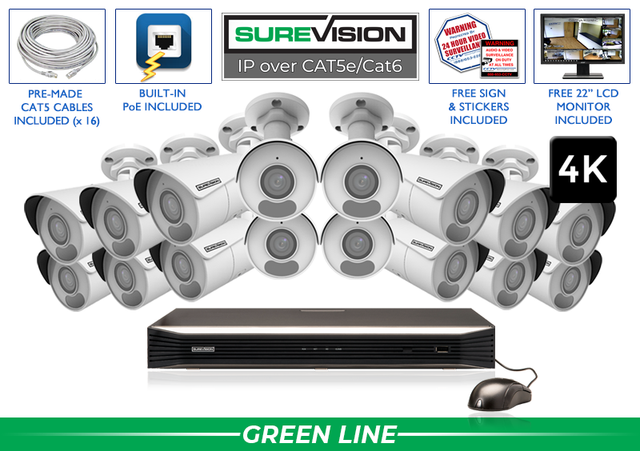
16 Camera 4K PoE System
Professional multi-area surveillance for warehouses, schools, retail properties, offices, and commercial facilities.
Need a different camera type at one or more locations? SureVision systems can be customized with compatible bullet, turret, dome, varifocal, audio, color-at-night, active-deterrence, and PTZ cameras.
PoE IP vs. HD-over-Coax CCTV Systems
The first major decision is the recording technology. Both IP and HD-over-coax systems can provide dependable local surveillance, but they use different cabling and recorders. The right choice often depends on whether the property is receiving a new installation or already has usable coax cable in place.
PoE IP Security Camera Systems
A Power over Ethernet system connects each compatible IP camera to an NVR using CAT5e or CAT6 network cable. Power and video travel through the same cable, which simplifies wiring and creates a stable direct connection. PoE IP systems are usually the best starting point for a new professional installation because they offer strong resolution, flexible camera choices, intelligent analytics, and straightforward expansion.
Choose PoE when you want a modern wired platform for a business, home, school, warehouse, farm, office, or multi-building property. View SureVision PoE IP security camera systems.
HD-over-Coax CCTV Systems
An HD-over-coax security camera system connects cameras to a DVR, typically using Siamese cable for video and power. It is often the practical choice when a property already has good coax wiring from an older analog CCTV system. Compatible HD cameras and a modern DVR can upgrade image quality and features without requiring every cable run to be replaced.
Choose HD over coax when preserving existing infrastructure is important or when a conventional DVR layout fits the project. Compare both technologies on our security camera systems page.
Professional vs. Consumer Systems
Consumer cameras can be convenient for checking a small indoor space or receiving a simple phone alert. However, convenience is not the same as a complete surveillance design. A professional security camera system is built around continuous coverage, local recording, multiple cameras, managed user access, longer video retention, reliable playback, and the ability to export evidence when needed.
| What to Compare | Professional Wired System | Typical Consumer Camera |
|---|---|---|
| Recording | Continuous, scheduled, motion, or event recording to an NVR/DVR | Often event clips or cloud-dependent recording |
| Power and connection | Permanent wired connection designed for routine operation | May depend on Wi-Fi strength, batteries, or nearby outlets |
| Storage control | Local hard-drive capacity selected for the desired retention period | May be limited by a subscription plan or device storage |
| Expansion | Recorder channels provide a defined path for adding cameras | Expansion and multi-camera management may be more limited |
| Best fit | Business, commercial, government, and serious home surveillance | Basic monitoring of one or two areas |
For a deeper explanation, read our comparison of professional and consumer security cameras.
10 Features That Matter Most
Marketing specifications are only useful when they solve a real surveillance problem. Compare these ten areas before selecting cameras and a recorder.
1. Camera Resolution and Identifying Detail
Resolution affects the amount of detail in recorded video, but the correct resolution depends on the scene. A 4MP camera can be a strong choice for general views, entrances, hallways, and routine property coverage. An 8MP or 4K security camera records more pixels and can provide greater detail when the lens, distance, lighting, and installation angle are also appropriate. Higher resolution is especially useful for large scenes or locations where digital zoom during playback may be important.
Resolution alone does not guarantee identification. A wide camera mounted too far from the subject may show the entire area without capturing a useful face or license plate. Begin with the evidence you want, then select resolution, lens, and camera position together.
2. Low-Light Performance and Night Vision
Most security events do not happen under ideal lighting. Compare infrared distance, available color-at-night modes, sensor performance, supplemental white light, glare control, and the actual lighting at the property. Infrared cameras can record monochrome video in darkness, while starlight or color-at-night cameras can preserve color when enough ambient or supplemental light is available.
Do not choose a camera by the maximum night-vision distance alone. Walls, reflective surfaces, windows, landscaping, and uneven light can all affect the image. For entrances and parking areas, proper placement is just as important as the camera’s stated infrared range.
3. Lens and Field of View
A fixed wide-angle lens is useful for broad overview coverage, while a motorized varifocal lens can narrow the view and bring a specific target area closer. Wide views are excellent for seeing activity across a room, yard, or storefront, but a narrower field of view generally places more pixels on a distant subject. Use overview cameras for context and targeted cameras for gates, registers, loading areas, driveways, or other critical points.
4. Recorder Quality and Compatibility
The recorder is the center of a multi-camera surveillance system. It manages video streams, recording schedules, playback, storage, remote users, alerts, and exported evidence. Confirm that the NVR or DVR supports the camera resolution, number of cameras, intelligent features, storage capacity, and incoming bandwidth required by the project. A camera feature may not work fully if the recorder does not support it.
5. Local Video Storage and Retention
Storage should be sized around the number of cameras, resolution, frame rate, compression, recording schedule, activity level, and desired number of retained days. Continuous recording uses more space than motion-only recording, and higher resolution or frame rate also increases storage demand. H.265 or H.265+ compression can reduce storage and network requirements compared with older compression methods, but retention should still be estimated for the intended settings rather than guessed.
6. Smart Human and Vehicle Detection
Basic motion detection can react to shadows, rain, insects, tree movement, and headlights. Compatible smart motion detection can distinguish people or vehicles from much of that background activity, helping reduce unwanted alerts and making recorded events easier to search. Perimeter tools such as line crossing or intrusion zones can add context when a supported person or vehicle enters a defined area.
Analytics improve efficiency, but they do not replace good camera placement. Detection distance, angle, scene density, lighting, and obstructions still matter. Choose the camera and recorder as a compatible pair when intelligent functions are a priority.
7. Remote Viewing and Multiple Users
A professional system should allow authorized users to view live video and recordings from compatible phones, tablets, and computers. Businesses may also need separate permissions for owners, managers, security staff, or multiple locations. Ask how users are created, whether permissions can be limited by camera or function, and how video is viewed locally if the internet is unavailable.
8. Outdoor Durability and Installation Environment
Outdoor security cameras must be rated for exterior use and installed with weather-protected connections. Consider operating temperature, exposure to rain, wind, salt air, dust, vandalism, direct sun, and lightning risk. Dome, turret, bullet, and PTZ housings each have strengths, but the best style is the one that fits the mounting surface, target view, and environmental conditions.
9. Audio, WDR, and Specialized Features
Built-in microphones can add context where audio recording is appropriate and lawful. Wide dynamic range helps balance difficult scenes with both bright and dark areas, such as an entrance with daylight behind the subject. Two-way audio, active deterrence, privacy masking, motorized zoom, and pan-tilt-zoom control can be useful in particular locations. Select these features for defined needs rather than adding them everywhere.
10. Warranty, Technical Support, and Long-Term Ownership
A surveillance system is a long-term purchase. Confirm who helps with planning, setup, remote access, replacement, and future expansion. Clear documentation and accessible technical support can be more valuable than a feature that looks impressive on a product page. CCTV Security Pros backs eligible systems with a three-year warranty, lifetime U.S.-based technical support, and a 30-day money-back guarantee.
How Many Security Cameras Do You Need?
Count coverage objectives, not just rooms or buildings. One camera should have one primary job whenever possible: identify a person at an entrance, watch a transaction point, cover a parking lane, document activity at a loading area, or provide an overview of a yard. Trying to make one ultra-wide camera perform several distant identification tasks usually creates blind spots or footage that lacks useful detail.
A small property may only need two or four well-placed cameras. Larger homes and small businesses often use four or eight. Warehouses, schools, retail properties, apartment buildings, and multi-structure sites may require 16, 24, 32, or 64 cameras. Choose an NVR or DVR with spare channels if expansion is likely; replacing an undersized recorder later is usually less efficient than planning capacity at the beginning.
How Much Storage Is Enough?
There is no single hard-drive size that is correct for every surveillance system. Required storage grows as the number of cameras, image resolution, frame rate, bitrate, and hours of recording increase. A quiet residential property using smart motion recording may retain video longer than a busy retail location recording all cameras continuously, even when both use the same hard drive.
Start with the retention goal: how far back might you need to review an event? Some owners need several days, while businesses may want weeks or longer because losses, disputes, or damage are not always discovered immediately. Then calculate storage using the actual camera settings and recording mode. Leave headroom when retention is important because real scenes vary in motion and detail.
A professional NVR can be configured for continuous recording, motion or smart-event recording, scheduled recording, or a combination. Continuous recording provides a complete timeline; event recording can extend retention and speed up searches. Many businesses use continuous recording as the primary record while also marking smart events for faster review.
Best Security Camera Systems by Property Type
Business & Commercial Properties
Business systems should prioritize entrances, transaction areas, inventory, loading zones, parking areas, employee-only spaces, and exterior approaches. Multi-user access, long recording retention, smart searches, evidence export, scalable NVR capacity, and consistent 24/7 operation are especially important. Camera placement should support both an overview of activity and closer identifying views at critical points.
Home Security Camera Systems
A wired home security camera system commonly covers exterior doors, driveway, garage, side access, yard, and detached structures. Local NVR recording provides privacy and eliminates a required monthly cloud-storage fee. Remote viewing lets authorized family members check the property while away.
Outdoor & Large Properties
Outdoor projects require weather-rated cameras, protected connections, appropriate night vision, and lenses suited to real distances. Farms, warehouses, parking lots, campuses, and multi-building locations may also need longer cable runs, point-to-point network planning, motorized lenses, or PTZ cameras. Explore outdoor security camera systems.
Choosing Bullet, Dome, Turret, or PTZ Cameras
Bullet security cameras have a visible, directional shape that makes the viewing direction clear. They work well on exterior walls, poles, driveways, parking areas, and longer approaches. Turret cameras offer flexible aiming in a compact housing and are common under eaves or on ceilings. Dome and vandal-dome cameras provide a lower-profile appearance and can be a good fit for entrances, public areas, and locations where added housing protection is useful.
PTZ security cameras can pan, tilt, and zoom to inspect a large area, but they should not automatically replace fixed cameras. A PTZ only records the direction it is facing at that moment. Fixed cameras preserve continuous views of critical locations, while a PTZ can supplement them for active monitoring, tours, or closer inspection.
Many of the best security camera systems mix camera styles instead of forcing the same model into every location. Use wide-angle cameras for general coverage, varifocal cameras for targeted detail, audio cameras where sound is appropriate, and specialty cameras only where their specific capability adds value. Browse professional security cameras to compare available options.
Security Camera System Planning Checklist
Before buying, walk the property during the day and at night. Write down the purpose of each proposed camera, the approximate distance to the target, the mounting height, the cable route, the available light, and whether audio or active deterrence is needed. This simple survey prevents common problems such as choosing a lens that is too wide, overlooking a dark approach, or running out of recorder channels.
- Define the evidence goal: overview, recognition, identification, vehicle activity, transaction documentation, or perimeter awareness.
- Mark every critical location: entrances, exits, parking, driveways, registers, loading areas, inventory, side access, and detached buildings.
- Measure important distances: lens choice and installation position depend on the distance between camera and subject.
- Check lighting at night: note complete darkness, glare, headlights, backlighting, reflective walls, and areas needing added illumination.
- Plan cable routes: identify safe paths, cable length, penetrations, conduit needs, and the recorder location.
- Choose recorder capacity: include every planned camera and spare channels for realistic growth.
- Estimate retention: select hard-drive storage from camera count and recording settings, not from a generic package label.
- Confirm remote users and support: decide who needs access and who will help with setup after the sale.
For wiring guidance, see how to install a PoE security camera system. For setup help after purchase, visit the Security Camera Technical Support & Setup Center.
Why Buy a Professional System From CCTV Security Pros?
CCTV Security Pros has served businesses, homeowners, government facilities, schools, warehouses, retailers, farms, offices, and other properties since 2008. More than 75,000 customers have relied on our team for professional security camera equipment and help choosing the right system. We focus on dependable wired surveillance with local recording and no required monthly cloud-storage fees.
SureVision systems can be customized instead of limiting every camera position to the same model. You can mix compatible bullet, turret, dome, varifocal, audio, color-at-night, active-deterrence, and PTZ cameras based on the needs of each location. Available NVR features include 4MP and 4K recording, smart human and vehicle detection, H.265 compression, remote viewing, privacy masking, and recorder options designed for projects from a few cameras to large multi-camera systems.
The difference is not only the equipment. Our team can help match camera views, night-vision requirements, NVR channels, and hard-drive storage before purchase. After installation, customers receive lifetime U.S.-based technical support, along with a three-year warranty and a 30-day money-back guarantee on eligible products.
Frequently Asked Questions
What is the best type of security camera system?
For most new professional installations, a wired PoE IP camera system with an NVR is the best all-around choice because it combines stable cabling, local storage, high-resolution cameras, remote viewing, intelligent detection, and room to expand. HD-over-coax CCTV systems remain an excellent option when a property has usable coax cable already installed.
Is 4K better than 4MP for security cameras?
A 4K camera records more pixels than a 4MP camera and can provide additional detail, especially across larger scenes. However, image usefulness also depends on lens choice, lighting, compression, mounting angle, and distance. A properly positioned 4MP camera may outperform a poorly placed 4K camera for a specific target.
Are wired security camera systems better than wireless systems?
Wired systems are generally preferred for continuous business surveillance and serious home security because the cameras have stable power and data connections. Wireless cameras can be convenient in limited applications, but performance can depend on signal strength, network congestion, batteries, and cloud services.
Do security camera systems require monthly fees?
A professional NVR or DVR system with local hard-drive recording does not require a monthly cloud-storage subscription for standard recording and playback. Internet service may be needed for remote viewing, but the recorder can continue capturing video locally when properly configured.
Can I view my security cameras from my phone?
Yes. Compatible professional systems support remote live view and recorded playback from phones and tablets, as well as computer viewing. Remote access requires correct recorder setup and an internet connection at the system location.
How long do security camera systems keep video?
Retention depends on hard-drive capacity, number of cameras, resolution, frame rate, compression, scene activity, and whether the recorder captures continuously or only during events. Storage should be calculated from the intended recording settings and the number of days you want to retain.
Can different camera styles be used on the same system?
Yes, when the cameras are compatible with the recorder. A customized system can combine bullet, dome, turret, varifocal, audio, active-deterrence, and PTZ cameras so each location receives the right field of view and feature set.
Do security cameras record when the internet is down?
A properly configured local NVR or DVR can continue recording connected cameras to its hard drive without internet service. Remote viewing and internet-based alerts may be unavailable until the connection returns.
Should a recorder have extra camera channels?
Yes, if future expansion is likely. Spare channels make it easier to add cameras without replacing the recorder. Recorder bandwidth, PoE capacity, storage bays, and supported camera resolution should also be considered—not only the channel count.
What is the most important factor when buying a security camera system?
The most important factor is whether the complete design can capture useful video at the locations that matter. Resolution, lens, lighting, placement, recorder, storage, and support must work together. A balanced system designed around clear surveillance goals is more valuable than one selected from a single specification.
Continue Your Security Camera Research
Use these resources to compare systems, plan installation, and understand the difference between professional and consumer equipment.
