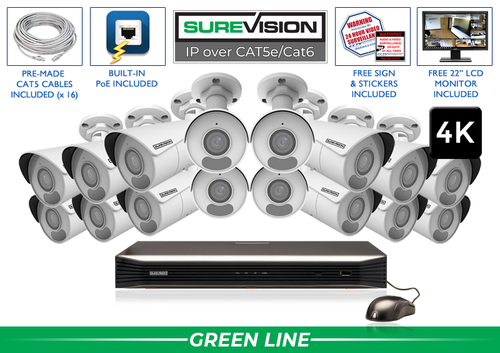
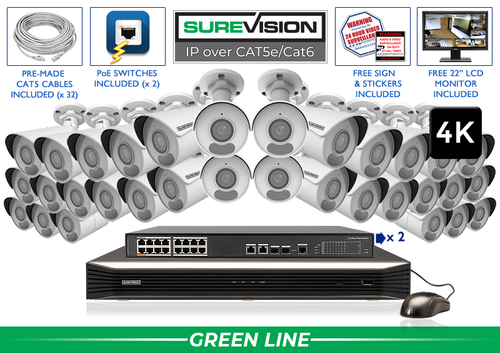
Professional property surveillance since 2008 Connect camera coverage, local recording, authorized remote access and a repeatable handover process across departments and locations. An enterprise camera plan works best when every location follows a clear standard while allowing for its own layout. Define the camera jobs, recording history, access roles and maintenance responsibilities before selecting equipment. The 4, 8, 16 and 32-camera kits below are starting options for individual sites or zones; size the full project from the complete camera schedule. Complete 4K camera systems Start with a value-focused SureVision 4K PoE kit, then match the camera positions to your layout. These complete systems bring cameras, local recording, storage and camera cables together. Choose cable lengths and storage for the job when ordering. Need different camera styles or a tighter view? Our team can help customize the kit around your business. Describe what a useful recording should show at entrances, reception, shared routes, operations areas and storage access. Give every camera a location name and a purpose. This makes it easier to compare proposals, identify a missing view and explain why a particular lens or placement belongs in the design. Apply that standard to the layout at each property. A branch office, distribution building and service yard may need different camera counts even when the review process is the same. Keep a camera schedule that records the intended view, location and the team responsible for changes. Count the cameras needed now and the additions already planned. Separate recorder channel capacity from powered camera connections. A recorder may have spare channels while a particular switch or group of built-in PoE ports has no spare connection or power capacity for the intended addition. Review cable routes, switch locations, separate buildings and recorder placement with the installation and IT teams. Larger projects may need recorders beyond the kit sizes shown here. Choose the architecture for the actual property and maintenance process rather than assuming a single small recorder can serve every part of an expanding operation. Next step: Record a normal test event and review the saved result before final mounting. Use a fixed view where a route must remain recorded continuously. Refine the framing with an appropriate lens when the subject or access point is farther away. A motorized varifocal camera can make setup adjustment easier at a selected entrance, loading area or service approach. Add PTZ observation, plate capture or active deterrence where those functions solve a defined requirement. Document which models and recording functions support that job. Check the actual recorded result at the target distance. A list of features is most useful when each one has a clear place in the operating plan. Define the people who need live viewing, playback, export or configuration access. Use individual authorized accounts and appropriate permissions. Protect the recorder and account recovery information, and make access review part of ordinary staff and contractor changes. Use a common naming convention for sites and cameras so the right view is easy to find. Test remote access from outside each property network. Confirm the features and viewing workflow supported by the selected equipment before promising a particular multi-site dashboard, integration or management function. Choose supported detection areas and schedules around the way each location operates. A restricted loading approach may need a different response from a busy public lobby. Define who receives a motion or perimeter notification, who checks the event and how responsibility changes between shifts. Keep a maintenance process for camera windows, mounts, cables, recorder storage and playback checks. Re-test important views after layout, lighting or network changes. For every change, confirm that recording still covers the intended hours and that the appropriate person can find and export a representative event. Next step: List the events, responsible users and notification hours, then test recording and alerts separately. Set a recording-history target for each type of location based on its incident-reporting and review process. Check the installed system against that target during representative operation. Camera count, video settings, activity and the recording schedule affect retention. Count planned views and near-term additions before choosing recorder capacity. Check PoE ports and any separate switches as well as the channel count. Use the recording storage calculator, then confirm the history after the system has operated normally. SureVision systems combine local NVR recording with a free viewing app and no required monthly viewing fees. Internet at the property supports access from outside the site. A properly configured local camera network can record independently of that internet connection. Test an arrival, an operations handoff and an after-hours access event. Have an authorized local or regional user find the correct camera, review the sequence and export it to another device. Check remote access using cellular data, review recorded footage and open an exported clip on another device. Leave the owner with the account and recovery information needed to manage the system. Use a small branch or defined zone to establish the equipment and handover standard, then apply it to the remaining properties. Compare the full schedule with available recorder sizes and expansion plans. Our team can help build a complete equipment list for larger sites as well as the starting kits shown above. For a new wired installation, start with matched SureVision IP cameras and an NVR. Choose storage, cable lengths, mounting accessories and powered connections together. CCTV Security Pros has supplied professional surveillance equipment since 2008, with a 3-year limited warranty and unlimited USA support for SureVision. Share a layout and your recording-history target for help selecting a complete system. Continue with the lens guide, PoE installation guide and recording storage calculator. Send your layout, important camera jobs and recording-history target. Our team can help match a complete system to the property.Enterprise Security Camera Systems: Build a Consistent Plan Across Your Properties
Popular Business Systems
In this guide
1. Define a standard for every camera job
A practical coverage plan
Area
Camera job
Check during setup
Public arrival
Approach, reception and shared movement
Test visitors, queues and daylight through glass.
Staff access
Movement at selected controlled entrances
Check doors and ordinary shift changes.
Operations and storage
Handoffs and important inventory routes
Test loaded racks, carts and staged deliveries.
Exterior routes
Parking approaches, gates and shared paths
Review nighttime activity and normal obstructions.
Recording and administration
Storage, search and authorized access
Have the responsible team find and export a test event.
2. Plan capacity for the whole project
3. Match each camera type to a specific view
4. Make remote access and event review repeatable
5. Assign alerts and maintenance to people
6. Choose NVR channels and recording history
7. Use free remote viewing and test the full workflow
8. Build a complete system around your layout
Look for the logo, expect the quality.Plan your enterprise camera system with the Pros
Free Viewing AppNo Monthly Viewing Fees3-Year WarrantyUnlimited USA Support