
Security Camera Systems with No Subscription Fees
Posted by Gregory Derouanna, MBA on May 18, 2024
Local Recording • Free Remote Viewing • No Required Cloud Plan
A professional security camera system should protect your property without turning essential recording, playback and remote viewing into a permanent monthly bill. This guide explains how no-subscription security cameras work, how local NVR storage compares with cloud plans and which SureVision cameras fit common home and business applications.
Updated August 2026
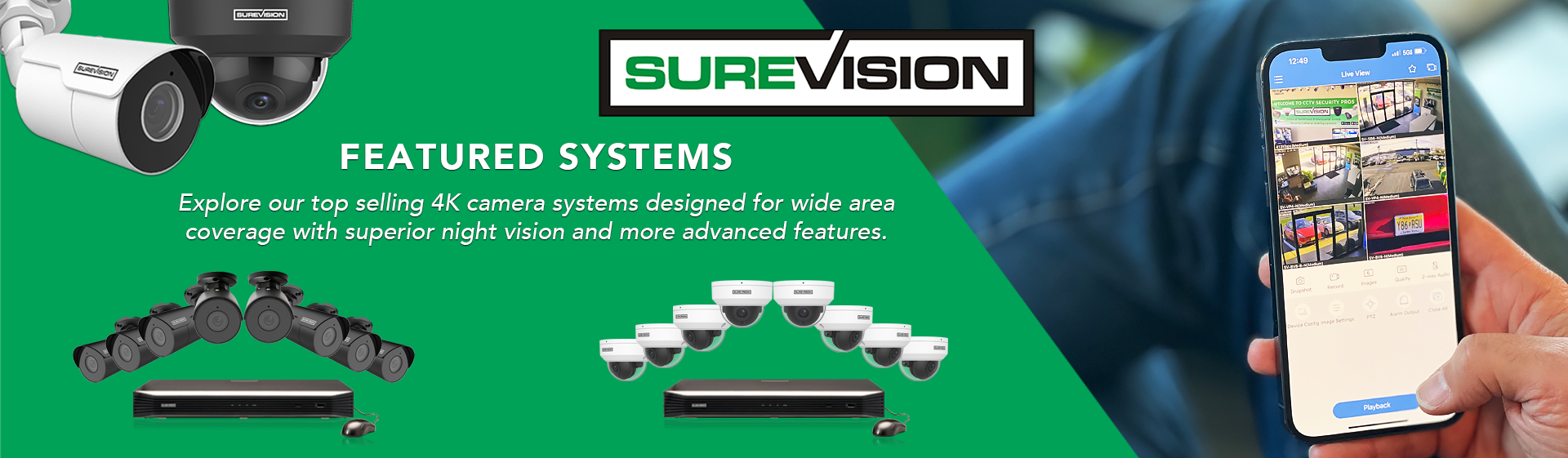
Quick Answer: Can Security Cameras Work Without a Subscription?
Yes. A security camera system with no subscription fees records video locally to a network video recorder (NVR), digital video recorder (DVR) or supported camera memory card. With the right system, live viewing, recorded playback, motion notifications and phone or computer access remain available without paying for a required cloud-storage plan. CCTV Security Pros specializes in wired PoE IP security camera systems and HD-over-coax CCTV systems that use local recording and do not require monthly monitoring or cloud-storage fees.
In This Guide
What Does “No Subscription Security Camera System” Really Mean?
A no-subscription system is surveillance equipment that does not require a recurring payment to perform its core jobs. You purchase the cameras, recorder and storage, then keep control of the system. Video is saved to hardware at your property instead of depending on a paid cloud account for every recording. This is why these products are also described as security cameras with no monthly fees, local-storage security camera systems, NVR camera systems without subscriptions or self-monitored security cameras.
“No subscription” does not mean “no network.” A wired IP system can still connect to your router so you can use free mobile and desktop software for remote viewing. The important distinction is that the internet connection helps you reach your system; it is not the only place your surveillance video exists. When properly configured, the NVR continues recording locally even if the internet service is temporarily interrupted. Remote access and push notifications may pause during the outage, but local recording can continue because the cameras and recorder remain connected on the property network.
It also does not mean that every camera marketed as “no fee” offers the same capabilities. Some consumer cameras provide only limited clips unless a plan is purchased. Others store to a small memory card that may fill quickly or be lost if the camera is damaged or stolen. A complete wired system with a dedicated recorder is designed for longer retention, centralized playback and multi-camera management. That is the practical difference between buying an individual app-based camera and installing a professional CCTV security camera system.
How a PoE NVR Camera System Records Without Monthly Fees
For most new wired installations, a PoE NVR security camera system is the simplest professional no-fee solution. PoE stands for Power over Ethernet. One network cable runs from each compatible IP camera to the NVR or PoE network equipment, carrying both electrical power and video data. The NVR receives the camera streams, saves them to an internal surveillance hard drive and organizes the footage for live view, search, export and playback.
This single-cable approach is easier to plan than systems requiring separate power and data at every camera. It also avoids the signal instability and battery maintenance that can affect wireless cameras. The recorder becomes the center of the system: connect it to a monitor for on-site use, connect it to a router for authorized remote access and choose enough storage for the desired recording history.
A typical installation follows this path:
- The camera captures video. An IP camera converts the image into digital video and may also process audio, night vision and intelligent events.
- Ethernet carries power and data. A Cat5e or Cat6 cable connects the PoE camera to a compatible NVR or PoE switch.
- The NVR stores footage locally. A surveillance-rated hard drive records continuously, on a schedule or when configured events occur.
- You review video on your terms. Authorized users can view live cameras, search recorded footage and export important clips from the recorder, phone app or computer software.
- Storage overwrites automatically. When the drive is full, the NVR can overwrite the oldest footage, allowing recording to continue without manual file cleanup.
For an existing property wired with coaxial cable, replacing every cable may be unnecessary. An HD-over-coax security camera system uses a DVR and can deliver modern high-definition surveillance over compatible coax runs. Both architectures can provide local recording without a required subscription; the correct choice depends on the existing wiring, desired resolution, expansion plan and camera features.
Why Property Owners Choose Security Cameras with No Monthly Fees
1. A Lower and More Predictable Long-Term Cost
A subscription can look inexpensive when advertised as a small monthly amount, but the charge continues for as long as you need the service. It may also increase when you add cameras, require longer video history or want advanced features. A local-recording system moves the major expense to the initial equipment purchase. After installation, you are not required to keep paying merely to retain essential recording and remote-viewing functions.
The practical comparison is not only camera price versus camera price. Compare the total cost of cameras, recorder, hard drive, installation and maintenance against the hardware cost plus every monthly plan payment over the years you expect to use the system. For a multi-camera business installation, the recurring portion can become significant.
2. Direct Control of Video Retention
Cloud plans commonly organize retention into fixed tiers. A locally recorded NVR system lets you select the storage capacity that matches the property. Recording duration depends on camera count, resolution, frame rate, video compression, bit rate, recording schedule and scene activity. If longer retention becomes necessary, many recorders support larger or additional hard drives within their rated limits. Browse surveillance hard drives and video storage options, or ask an expert to size storage around a specific retention goal.
3. Recording Can Continue During an Internet Outage
A properly installed NVR and its wired cameras communicate on the local network. If the outside internet connection goes down, local recording can continue as long as the cameras, network equipment and NVR still have power and remain connected. You will generally need working internet service for off-site viewing and remote alerts, but the event can still be recorded locally for later review. Adding an uninterruptible power supply can also help the recorder and network equipment ride through short power interruptions.
4. Professional Multi-Camera Management
A dedicated recorder gives home and business users one interface for multiple views, synchronized playback, user permissions, exported evidence and system settings. This becomes more important as an installation grows from two cameras to eight, sixteen or more. Instead of managing separate camera accounts and fragmented clips, the NVR provides a central recording timeline.
5. Better Privacy Control—When Properly Secured
Keeping the primary recording on hardware you control can reduce dependence on third-party cloud storage. However, local recording is not automatically secure. Use unique passwords, limit administrative accounts, keep approved firmware current, secure the router, avoid exposing recorder ports directly to the public internet and review remote-access settings. Privacy is created by the combination of local ownership, secure configuration and good account practices.
Local NVR Recording vs. Subscription Cloud Cameras
| Feature | Local NVR Security Camera System | Typical Subscription Cloud Camera |
|---|---|---|
| Core recording | Stored on a recorder at the property | Often stored in a provider-managed cloud account |
| Recurring fee | No required monthly cloud-storage fee | Frequently required for recording history or advanced features |
| Internet outage | Local recording can continue if the local system has power | Cloud uploads and remote features may stop; behavior varies by product |
| Retention | Based on installed hard-drive capacity and recording settings | Based on the provider’s plan and retention tier |
| Expansion | Add compatible cameras up to recorder and network limits | Extra cameras may increase subscription cost |
| Evidence export | Export from the NVR, app or computer software | Download options depend on the account and service |
| Best fit | Owners wanting continuous local recording, control and predictable cost | Users prioritizing simple, lightweight installation and managed cloud service |
Cloud service is not inherently bad. It may suit a renter, a one-camera apartment or a user who wants provider-managed off-site storage. Local NVR recording is usually the stronger fit when the priority is 24/7 coverage, several cameras, longer retention, control of footage and no required monthly payment. Some properties also choose a hybrid strategy: the NVR remains the primary recorder while important clips are exported or backed up separately according to the organization’s policies.
Featured SureVision Security Cameras with No Required Subscription
The best camera depends on the scene—not simply the highest resolution. A driveway may benefit from a visible long-range bullet camera, while a lobby may call for a lower-profile vandal dome. An active-deterrence camera can help at a vulnerable exterior entrance, and a PTZ may make sense for a large open property. The SureVision IP cameras below can provide free phone and PC viewing and pair with a compatible SureVision network video recorder for centralized local recording and playback.
Price note: Prices below were verified on August 19, 2026, before coupons or selected accessories. Product prices, availability and promotions can change. Use code UPGRADE25 when the product page shows the promotion, and confirm the final price in the cart.

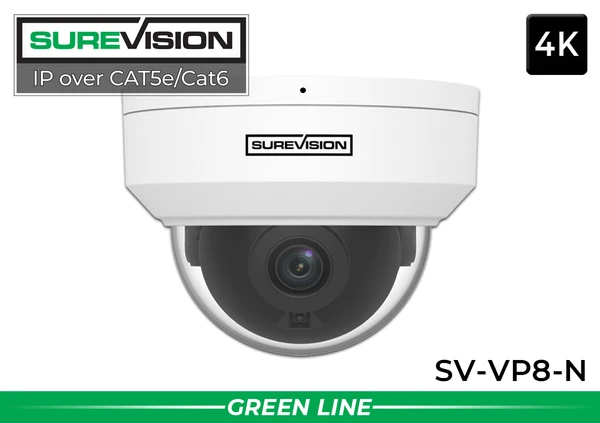


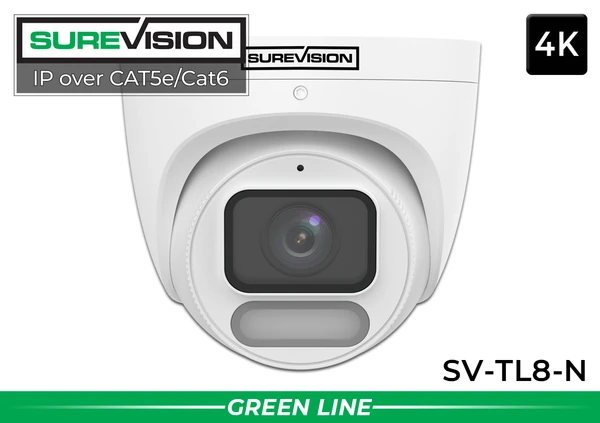

How to Choose the Best No-Subscription Security Camera System
Start with the Areas You Must See
Do not begin with a camera count pulled from a package name. Walk the property and list the views that matter: front and rear doors, driveway, garage, side gates, cash register, loading dock, stockroom, hallways, parking entrances, building perimeter and any isolated equipment. Each camera should have a specific job. A wide overview camera documents general activity, while an identification view must be positioned close enough and at a useful angle to capture faces or other important detail.
Choose Resolution for the Scene
1080p can be appropriate for basic observation, while 4MP provides a useful step up for many general-purpose views. True 8MP 4K cameras provide more image detail and additional digital-zoom flexibility during playback, but resolution alone does not guarantee identification. Lens choice, mounting height, lighting, distance and motion all affect the usable result. For critical entrances, combine good placement with adequate pixels on the target instead of expecting one ultra-wide camera to identify people everywhere in the frame.
Match the Camera Housing to the Location
- Bullet cameras: visible, easy to aim and well suited to driveways, perimeters, parking areas and building exteriors.
- Turret cameras: lower-profile housings with flexible aiming, often used at entrances, offices, soffits and residential exteriors.
- Vandal domes: protected housings for lobbies, schools, retail spaces and areas where cameras are mounted lower or within reach.
- PTZ cameras: motorized pan, tilt and optical zoom for large open scenes; fixed cameras should still cover critical views when the PTZ is pointed elsewhere.
- Wide-angle cameras: useful for broad rooms and open areas, though very wide views spread available detail across more of the scene.
Plan Nighttime Performance Before Installation
Night vision claims should be evaluated with the actual location in mind. Infrared cameras can see in darkness without visible white light, while full-color night cameras use available illumination or a built-in spotlight to preserve color information. Reflective walls, soffits, spider webs, rain and nearby objects can bounce infrared light back into the lens. Aim the camera away from close reflective surfaces and test the final view after dark—not only during daytime installation.
Select Enough NVR Channels for Future Growth
An NVR’s channel count is the maximum number of supported camera streams, subject to the recorder’s specifications. If you need six cameras now, an eight-channel NVR leaves little room. If future buildings, entrances or parking views are likely, choosing a recorder with additional channels can prevent an early replacement. Compare SureVision NVRs by channel capacity, PoE ports, supported resolution, incoming bandwidth, hard-drive bays and maximum storage.
Calculate Storage Around a Retention Goal
Ask how many days or weeks of footage must be available before older video is overwritten. Continuous 4K recording consumes more storage than lower-resolution or motion-based recording. A busy retail store also produces more event footage than a quiet storage room. Camera count, bit rate, compression and frame rate should all be included in the estimate. For regulated or high-risk environments, document the retention requirement and have the system sized around it.
Use a Wired System Where Reliability Matters
Wi-Fi cameras can be convenient when cable installation is impossible, but radio interference, distance, construction materials, bandwidth and battery charging can introduce maintenance. For entrances, cash-handling areas, business exteriors and other essential views, a hardwired PoE or HD-over-coax connection usually offers the more dependable foundation.
Best No-Fee Camera Systems for Home, Business and Outdoor Security
Home Security
Cover doors, driveway, garage, backyard and side access with a recorder located in a protected interior area. A four- or eight-camera PoE system gives many homes useful coverage without a recurring plan. Shop home security camera systems.
Business Security
Prioritize entrances, transaction areas, inventory, employee-only zones, loading areas and parking approaches. Choose user permissions, storage and cameras around operational risk. Shop business security camera systems.
Outdoor Security
Use weather-rated housings, protected cable entry, suitable junction boxes and nighttime testing. Bullet, turret, deterrence and PTZ cameras can be mixed to match the property. Shop outdoor security camera systems.
Complete systems make it easier to start with a recorder, hard drive and compatible cameras. Choose a package close to the current coverage plan, then customize camera styles and storage when needed:
Installation and Cybersecurity Tips for a Reliable No-Subscription System
- Bench-test before mounting. Connect the cameras and recorder indoors, confirm video, set passwords and verify that every device is compatible before running cable.
- Use solid-copper network cable. Avoid copper-clad aluminum for permanent PoE runs. Follow cable-length limits and protect outdoor cable with suitable pathways and weatherproof terminations.
- Protect connections. Use the recommended junction box or weatherproof enclosure. The camera may be weather rated while an exposed network connector is not.
- Mount for useful evidence. Extremely high cameras provide broad overviews but may show mostly the tops of heads. Use dedicated identification views at doors, gates and controlled paths.
- Secure the recorder. Place the NVR in a locked, ventilated location that is not obvious to visitors. Consider a UPS for the recorder, router and essential network switch.
- Use unique credentials. Change default passwords, avoid reusing credentials and give each user only the permissions required.
- Maintain the system. Review camera views, clean lenses, check recorder health, confirm the date and time and test video export on a regular schedule.
- Respect audio and privacy rules. Laws governing audio recording, notices and cameras in private areas vary by jurisdiction. Confirm the rules that apply to your property and use.
If you prefer to install the equipment yourself, PoE systems simplify wiring by using one Ethernet cable per camera. For a step-by-step overview, read the PoE security camera installation guide. For complex commercial properties, long cable runs, lifts, conduit or code requirements, work with a qualified local installer.
Common Mistakes to Avoid
- Buying only for the advertised resolution. The correct lens, field of view and mounting position often matter more than one specification.
- Expecting one camera to cover everything. An overview is not automatically an identification view. Use overlapping coverage for critical areas.
- Ignoring nighttime conditions. Test headlights, landscape lighting, reflective surfaces and dark corners after installation.
- Choosing an NVR with no expansion room. A small amount of unused channel capacity can be valuable as the property changes.
- Underestimating storage. Size the hard drive with real camera settings and retention needs, not a generic day estimate.
- Assuming remote viewing means cloud recording. A local NVR can provide authorized remote access while continuing to store primary footage on site.
- Failing to export important evidence. NVRs overwrite old footage. Export needed clips promptly and store copies according to your incident policy.
Frequently Asked Questions About Security Cameras with No Subscription
Do security cameras work without monthly fees?
Yes. A compatible camera and local NVR or DVR can record without a required cloud plan. CCTV Security Pros systems also support free remote viewing; an internet connection is needed for off-site access, but not for basic local recording between properly connected cameras and the recorder.
Can I view a no-subscription camera system from my phone?
Yes. SureVision cameras and NVRs support free phone and computer viewing when the system is connected and configured for remote access. Your phone and the property need suitable internet connections for off-site live view, alerts and playback.
Where is the video stored?
In a complete system, footage is stored on a surveillance hard drive inside the NVR or DVR. Some compatible IP cameras also support microSD edge storage. An NVR is recommended for centralized, longer-term recording and easier multi-camera playback.
Will an NVR record if the internet goes down?
It generally can continue recording locally when the cameras, NVR and local network remain powered and connected. Remote access and notifications that depend on the outside internet connection will be unavailable until service returns.
Are PoE cameras better than Wi-Fi cameras?
PoE cameras are often preferred for permanent, mission-critical surveillance because a wired Ethernet connection provides power and data without relying on Wi-Fi signal strength or batteries. Wi-Fi can still be useful where running cable is impractical.
How many cameras do I need?
Count required views rather than rooms. Most properties need separate views for key entrances, vehicle approaches, transaction areas, inventory, rear access and blind spots. A specialist can review the property layout and recommend camera count, styles and lenses.
How long will an NVR keep recordings?
Retention depends on the number of cameras, resolution, frame rate, bit rate, compression, recording schedule, activity and hard-drive capacity. There is no single accurate answer for every system. Size the storage around a defined number of days and the planned recording settings.
Do no-fee cameras send motion alerts?
Compatible cameras and recorders can send notifications without a paid subscription. Available event types vary by model and configuration; newer cameras may distinguish people, vehicles or intrusion events to reduce unwanted alerts.
Can I mix bullet, dome, turret and PTZ cameras?
Yes, when the cameras are compatible with the recorder. Mixing styles is often the best design because each location has different coverage, deterrence, mounting and zoom requirements. Confirm exact model compatibility before ordering.
Is local storage completely private?
Local storage gives you more direct control, but privacy still depends on secure passwords, user permissions, network configuration, firmware maintenance and physical protection of the recorder. No internet-connected device should be treated as secure without proper setup.
Can I add cloud backup later?
Available backup options depend on the specific recorder, camera and software. Even without a recurring cloud plan, important clips can be exported to approved storage. Discuss any required off-site redundancy before selecting the system.
What is the best no-subscription camera for a business?
There is no single best model for every scene. Businesses commonly combine 4K bullet or turret cameras for general coverage, vandal domes in accessible areas, active-deterrence cameras at vulnerable exterior points and PTZ cameras for large lots. The recorder and storage should be sized for operating hours, camera count and retention policy.
Build a Security Camera System You Own
Choose a complete wired system with local recording, free remote viewing and no required monthly cloud-storage fees. CCTV Security Pros can help match the camera styles, NVR channel count, storage capacity and accessories to your home, business or outdoor property.
Product specifications, prices, promotions and availability can change. Confirm the current product page and cart before purchase. Recording laws, audio-consent requirements and privacy rules vary by location; this article is general information and not legal advice.
