
Best Security Camera Systems: Top 5 Professional Picks
The best security camera system is not simply the package with the highest resolution or the largest camera count. It is the professional surveillance solution that covers the right areas, records dependable evidence day and night, stores video locally, remains easy to operate, and can expand as your property changes.
This guide ranks five current SureVision systems selected for professional features and strong overall value. The list favors practical two-, four-, and eight-camera packages that can protect small businesses, offices, stores, warehouses, homes, and other properties without moving immediately into a large enterprise installation. Product availability and configuration options can change, so use each linked product page for current details.
Quick Answer: What Is the Best Security Camera System?
For most new professional installations, the best security camera system is a wired PoE IP system with a compatible NVR, local hard-drive storage, remote viewing, room to add cameras, and cameras chosen for each scene. A single Ethernet cable can carry power and video to each PoE camera, helping create a stable foundation for continuous recording.
Our best overall value pick is the SureVision SV-4IPBIR8-N four-camera 4K system. It combines four professional 4K bullet cameras with audio and a network video recorder that leaves room for future expansion. Smaller properties may prefer the two-camera version, while larger business perimeters may benefit from the eight-camera 4MP system and its 16-channel recorder.
A Practical and Transparent Ranking
The scores below are editorial ratings created for this guide. They are not Google product ratings, and they do not mean that one package is perfect for every property. We compared the features that most directly affect professional surveillance results, long-term ownership, and everyday value.
| Evaluation Area | What We Considered | Why It Matters |
|---|---|---|
| Useful Video Detail | 4MP or 4K resolution, lens coverage, WDR, audio, and scene fit | A specification only matters when the installed view captures usable evidence. |
| Night Performance | Infrared distance, low-light support, and realistic placement | Nighttime conditions often expose weaknesses hidden during daytime testing. |
| Recorder and Storage | NVR channel count, local recording, playback, export, and expansion | The recorder determines how footage is retained, reviewed, and managed. |
| Installation Reliability | PoE wiring, weather protection, cable simplicity, and system compatibility | A professional system should record consistently without battery charging or weak Wi-Fi links. |
| Value and Ownership | Camera count, future capacity, no required monthly fees, warranty, and support | A system should remain useful and supportable after the initial installation. |
The Top 5 Best Security Camera Systems
All five packages use professional SureVision IP cameras and local NVR recording. The ranking emphasizes overall value, but the “best for” label matters more than the number. Choose the system whose camera count, camera style, night range, and expansion capacity match your property.

SV-4IPBIR8-N: Best Overall Professional Security Camera System
Best for: small businesses, retail stores, offices, homes, workshops, entrances, driveways, building exteriors, and other properties with four priority coverage zones.
This four-camera system earns the top position because it balances professional image quality, manageable installation, local recording, and future growth. It includes four SureVision SV-B8IR-N 8MP / 4K bullet cameras with built-in microphones, wide 2.8 mm lenses, True 120 dB WDR, human-based event support, and Smart IR illumination up to approximately 100 feet.
The included 8-channel 4K NVR powers the PoE cameras, records video locally, supports playback and export, and leaves room to add four more cameras. That expansion headroom is especially valuable for a growing business that begins with doors, registers, a loading area, and a parking approach, then later adds warehouse aisles or additional exterior views.
Choose another system when: two cameras fully cover the property, a lower-storage 4MP system meets your evidence goals, or you need eight cameras installed immediately.
View the SV-4IPBIR8-N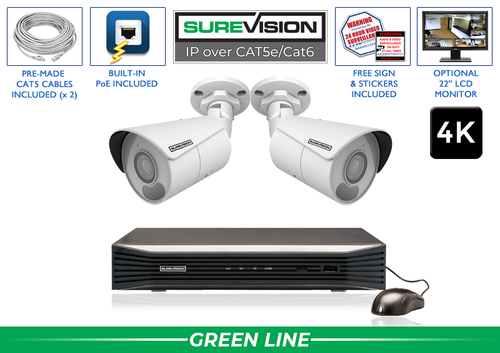
SV-2IPBIR8-N: Best Two-Camera 4K Starter System
Best for: small offices, storefronts, detached buildings, homes, garages, front-and-rear entrances, and properties with two evidence-critical views.
The two-camera package delivers the same professional SV-B8IR-N 4K bullet-camera platform as our top pick in a smaller configuration. Each camera combines 8MP video, a built-in microphone, wide coverage, approximately 100 feet of Smart IR, WDR for difficult contrast, PoE connectivity, and an IP67 enclosure for indoor or outdoor use.
Its 4-channel 4K NVR provides local hard-drive recording and leaves two channels available for later additions. That makes the package more useful than a closed two-camera kit: a customer can protect the highest-priority views now and add side-yard, register, warehouse, or driveway coverage when needed.
Choose another system when: the property needs more than two views on day one, longer-range infrared coverage is a priority, or a turret-style camera better fits the installation.
View the SV-2IPBIR8-N
SV-4IPSB4-N: Best 4MP Bullet System for Larger Exterior Areas
Best for: parking approaches, loading areas, long exterior walls, driveways, warehouses, side yards, and businesses that want visible perimeter coverage.
This system uses four professional SV-SB4-N 4MP bullet cameras with built-in microphones, 2.8 mm lenses, True 120 dB WDR, human-based event support, PoE, and weather-resistant IP67 housings. Its standout feature is infrared illumination rated up to 164 feet, giving installers more reach in larger dark exterior scenes than a compact general-purpose camera.
The included 8-channel 4K NVR provides local recording and four open channels for expansion. Remember that an IR-distance specification describes illumination reach; it does not guarantee facial identification at that distance. The target still needs to occupy enough of the image, and the lens, angle, lighting, motion, and recording settings must support the evidence goal.
Choose another system when: 4K resolution matters more than extended infrared reach, you prefer a lower-profile turret body, or the scene requires an adjustable motorized lens.
View the SV-4IPSB4-N
SV-4IPTD4-N: Best Turret System for Clean, Flexible Installation
Best for: offices, retail interiors, restaurants, lobbies, hallways, soffits, entrances, garages, and covered exterior areas where a compact appearance is preferred.
The SV-4IPTD4-N combines four 4MP turret cameras with a professional SureVision NVR. The cameras use wide 2.8 mm lenses, include audio, support approximately 100 feet of infrared or supported color-at-night operation, and connect with one PoE network cable per camera. The turret body offers the tidy appearance often associated with dome cameras while remaining straightforward to aim.
An 8-channel 4K NVR provides centralized local storage, remote viewing, event search, playback, and export while leaving four channels available. This makes the system a strong fit for businesses that want clean-looking camera placement now but may add stockroom, rear-door, exterior, or parking coverage later.
Choose another system when: you want highly visible bullet cameras as a deterrent, need 4K at every view, or require the longest infrared specification in this list.
View the SV-4IPTD4-N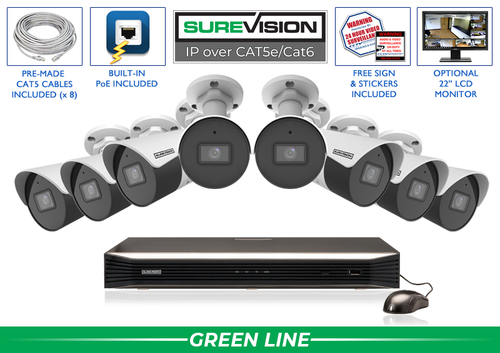
SV-8IPSB4-N: Best Eight-Camera System with Room to Grow
Best for: stores, restaurants, offices, warehouses, workshops, small commercial buildings, larger homes, and properties that need several interior and exterior views.
This package expands the professional 4MP bullet-camera platform to eight cameras. It is designed for businesses that need simultaneous coverage of entrances, exits, registers, customer areas, stockrooms, loading zones, parking approaches, and building perimeters. The SV-SB4-N cameras provide audio, wide-angle coverage, True WDR, smart event support, PoE, IP67 protection, and infrared illumination rated up to 164 feet.
The included 16-channel SureVision NVR leaves eight channels available for future cameras. That makes the system a sensible starting point for a growing facility: the owner can deploy eight priority views first and later add cameras without replacing the recorder, subject to recorder bandwidth, storage, and compatibility planning.
Choose another system when: four cameras cover the essential zones, 4K is required at every position, or a mix of bullet and turret cameras would better suit the property.
View the SV-8IPSB4-NGoogle Reviews You Can Verify
Trust should be earned, not manufactured. These are real public customer reviews collected and displayed by Google, not testimonials invented for this page. Google’s public store page currently displays a 4.8 out of 5 store rating based on 325 reviews. The rating and review count can change as customers add new feedback.
This is a store-level rating for customers’ overall experience with CCTV Security Pros. It is not being presented as a Google rating for any individual product, and it is separate from the editorial system scores above. Read the public reviews directly on Google to evaluate the feedback for yourself.
Read the Reviews on GoogleWhat Makes a Security Camera System Professional?
A complete professional system is more than a group of cameras. The cameras, recorder, hard-drive storage, cabling, network access, display, user permissions, and installation plan must work together. A mismatch in any one area can reduce reliability or make important footage harder to find.
Professional Cameras
The cameras should match the scene’s lighting, distance, viewing angle, mounting surface, weather exposure, and identification goal. A business may combine 4K bullet cameras at entrances with 4MP turret cameras in offices or hallways.
Compatible NVR
The NVR is the system’s control center. It powers supported PoE cameras, records footage, manages users, organizes playback, exports evidence, and provides remote-viewing access when correctly configured.
Local Video Storage
Surveillance-rated hard-drive capacity should be planned around camera count, resolution, frame rate, bitrate, recording schedule, scene activity, compression, and the number of days of footage required.
Reliable Cabling
CAT5e or CAT6 cable can carry power and data to a PoE camera. Quality cable, weather-protected terminations, suitable run lengths, and careful routing matter as much as the camera specification.
Remote Viewing
Remote access lets authorized users view live or recorded video from supported phones, tablets, and computers. It depends on the local network and internet connection; local recording remains the dependable core.
Support and Documentation
Professional ownership includes help with setup, playback, export, storage, remote viewing, passwords, and system expansion—not only a box of hardware delivered to the property.
Wired PoE NVR Systems vs. HD-Over-Coax DVR Systems
Both IP and HD-over-coax systems can deliver professional surveillance. The better choice often depends on the building’s existing cable, required camera features, installation plan, and future expansion. For a new installation, PoE IP systems are usually the most flexible foundation. For a property with usable coax already in place, an HD-over-coax upgrade may reduce rewiring.
| Feature | PoE IP System with NVR | HD-Over-Coax System with DVR |
|---|---|---|
| Typical camera cable | CAT5e or CAT6 Ethernet | RG59 Siamese coax with power |
| Power and video | PoE can carry both over one network cable | Siamese cable provides separate coax and power conductors |
| Recorder | Network video recorder | Digital video recorder |
| Best starting point | New professional installations, advanced IP features, and scalable systems | Buildings with existing usable coax that should be retained |
| Monthly fee | No required monthly fee for core local recording | No required monthly fee for core local recording |
Compare professional PoE IP security camera systems, review HD-over-coax security systems, or read the DVR vs. NVR guide.
Choose the Right Number of Security Cameras
Camera count should come from a coverage plan, not the number printed on the front of a kit. List every entrance, exit, transaction point, hallway, stockroom, loading door, driveway, parking approach, gate, exterior wall, and detached structure. Then decide whether each position needs identification, recognition, or general activity awareness.
| System Size | Typical Fit | Planning Advice |
|---|---|---|
| 2 camera systems | Small offices, garages, entrances, detached buildings, or focused residential coverage | Use open recorder channels for future blind spots discovered after installation. |
| 4 camera systems | Small stores, offices, workshops, homes, and front/rear/perimeter coverage | An 8-channel recorder can preserve a useful expansion path. |
| 8 camera systems | Retail, restaurants, offices, larger homes, warehouses, and small commercial buildings | Mix interior overviews with focused cameras at entrances and high-value areas. |
| 16 camera systems | Multi-zone businesses, warehouses, apartment properties, and larger facilities | Plan storage retention and network bandwidth alongside camera placement. |
| 24 camera systems | Larger commercial properties, schools, campuses, warehouses, and multi-building sites | Document camera names, cable routes, user roles, and retention requirements. |
| 32 camera systems | Enterprise buildings, manufacturing, distribution, and broad commercial coverage | Use a formal site plan and confirm recorder throughput before finalizing cameras. |
| 64 camera systems | Large campuses, government sites, logistics, and extensive multi-zone surveillance | Coordinate network design, permissions, storage, displays, backup power, and maintenance. |
Bullet, Dome, and Turret Cameras Inside a Complete System
A professional camera system does not need to use the same camera body at every location. The best design often mixes camera styles according to visibility, aiming, mounting, weather, and tamper concerns.
Bullet security cameras have a visible directional body. They are easy to aim and work well on building exteriors, driveways, parking areas, gates, long walls, loading docks, and other perimeter locations. Their noticeable appearance can also make the protected direction obvious.
Turret cameras offer a compact appearance and straightforward aiming without the reflective cover used on some traditional domes. They are popular under soffits, at entrances, in offices, retail interiors, restaurants, hallways, and garages.
Vandal dome cameras use a protective housing that can help in areas exposed to tampering or impact. The enclosed design suits public-facing indoor spaces and lower mounting positions, although careful cleaning and installation are important to prevent nighttime reflections.
Browse all SureVision IP security cameras if a mixed camera package would fit the property better than a single-style kit.
Resolution, Night Vision, Audio, and Smart Detection
4MP vs. 4K Security Camera Systems
A 4MP system offers a useful balance of detail, storage, and bandwidth for many everyday business and home views. A 4K system records more pixels and can preserve additional detail when the camera is correctly placed and the lens, lighting, bitrate, frame rate, and recorder support the scene. More pixels do not correct a poor angle or make a distant face fill the frame.
Infrared and Color at Night
Infrared illumination helps cameras record in very dark areas, usually in black and white. Keep walls, eaves, gutters, spider webs, signs, and foliage away from the immediate field of view because they can reflect IR light and reduce distant detail. Supported color-at-night modes may use available ambient light or visible illumination to preserve color information.
Built-In Microphones
Audio can add context to recorded events around entries, counters, work areas, and deliveries. Laws and workplace policies governing audio recording vary, so confirm what is permitted in the installation location and configure sound responsibly.
Human and Vehicle Detection
Supported analytics can help focus event searches and alerts on people or vehicles instead of every lighting change, moving branch, or small animal. Detection is an aid, not a guarantee. Configure zones, schedules, sensitivity, thresholds, and notification rules for the actual scene, then test both daytime and nighttime performance.
Plan NVR Channels, Storage, and Future Expansion
The recorder deserves the same attention as the cameras. First, count the cameras needed now and the views that may be added during the next several years. A four-camera system paired with an 8-channel NVR can often grow without replacing the recorder, while an eight-camera package with a 16-channel NVR offers an even larger path.
Second, plan hard-drive retention. Recording time depends on much more than drive size. Camera count, resolution, frame rate, bitrate, compression, scene activity, continuous versus event recording, audio, and the desired retention period all affect capacity. A busy retail entrance consumes storage differently from an inactive hallway even when the cameras share a resolution.
Third, confirm recorder bandwidth and decoding capability. A recorder may have enough physical channels yet still require careful planning when many high-resolution cameras record at demanding settings. Review the NVR specification before adding cameras, especially in 16-, 24-, 32-, or 64-camera systems.
Finally, protect access. Use strong unique passwords, create separate user accounts with only the permissions each person needs, keep supported firmware and viewing applications current, and coordinate commercial network settings with the organization’s IT administrator. Compare current SureVision NVR recorders or visit the SureVision Support Center for setup and operation guidance.
Best Security Camera Systems by Property Type
| Property | Recommended Starting Approach | Priority Views |
|---|---|---|
| Retail and restaurants | 4- or 8-camera PoE system; mix 4K priority cameras with broad interior views | Entrances, registers, customer areas, stockrooms, rear doors, and deliveries |
| Offices | 2- or 4-camera system for a small suite; larger counts for multi-floor space | Main doors, reception, hallways, server rooms, storage, and parking approaches |
| Warehouses and workshops | 8- or 16-camera system with a mix of overviews and focused entry cameras | Loading docks, employee doors, inventory lanes, equipment areas, gates, and yards |
| Homes | 2-, 4-, or 8-camera PoE system based on lot size and detached structures | Front approach, driveway, garage, rear door, side gates, yard, and outbuildings |
| Apartments and multi-family | 16 cameras or more depending on entrances, floors, parking, and shared areas | Building doors, mail areas, halls, elevators, lots, garages, and common spaces |
| Government and campuses | Formal multi-recorder design with documented requirements and user roles | Public entrances, restricted doors, corridors, lots, perimeters, and critical assets |
Professional Security Camera System Buying Checklist
- Map every priority area. Mark entrances, exits, transaction points, high-value assets, parking, gates, blind spots, and approach routes.
- Define the evidence goal. Decide where you need identification, recognition, plate capture, or general activity awareness.
- Measure distance and mounting height. Wide-angle cameras are excellent for broad nearby views but may not place enough pixels on a distant target.
- Evaluate lighting day and night. Check backlighting, headlights, darkness, reflective surfaces, exterior fixtures, and nearby objects that may reflect infrared.
- Select camera styles by location. Use bullet, turret, dome, motorized, or specialty cameras according to the scene—not simply appearance.
- Plan extra NVR channels. Leave reasonable room for expansion when future coverage is likely.
- Calculate retention. Size storage around camera settings, recording schedule, activity, and the number of days the organization must retain footage.
- Confirm cable routes. Plan CAT5e or CAT6 runs, weatherproof junctions, penetrations, conduit, surge protection, and recorder location before installation begins.
- Protect the recorder and network. Use a secure, ventilated location, strong passwords, suitable permissions, and backup power where needed.
- Test the finished system. Verify daytime and nighttime images, event rules, playback, export, time settings, remote access, and every camera name before considering the job complete.
Best Security Camera System FAQs
What is the best security camera system for a small business?
A four- or eight-camera wired PoE system is a strong starting point for many small businesses. Four cameras can cover a small office or shop’s most important doors and transaction areas. Eight cameras provide more flexibility for interiors, stockrooms, rear doors, loading areas, and parking. Choose a recorder with open channels if growth is likely.
Are 4K security camera systems better than 4MP systems?
4K systems record more pixels and can preserve additional detail in a well-designed scene, but they also use more storage and bandwidth. A correctly positioned 4MP camera may outperform a poorly placed 4K camera for the target that matters. Match resolution with lens, distance, lighting, recorder support, and retention requirements.
Do professional security camera systems require monthly fees?
The SureVision systems in this guide use local NVR storage and do not require a monthly fee for core recording, playback, and supported remote viewing. Optional third-party services or network costs are separate, but the professional local-recording system itself is not dependent on a required cloud subscription.
Can I view my security camera system remotely?
Yes. A properly connected and configured SureVision NVR supports remote viewing from compatible mobile and computer applications. Remote access depends on the property’s internet and network configuration, while local recording can continue even if off-site viewing is temporarily unavailable.
How much NVR storage do I need?
Storage needs depend on camera count, resolution, frame rate, bitrate, compression, audio, scene activity, recording schedule, and desired retention days. Continuous 4K recording requires more capacity than event-based 4MP recording. Provide these details when requesting a storage recommendation.
Can bullet and turret cameras be mixed in one system?
Yes, when the cameras and NVR are compatible. Mixing styles is often the better design. Bullet cameras suit visible perimeter views, while turret or dome cameras provide a compact appearance at entrances, soffits, offices, stores, and hallways. Confirm channel, bandwidth, resolution, and feature compatibility before adding models.
How far can a security camera see at night?
Published infrared distance describes illumination reach under supported conditions, not guaranteed identification distance. Usable detail depends on target size, lens, mounting angle, movement, exposure, nearby reflections, and ambient light. Plan each camera around the required evidence at the actual target distance.
Is PoE better than Wi-Fi for a permanent camera system?
For most permanent professional installations, PoE provides a more stable foundation because one wired connection carries power and video without relying on wireless signal quality or battery charging. Wireless cameras still have valid uses where network cabling is impractical, but this ranking focuses on wired systems for continuous business and property surveillance.
Can I install a professional system myself?
Many customers install PoE systems themselves because each camera uses one network cable to the recorder. Success still requires safe cable routing, weatherproof connections, suitable mounting, network setup, and careful camera aiming. Customers who prefer professional installation can use the third-party installation service to request local installation assistance.
Why buy a complete system instead of cameras separately?
A complete system simplifies compatibility and planning by combining cameras, a recorder, storage options, and cabling intended to operate together. Buying separately can be appropriate for an existing system, but a new buyer must verify protocol, resolution, PoE, bandwidth, channel, storage, analytics, and remote-viewing compatibility for every component.
Get Professional Security Camera System Advice
Tell CCTV Security Pros about your property, priority views, distances, lighting, camera count, recording schedule, and retention goals. A security specialist can help match the cameras, NVR, storage, cable, and accessories to the job without overbuilding the system.
Professional SureVision cameras and recorders • Local storage • Remote viewing • No required monthly fees
