
Bullet Security Cameras: Lenses, Placement and Buying Guide
Posted by CCTV Security Pros on Oct 7, 2026
Choose the View Behind the Bullet-Camera Shape
Bullet cameras are a familiar choice for building exteriors, entrances and work areas. Compare the lens, lighting, housing and recording requirements before choosing the model for each location.
Updated October 7, 2026 · CCTV Security Pros
What is a bullet security camera?
A bullet camera has an elongated housing and is typically aimed toward a selected area. The shape can make its presence visible, but the lens and installation determine the useful view. A bullet housing alone does not mean the camera has long-range zoom or can identify distant faces and plates.
Start with the viewing distance and lens
List the purpose of each camera before comparing resolution. An entrance overview, a narrow side passage and a distant gate call for different framing. A wide fixed lens can show more of the scene, while a tighter or adjustable lens may put more detail on a particular target.
Optical zoom changes the lens view. Digital zoom enlarges the existing image and cannot create detail that was not captured. If identification matters, test the intended target at the actual distance and mounting position.
Compare resolution and nighttime performance together
A 4K camera can provide more recorded image detail than a comparable lower-resolution view, but lighting, exposure and motion affect the result. Check a person or vehicle moving through the recorded scene rather than evaluating only a bright, still live image.
Infrared night vision usually provides a monochrome view when visible light is limited. Color-at-night features depend on the model and available or supplemental illumination. A listed illumination range is not a promise of identification at that same distance.
Inspect glare from nearby surfaces, lighting and headlights. Avoid pointing the camera so a close wall or obstruction dominates the illuminated scene.
Match the housing and mounting to the location
Check the exact model's environmental rating and operating-temperature range. Use compatible mounts or junction boxes and protect cable entries. Outdoor durability depends on the complete installation, not just the camera enclosure.
Choose a stable mounting position that balances useful detail, access for maintenance and the chance of interference. Very high mounting can improve an overview but create a steep angle at entrances. An accessible camera may need another view that records its surrounding area.
Compare bullet and dome cameras by the task
A bullet can be convenient on a wall where the camera needs to be aimed at a defined approach. A dome may suit a lower public-area position or a location where a compact protective housing is preferred. Neither shape is automatically better in every setting.
Use a mix when the property requires different views. Consider the lens, lighting, mounting, environmental specifications and required functions for each model rather than selecting every camera for a matching appearance.
Confirm the recorder and required features
For a PoE IP bullet camera, verify the required power, supported recorder connection and intended recording settings. Check available audio and analytics individually. A built-in microphone does not mean a camera includes a speaker or two-way audio.
Size NVR storage to the actual recording workload and retention goal. Verify playback and clip exports after installation, and schedule periodic checks for blocked views, dirty lenses and recording health.
Your planning priorities
Two real SureVision bullet cameras to compare
These products are available from CCTV Security Pros. Match each model to the viewing task and confirm the final recorder, power, mounting and storage configuration before ordering.
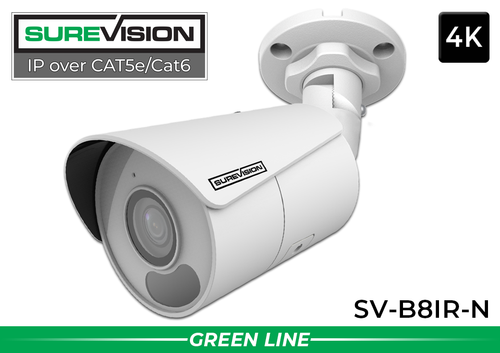
SureVision SV-B8IR-N 4K Bullet IP Camera
An 8MP IP camera with a fixed 2.8mm wide-angle lens, infrared night vision and built-in microphone. Consider it for general entrance and area views where those specifications fit. It does not provide two-way audio through a built-in speaker.
View product details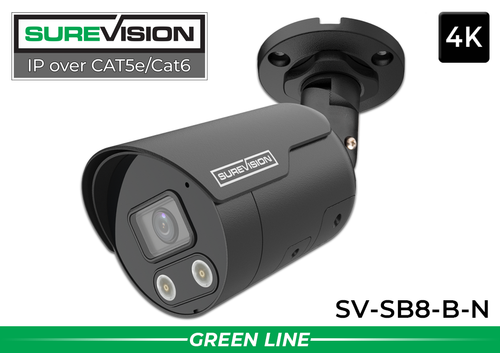
SureVision SV-SB8-B-N 4K Active Deterrent Bullet Camera
This 8MP model adds visible-light warning, a siren and two-way audio through its microphone and speaker. Consider it where an active response feature is appropriate, and configure its zones, schedules and outputs for the property.
View product detailsBullet camera questions
Are all bullet cameras long-range cameras?
No. Range depends on the lens, target detail, lighting and other specifications. A wide-angle fixed bullet and a motorized zoom camera serve different viewing tasks.
Can a bullet camera read license plates?
Sometimes a view may capture a readable plate, but reliable plate capture should be designed for a specific lane and conditions. Do not assume a general 4K overview is a dedicated plate-capture system.
Can bullet cameras be used indoors?
Many models support suitable indoor use. Check the selected camera's specifications, mounting requirements and viewing angle for the location.
Match a Bullet Camera to the View You Need
Share the mounting location, approximate distance and daytime and nighttime conditions. CCTV Security Pros can help you compare a practical camera and recorder combination.
Get a Free System Quote Shop SureVision CamerasMatch a bullet camera’s lens to a specific viewing task
A bullet camera’s shape does not determine the useful viewing distance. Start with the size of the area and the detail required at its farthest important point. A wide lens is useful for an overview near a building. A tighter view can give more image space to a gate or approach, but covers less of the surrounding area.
| Location | Starting viewing goal | What to test |
|---|---|---|
| Building corner | Show movement along the adjacent routes | Check near-camera blind areas and the far end of each route. |
| Entrance approach | Show a person approaching the door | Test face detail while the person is moving. |
| Loading area | Show the handoff and surrounding activity | Check a vehicle in its normal parked position. |
| Distant gate | Show the required detail at the gate | Compare framing at the actual subject distance. |
Use the 4K security camera guide to understand how resolution relates to scene detail. Our dome and bullet camera comparison helps when mounting style and appearance also matter.
Evaluate nighttime footage with a moving subject
Infrared range is an illumination specification, not a promise that faces or plates can be identified at that distance. Put a person or vehicle at the required point in the scene, record normal movement and inspect the saved result. Check the image under the actual lighting rather than relying only on a still daytime view.
Nearby walls, soffits, signs and foliage can reflect light back toward the camera. Keep the installation aimed and positioned to avoid unnecessary reflections, and secure the cable connection using the appropriate weather protection. Consider where the camera can be cleaned and serviced without disturbing the final view.
Browse SureVision IP cameras with the selected lens and recording requirements in mind. When several views need different lenses or housing styles, the custom system builder can organize the mix. A system quote is useful when you can provide a photograph, mounting position and approximate distance to the detail you need.
What to record at the final system check
Keep the acceptance check simple enough that the owner can repeat it later. Use the final camera positions and recording settings, and include the lighting and activity that make the important views difficult. A recorded test gives a useful baseline for future troubleshooting.
- Confirm that each camera name matches its actual location and purpose.
- Review a saved daytime event and, where relevant, a nighttime event with a moving subject.
- Check the recording history against the agreed retention goal after a representative operating period.
- Test the permissions and playback functions of an ordinary user account.
- Export a short sample and check it on the device that will be used for review.
- Record any unresolved issue and the person responsible for correcting it.
Repeat the relevant checks after a camera is moved, a major display or obstruction changes, or recording settings are adjusted. This keeps the system aligned with the property’s current needs and makes maintenance more predictable.
Turn the plan into a complete equipment list
After defining the required views, compare SureVision IP cameras. Match each camera to a recorder channel, a compatible power connection and a documented cable route. Keep the installation materials, storage assumptions and required user functions on the same list so a missing component is easier to spot before ordering.
Use our dome-versus-bullet guide for the next planning decision and the 4K camera guide for the related technical detail. These guides provide background for comparing the actual equipment rather than choosing solely by a camera count or a resolution label.
Bring the list together in the custom security camera system builder, or send the property layout and viewing goals with a free system quote request. Include the mounting locations, approximate subject distances and any existing equipment you want to keep. That information makes the proposed configuration more specific to the property.
Before accepting the installation, practice the tasks the owner will perform: checking a live view, finding a recorded event and preserving a usable export. Save the camera schedule, equipment model numbers and support information with the project records. Use the technical support center for model-specific setup resources and ask for help when a required function needs clarification.
