
Self-Monitored Business Camera Systems: A Practical Operations Guide
Posted by CCTV Security Pros on Oct 5, 2026
Choose Who Watches, Who Responds and What Gets Recorded
A self-monitored camera system puts viewing and incident review in your team's hands. Pair the equipment with an alert and response process that works during business hours, after closing and when the usual contact is unavailable.
Updated October 7, 2026 · CCTV Security Pros
What does self-monitored mean?
Your business is responsible for checking cameras, reviewing alerts and deciding how to respond. A camera system with notifications is not the same as a staffed monitoring service, and an alert does not by itself arrange an emergency response.
Assign responsibility before enabling alerts
Decide who receives notifications during opening hours and who is responsible after closing. Identify a backup person for leave, busy periods or lost connectivity. An alert sent to a phone that nobody checks will not support the intended response.
Write a short procedure for reviewing an event and escalating it through your business's established channels. Staff should understand their responsibilities and avoid confronting a potentially dangerous situation. Surveillance supports the response plan; it does not replace it.
Keep alerts focused on useful events
Start with a few important areas, such as a closed gate or restricted entrance outside operating hours. Set schedules and detection zones around the actual workflow. A rule that repeatedly alerts on routine deliveries or public traffic will be harder for staff to use consistently.
Compatible cameras and recorders may offer human or vehicle classification and other event functions. Verify support for the specific models and test the rule under real lighting and weather. Analytics can help filter events but do not eliminate every false or missed alert.
Keep recording separate from notification choices
An alert helps bring attention to an event, while recorded video provides context for later review. Decide where continuous recording is useful and where event-based recording is appropriate. Test event settings to confirm that they capture the beginning and end of the activity you need.
Size local NVR storage for the actual camera settings and the required history. Cameras should have descriptive names and synchronized timestamps so staff can follow movement between views. Export important clips before routine overwrite.
Plan remote access and staff changes
Verify supported phone and computer access before choosing the system. Configure permissions around the staff roles and keep administrative access controlled. Review accounts when employees leave or their responsibilities change.
Remote viewing and notifications depend on the required connectivity and services working. Local recording can continue during an internet outage when the cameras, NVR and local network remain powered and functioning. Include outages and unreachable devices in the operating plan.
Test the whole process
Run a planned test after installation: create an approved event, confirm the intended notification, review the relevant video and export a clip. Ask the designated backup person to repeat the process. This tests the people and workflow as well as the equipment.
Schedule checks for recording health, blocked views and useful nighttime images. If the business cannot reliably staff the required response, evaluate whether an appropriate professional service is needed alongside the camera equipment.
Your planning priorities
SureVision equipment for self-managed surveillance
These products are available from CCTV Security Pros. Match each model to the viewing task and confirm the final recorder, power, mounting and storage configuration before ordering.
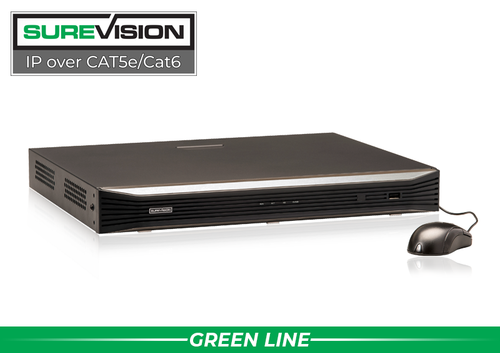
SureVision SV-NVR2P16-N 16-Channel PoE NVR
A local recording platform for up to 16 compatible IP cameras. Confirm the required remote viewing, permissions and event functions with the selected cameras, and size storage to the business's review needs.
View product details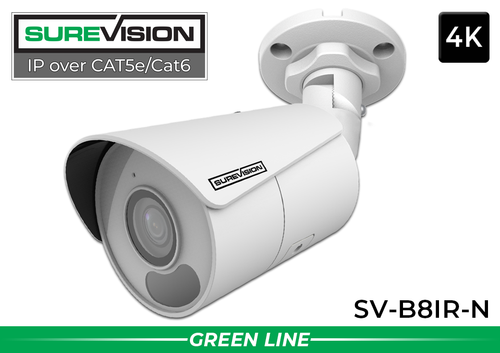
SureVision SV-B8IR-N 4K Bullet IP Camera
An 8MP wide-angle camera for appropriate entrance and general-area views. Match the 2.8mm lens and mounting location to the required detail, and verify any event features through the complete system configuration.
View product detailsSelf-monitored camera questions
Does a phone notification dispatch the police?
No. A notification is a message to the configured user. Any emergency response follows your business procedures or a separately arranged service.
Is someone watching all the time?
Only if you arrange that responsibility. Recording continuously does not mean a person is continuously monitoring the cameras.
Can I record locally without a cloud plan?
Compatible SureVision systems can record to an NVR without required monthly cloud-storage fees. Power, network connectivity, maintenance and any optional services remain part of the ownership plan.
Build a Camera System Your Team Can Operate
Share the areas you need to cover, the events that matter and your remote-viewing requirements. CCTV Security Pros can help match the equipment to the workflow.
Get a Free System Quote Shop SureVision CamerasWrite a response plan for the alerts you enable
Self-monitoring works best when an alert has an owner and a clear next step. Decide which events deserve attention, when someone is available to review them and what happens if the first person does not respond. Keep the response appropriate to the situation; camera notifications do not replace emergency services or a professionally monitored alarm service.
| Event | Initial review | Follow-through |
|---|---|---|
| After-hours activity | Check the correct camera and a short recorded sequence | Follow the organization’s response procedure. |
| Unexpected delivery | Confirm location and context | Contact the responsible employee or receiving team. |
| Repeated nuisance alert | Check the scene, schedule and detection area | Adjust only after understanding what triggered it. |
| Missing recording or offline device | Confirm the equipment status and affected views | Notify the assigned support or maintenance contact. |
Our business surveillance planning guide connects camera coverage with staff responsibilities. Use the AI NVR guide to frame questions about supported event filtering and search features on the exact hardware.
Measure whether notifications remain useful
For an initial trial period, keep a simple log of useful events, nuisance alerts and missed events noticed by staff. Compare the log with saved footage. If users receive too many unhelpful alerts, they may stop checking them; if a rule is too restrictive, it may miss the activity the business needs to review.
Adjust detection areas, schedules and supported classifications one change at a time. Avoid treating a quiet phone as proof that everything is working. Check recording health separately and conduct a staged event during each important schedule, including nights and weekends where relevant.
Give each authorized reviewer the access they need and remove access when roles change. Practice playback and export using the actual phone or computer they will use. The technical support center provides setup resources, while a tailored system quote can help match camera features and recording hardware to the intended self-monitoring workflow.
What to record at the final system check
Keep the acceptance check simple enough that the owner can repeat it later. Use the final camera positions and recording settings, and include the lighting and activity that make the important views difficult. A recorded test gives a useful baseline for future troubleshooting.
- Confirm that each camera name matches its actual location and purpose.
- Review a saved daytime event and, where relevant, a nighttime event with a moving subject.
- Check the recording history against the agreed retention goal after a representative operating period.
- Test the permissions and playback functions of an ordinary user account.
- Export a short sample and check it on the device that will be used for review.
- Record any unresolved issue and the person responsible for correcting it.
Repeat the relevant checks after a camera is moved, a major display or obstruction changes, or recording settings are adjusted. This keeps the system aligned with the property’s current needs and makes maintenance more predictable.
Turn the plan into a complete equipment list
After defining the required views, compare security camera systems. Match each camera to a recorder channel, a compatible power connection and a documented cable route. Keep the installation materials, storage assumptions and required user functions on the same list so a missing component is easier to spot before ordering.
Use our commercial camera planning guide for the next planning decision and the AI NVR guide for the related technical detail. These guides provide background for comparing the actual equipment rather than choosing solely by a camera count or a resolution label.
Bring the list together in the custom security camera system builder, or send the property layout and viewing goals with a free system quote request. Include the mounting locations, approximate subject distances and any existing equipment you want to keep. That information makes the proposed configuration more specific to the property.
Before accepting the installation, practice the tasks the owner will perform: checking a live view, finding a recorded event and preserving a usable export. Save the camera schedule, equipment model numbers and support information with the project records. Use the technical support center for model-specific setup resources and ask for help when a required function needs clarification.
