
A Comprehensive Guide to Security Camera Cables and Connectors
Aug 11, 2026
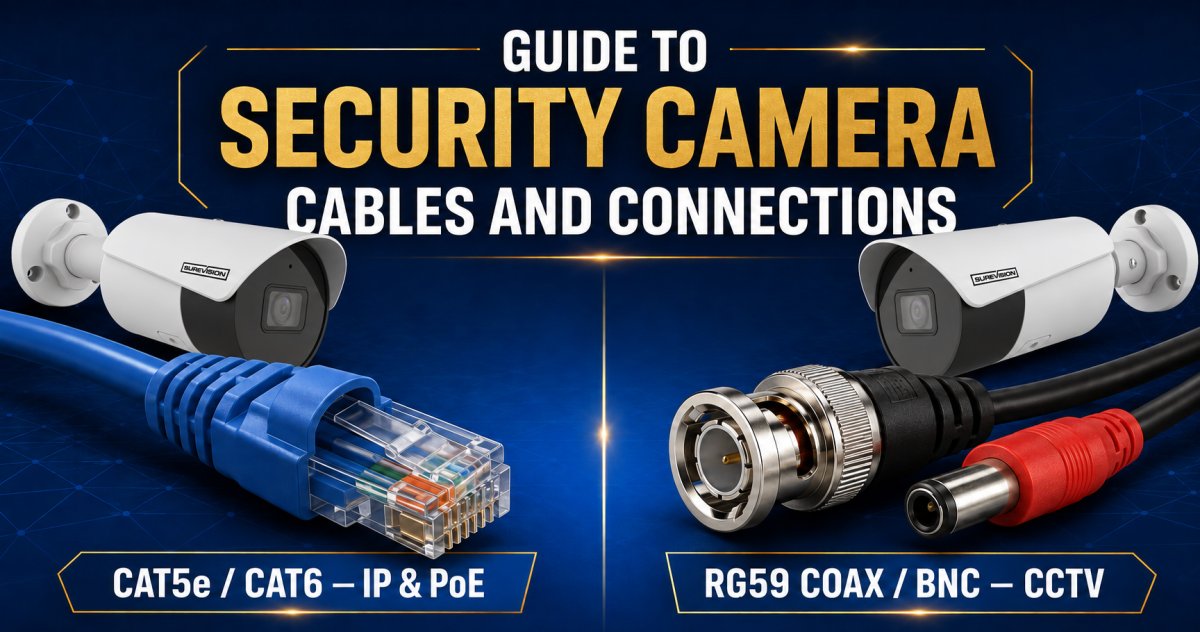
Your high-resolution cameras are only as good as the wires hidden behind your walls. If you choose the wrong security camera cables and connectors, even a premium system will suffer from grainy footage and frustrating signal interference. We understand that the choice between Cat6 Ethernet and RG59 Coaxial can feel overwhelming, especially when you're worried about buying the wrong grade or dealing with signal degradation over long distances. It's a common concern, but getting the nervous system of your surveillance right is the only way to guarantee professional-grade performance.
Our team at CCTVSecurityPros - Professional Security Cameras and Systems is here to ensure you don't have to guess. We're committed to being your partner in security, offering unlimited customer support and expert advice whenever you need it. In this guide, you'll learn how to identify the exact cable type for your specific system and understand how Power over Ethernet (PoE) simplifies your installation. We'll show you how to build a foundation that guarantees long-term reliability. If you ever feel stuck, remember that we're very good at providing ongoing help. We're always ready to talk to you to provide a personalized cabling plan or a quote for your project.
Key Takeaways
- Distinguish between IP and Analog systems to identify the correct transmission medium for your specific hardware setup.
- Compare Cat5e and Cat6 standards to decide which Ethernet grade best supports your high-resolution video and future-proofing needs.
- Master the technical essentials of security camera cables and connectors to ensure your system delivers crystal-clear video without signal loss.
- Implement professional installation techniques like drip loops and proper shielding to protect your hardware from environmental damage and interference.
- Learn how our team's unlimited technical support can help you simplify the cabling process for a reliable, professional-grade connection.
Understanding the Two Main Types of Security Camera Cabling
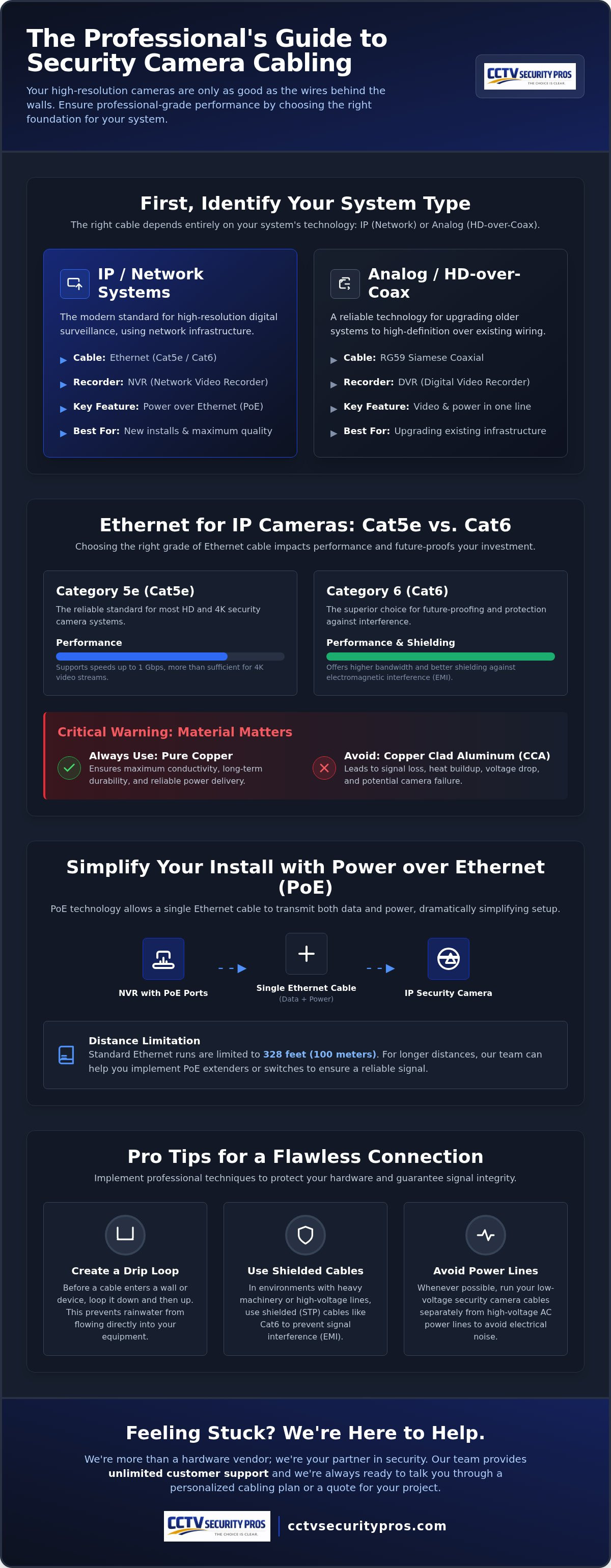
Before you begin running lines through your attic or office ceiling, you need to identify the technology driving your surveillance system. Security camera cabling is fundamentally split into two categories: digital IP (Network) and Analog (HD-over-Coax). Choosing the wrong security camera cables and connectors isn't just a minor mistake; it can lead to a complete lack of signal or even permanent hardware damage if power is misapplied. We want to help you get it right the first time so your system stays reliable for years.
Network Cabling for Modern IP Systems
Modern IP systems are the gold standard for high-resolution surveillance. These cameras utilize Ethernet cables to communicate with a Network Video Recorder (NVR). One of the biggest advantages here is Power over Ethernet (PoE). This technology allows a single wire to transmit both high-definition digital data and the electrical power the camera needs to operate. It simplifies your project significantly. For the best results, we recommend using SureVision IP Recorders, which are designed for seamless plug-and-play integration with these digital systems.
Coaxial Cabling for HD-over-Coax Systems
If you are upgrading an older system or prefer a traditional setup, you'll likely use HD-over-Coax technology. These systems rely on RG59 Siamese cables to transmit video signals to a Digital Video Recorder (DVR). The term Siamese refers to the way the cable is manufactured: one side handles the video feed while an attached 18/2 power wire runs alongside it. This design is incredibly efficient for installations because you only have to pull one line to each camera location. It's an ideal solution for buildings with existing analog infrastructure where you want to achieve high-definition results without the cost of a full network rewire.
We understand that these technical choices can feel daunting. That's why our team at CCTV Security Pros is always available to talk. We pride ourselves on being more than a hardware vendor; we're your partner. We offer unlimited customer support and are very good at helping our clients find the perfect fit for their specific environment. If you're unsure which technology fits your needs, just give us a call for a personalized quote or some expert advice.
Ethernet Cables for IP Cameras: Cat5e vs. Cat6
In the digital age of surveillance, network cables are the backbone of your security infrastructure. While there are many options on the market, Cat5e and Cat6 are the industry standards for professional installations. Cat5e is a highly capable choice that supports speeds up to 1Gbps. This is more than sufficient for most 4K camera streams, which typically require much less bandwidth than the cable's maximum capacity. If you want to future-proof your setup, Cat6 offers even higher bandwidth and superior shielding against electromagnetic interference (EMI). This extra protection ensures that your video signal remains stable even when run near power lines or other electronics.
We always advise our clients to prioritize the material of their security camera cables and connectors. It is critical to use pure copper cabling rather than Copper Clad Aluminum (CCA). CCA cables are essentially aluminum wires with a thin copper coating. They suffer from higher resistance, which leads to signal loss and heat buildup. Pure copper ensures maximum conductivity and long-term durability for your hardware. If you're feeling unsure about which grade to choose, our team is always willing to talk to you to provide advice or a quote for your specific project.
The Role of Power over Ethernet (PoE)
PoE technology is a game-changer for modern installations. It allows a single Ethernet cable to provide both the network connection and the electrical power your camera needs. This eliminates the need for local power outlets at every camera location, which reduces both installation time and labor costs. PoE works most efficiently with 8 Camera IP Systems that feature integrated PoE ports directly on the recorder. We provide these plug-and-play kits to make your setup as straightforward as possible.
Distance Limitations for Network Cables
Standard Ethernet runs have a technical limit of approximately 328 feet (100 meters). Beyond this point, the signal can begin to degrade, and power delivery may become inconsistent. If your cameras are located further away, we can help you implement PoE extenders or specialized switches to bridge the gap. Using low-quality or CCA cables over these distances significantly increases the risk of voltage drop, which can cause cameras to reboot or fail entirely. We are very good at maintaining high standards of service, and our unlimited customer support is available to help you troubleshoot any distance-related challenges you might face.
Coaxial Siamese Cables and BNC Connectors
Choosing the right security camera cables and connectors for an analog system is just as critical as it is for an IP setup. RG59 is the industry standard for these installations because of its heavy shielding and 75-ohm impedance. This specific construction prevents outside electrical interference from ruining your video feed. We frequently recommend Siamese cable, which simplifies the installation process by attaching an 18/2 power wire directly to the video line. This design allows you to power your cameras and receive video through a single cable run, saving you time and effort.
If you're utilizing existing BNC infrastructure, our HD Security Camera Systems are designed to integrate seamlessly. We're very good at helping our customers transition to high-definition without needing a complete network overhaul. Our team is always willing to talk to you if you need advice on your specific layout or a personalized quote for your hardware.
Shop Professional HD Security Camera Systems
Terminating Coaxial Cables
To finish your cable runs, you'll need BNC (Bayonet Neill-Concelman) connectors. There are three common types: Crimp-on, Twist-on, and Compression. We strongly recommend compression connectors for professional results. They provide the most secure, weatherproof fit, which is vital for maintaining a reliable connection in outdoor environments. Always use a dedicated stripping tool when preparing your lines. Damaging the copper core with a standard knife is a fast way to cause signal drops and intermittent video loss.
Maximum Distance for Analog Video
One major advantage of analog technology is its reach. Analog signals can often travel much further than digital signals without needing a repeater. High-quality RG59 cable is capable of transmitting HD video up to 1,500 feet, depending on the specific camera technology being used. It's important to remember that signal quality will eventually degrade over extreme distances. If you're planning a large-scale installation, you'll need higher-grade shielding to maintain clarity. We provide unlimited customer support to help you calculate these distances and ensure your system performs perfectly from day one.
Expert Tips for a Reliable Cable Installation
Running the lines is often the most labor-intensive part of your project. Properly installing your security camera cables and connectors ensures the longevity of your hardware investment and prevents signal issues down the road. We believe that good cable management is about more than just aesthetics; it's about protecting the nervous system of your surveillance. If cables are left hanging or under tension, they can suffer physical damage or internal wire breaks that are difficult to diagnose once the system is live.
One of the simplest yet most effective techniques we recommend is the "drip loop." Before a cable enters a building or a junction box, allow it to sag slightly in a U-shape. This ensures that rainwater runs to the bottom of the curve and drops off rather than following the wire directly into your hardware or through the wall. We also suggest labeling both ends of every cable during the pull. It takes a few extra seconds, but it will save you hours of troubleshooting when you're at the recorder trying to identify which line belongs to which camera. If you run into any challenges, remember that we provide unlimited USA-based technical support. We're very good at helping our customers navigate these hurdles to ensure a perfect setup.
Weatherproofing Your Connectors
Exposed connectors are the primary cause of system failure in outdoor environments. Moisture can quickly corrode RJ45 or BNC tips, leading to intermittent signal loss. We suggest using dedicated junction boxes or silicone sealant to shield these connections from the elements. Many of our IP Cameras include weatherproof grommets specifically designed to seal the Ethernet port. Taking these small steps during installation prevents the need for costly repairs later.
Avoiding Interference and Cross-Talk
To maintain a crystal-clear image, you must be mindful of electrical interference. Don't run your security cables parallel to high-voltage AC power lines. This can cause video "ghosting" or rolling lines on your screen. We advise maintaining a minimum of 12 inches of separation from electrical wiring whenever possible. If you have a complex layout and need guidance on the best path for your lines, please contact us. Our team is always willing to talk to you to provide a free quote or expert cabling advice for your specific property.
Secure Your Surveillance with Professional Connectivity
Choosing the right hardware is only half the battle; the real strength of your system lies in the quality of your connections. We've explored how matching the correct cable type to your specific camera technology prevents signal degradation and ensures crystal-clear video. Whether you're pulling Cat6 for a high-bandwidth IP system or utilizing RG59 for a traditional setup, the right security camera cables and connectors are essential for long-term reliability.
We've helped over 70,000 customers secure their properties with professional-grade hardware. Our team is very good at providing the guidance you need from the initial selection through the final installation. Every piece of equipment we sell comes with a 3-year warranty and our commitment to unlimited lifetime technical support. We're proud to be your partner in security and want to ensure your system performs at its peak from day one.
Don't hesitate to reach out if you have questions about your cabling plan. We're always willing to talk to you to provide expert assistance or a custom quote for your project. You can trust that we'll be here to support you long after your purchase is complete.
Frequently Asked Questions
What is the difference between Cat5e and Cat6 for security cameras?
Cat5e and Cat6 differ primarily in their bandwidth capacity and internal construction. While Cat5e supports speeds up to 1Gbps, Cat6 is rated for 10Gbps and features tighter twists that provide superior protection against signal interference. For most 4K surveillance cameras, Cat5e is perfectly adequate, but Cat6 offers better future-proofing for the next generation of hardware. We're very good at helping you determine which standard is right for your property.
Can I use a regular Ethernet cable for my security cameras?
You can use standard Ethernet cables, but we strongly recommend avoiding Copper Clad Aluminum (CCA) versions for your security system. Pure copper cables are essential for reliable Power over Ethernet (PoE) delivery and long-term signal stability. Low-quality cables often lead to intermittent camera reboots or poor image quality. If you have questions about the grade of your security camera cables and connectors, our team is always willing to talk to you.
How far can I run a security camera cable without losing signal?
Ethernet cables have a maximum reliable distance of 328 feet (100 meters) before signal loss occurs. If your project requires longer runs, you can use PoE extenders or specialized network switches to bridge the gap. High-quality RG59 coaxial cables can often transmit HD video up to 1,500 feet without a repeater. We provide unlimited USA-based technical support to help you plan your layout and ensure your security camera cables and connectors perform reliably.
What are BNC connectors and do I need them for my system?
BNC connectors are the standard interface for coaxial cables used in analog and HD-over-Coax surveillance systems. They use a bayonet-style locking mechanism that ensures your video lines stay securely connected even in high-vibration environments. You'll need these connectors if you're installing a DVR-based system with RG59 cabling. We recommend using compression-style BNC connectors for the most durable and weatherproof termination. If you need help with a quote, just give us a call.
Is Power over Ethernet (PoE) better than using separate power cables?
Power over Ethernet (PoE) is generally the better choice because it streamlines your installation by sending both data and power through one cable. This approach removes the requirement for a local power outlet at every camera site, which significantly cuts down on labor and material costs. It's a cleaner, more professional way to manage your hardware. We specialize in plug-and-play PoE systems that make setting up your surveillance network as straightforward as possible.
Can I run security camera cables next to electrical wires?
We recommend maintaining at least 12 inches of separation between your security lines and high-voltage electrical wiring. Running these cables parallel to each other often creates electromagnetic interference, which leads to distorted video or "ghosting" effects. If your installation requires crossing a power line, try to do so at a 90-degree angle to reduce signal disruption. If you're facing a difficult cable path, we're always willing to talk to you to provide expert advice.
