
Industrial Security Cameras: Planning a Reliable Facility System
Posted by CCTV Security Pros on Oct 27, 2026
Match Industrial Security Cameras to Your Facility
Build useful views of gates, loading areas, inventory and production spaces. A reliable industrial surveillance system begins with the environment, the evidence you need and a plan for keeping cameras recording.
Updated October 7, 2026 · CCTV Security Pros
What should an industrial camera system do?
An industrial camera system should capture useful, reviewable video at the places where people, vehicles and valuable materials enter, move and leave. Select each camera for its viewing task and actual operating conditions. A professional surveillance camera is not automatically suitable for extreme heat, corrosive chemicals, washdown or hazardous locations.
Separate surveillance goals from equipment labels
Start with the questions a recording must answer. Who entered a restricted stockroom? Which truck used a loading bay? What happened before a damaged pallet left the dock? A wide overview and a close view of a transfer point can answer different parts of the same question.
Map gates, employee entrances, shipping areas, equipment storage and controlled rooms. Include the position of machines, stacked materials and doors that may obstruct a camera. Prioritize the locations where an event could be difficult to reconstruct without video.
Do not use a fixed number of cameras per square foot. A simple open floor and a facility divided by tall machinery need different layouts even when their total area is similar. Design the views first, then count the cameras and recorder channels.
Check the environment at every mounting position
Outdoor loading areas, a clean office corridor and a dusty production floor should not be treated as the same environment. Review the selected model's documented operating-temperature range, ingress protection and mounting requirements. Keep connectors and cable entries protected as carefully as the camera housing.
A weather or impact rating does not establish suitability for chemical exposure, industrial washdown, persistent vibration or hazardous atmospheres. For these locations, have the facility's qualified engineering or safety team define the required equipment and installation. General-purpose cameras should not be presented as substitutes for specialized certified equipment.
Mount cameras on stable structures where possible. Vibration can degrade the image even when the housing remains intact. Leave room for lens cleaning, inspection and replacement without interrupting critical operations unnecessarily.
Choose lenses around the detail you need
A wide-angle camera is useful for an overview of a loading apron or work area. A more tightly framed view may be needed for a doorway, a distant gate or a particular transfer point. Higher resolution gives you more image detail, but it does not remove the effect of distance, lighting and field of view.
At entrances, test a person moving toward and away from the building under actual lighting. At docks, review video with bay doors open and closed. Bright daylight behind a subject can challenge an indoor camera; a clean daytime overview is not proof that a night recording will be useful.
Choose dedicated plate-capture equipment and a suitable lane view if reading license plates is a requirement. Avoid treating every 4K overview as a plate-reading camera. For small labels or fast-moving objects, ask for a practical demonstration at the intended distance before accepting the design.
Combine fixed cameras with selective PTZ coverage
Fixed cameras maintain continuous views of gates, doors and high-value areas. A PTZ can help an operator investigate an event by changing direction and zooming optically into a selected scene. It is especially useful when someone will actively use those controls.
Maintain fixed coverage of critical locations even when adding a PTZ. A moving camera can be pointed elsewhere when something happens. Patrols and auto tracking depend on configuration and scene conditions, so evaluate them as extra tools rather than a replacement for a well-planned layout.
Design the network and recorder together
Power over Ethernet simplifies compatible camera connections by carrying power and data over one cable. Check the power requirement of each model and the total capacity of the NVR or switch. High-power cameras may require a different PoE source from standard fixed cameras.
Long runs, separate buildings and electrically noisy areas deserve an installation plan from the network and electrical teams. Document the cable routes, intermediate switches, power sources and recorder connections. Confirm that the complete network can carry the combined camera traffic at the selected settings.
When choosing a SureVision NVR, check channels, supported resolution, incoming bandwidth, drive bays and playback limits. Leave suitable room for expansion. A recorder with spare channels can still run out of bandwidth, power or storage if those capacities were overlooked.
Make recording continuity and review part of the handover
Decide how long footage needs to remain available, then size drives using the actual camera bitrates and recording schedule. Continuous recording and event recording have different storage demands. Event recording should be tested carefully where missing the beginning of an incident would make review difficult.
Protect the NVR physically, control user access and plan backup power for the devices needed to keep recording. Local storage does not eliminate hardware failure, accidental deletion or unauthorized access. Export and safeguard important incidents separately according to your business procedures.
Before signing off, review recorded examples from day and night shifts. Test time synchronization, camera names, event searches and video exports. Assign someone to check recording health, lens cleanliness and obstructions regularly, especially after equipment or rack layouts change.
Your planning priorities
SureVision products for industrial surveillance planning
These products are available from CCTV Security Pros. Match each model to the viewing task and confirm the final recorder, power, mounting and storage configuration before ordering.
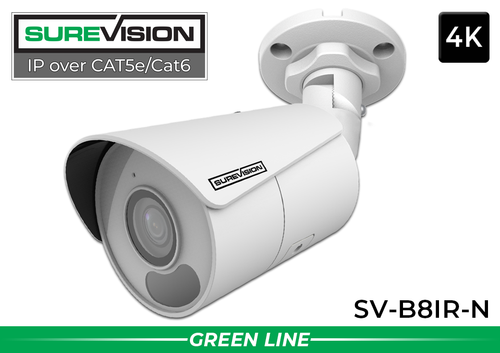
SureVision SV-B8IR-N 4K Bullet IP Camera
An 8MP fixed-lens IP camera for broad views of appropriate indoor and outdoor areas. Its 2.8mm lens and infrared night vision make it a candidate for building approaches and general work-area coverage. Confirm that the location fits the published environmental specifications.
View product details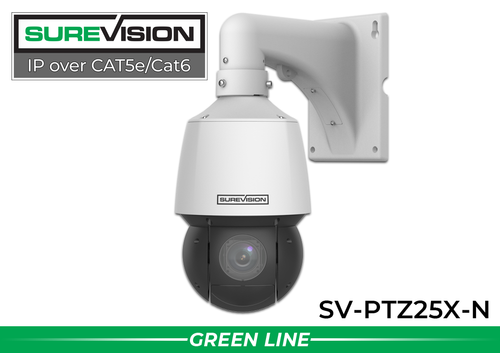
SureVision SV-PTZ25X-N 4MP 25X PTZ Camera
A controllable 4MP PTZ with a 4.8–120mm motorized lens and 25X optical zoom. Consider it for active inspection of a yard or gate while fixed cameras maintain the key views. Check the required power, mounting and recorder compatibility for the installation.
View product detailsIndustrial security camera questions
Are weatherproof cameras suitable for every industrial site?
No. Weather protection alone does not establish suitability for chemical exposure, extreme process heat, hazardous atmospheres or heavy vibration. Match the exact equipment documentation to the conditions defined by the facility's qualified team.
Can existing coaxial cameras be kept?
Sometimes. Assess the existing cameras, cable condition and compatible recorder before deciding on an upgrade. Modern HD-over-coax and IP systems have different connection requirements; an NVR does not directly replace a coaxial DVR in every installation.
How much storage will the system need?
Storage depends on camera count, bitrate, frame rate, compression, recording schedule and the required retention period. Use the planned settings for an estimate and confirm actual retention after commissioning.
Does local NVR recording require a cloud subscription?
SureVision systems can record to local surveillance hard drives without required monthly cloud-storage fees. Budget separately for the equipment, installation, power, network service and maintenance your facility needs.
Plan Your Industrial Surveillance System
Share the facility layout, environmental conditions, viewing distances and retention goals. CCTV Security Pros can help you choose a practical combination of cameras, recording equipment and accessories.
Get a Free System Quote Shop SureVision CamerasCreate a camera schedule for each operating zone
An industrial site often contains ordinary office areas, loading zones and environments that need specialized equipment. Keep these separate in the design. A weather-resistant camera may suit an outdoor doorway, but its weather rating does not establish suitability for combustible dust, an explosive atmosphere, a washdown process or an extreme-temperature location.
| Zone | Questions for the site team | Planning result |
|---|---|---|
| Receiving | Where do vehicle, goods and staff handoffs happen? | Dedicated views of the handoff plus an overview of the route. |
| Production perimeter | What can obstruct the view during normal operation? | A position tested with equipment and materials in place. |
| Outdoor storage | How do lighting and stacked materials change? | Fixed coverage with a repeatable nighttime test. |
| Special environment | What certification and installation rules apply? | A documented equipment requirement from qualified site personnel. |
Use the commercial system planning guide to organize the general surveillance requirements. Compare complete security camera systems only after the facility team has identified any specialist environmental requirements.
Make acceptance testing part of the installation scope
Before installation, write down what must be visible at each camera. “Show the delivery bay” is an overview requirement; “show the label at the handoff point” is a tighter detail requirement. Record the expected subject distance and movement. Where reading small labels is essential, validate that exact task rather than assuming a resolution label settles the question.
Run tests during the actual operating conditions: forklifts moving, dock doors open, machinery running and night-shift lighting active. Check whether vibration affects the image and whether packaging, racking or temporary equipment blocks the intended view. Do not mount equipment where it interferes with machinery operation, safety systems or service clearances.
Hand over a location-based camera list, network diagram, recorder settings, account permissions and support contact information. Your IT team should know which equipment needs power to keep recording during an outage. Use the NVR capacity guide to review recorder sizing and the technical support center for the selected equipment’s setup resources. Retest changed areas when the production layout changes.
What to record at the final system check
Keep the acceptance check simple enough that the owner can repeat it later. Use the final camera positions and recording settings, and include the lighting and activity that make the important views difficult. A recorded test gives a useful baseline for future troubleshooting.
- Confirm that each camera name matches its actual location and purpose.
- Review a saved daytime event and, where relevant, a nighttime event with a moving subject.
- Check the recording history against the agreed retention goal after a representative operating period.
- Test the permissions and playback functions of an ordinary user account.
- Export a short sample and check it on the device that will be used for review.
- Record any unresolved issue and the person responsible for correcting it.
Repeat the relevant checks after a camera is moved, a major display or obstruction changes, or recording settings are adjusted. This keeps the system aligned with the property’s current needs and makes maintenance more predictable.
Turn the plan into a complete equipment list
After defining the required views, compare 32-camera IP systems. Match each camera to a recorder channel, a compatible power connection and a documented cable route. Keep the installation materials, storage assumptions and required user functions on the same list so a missing component is easier to spot before ordering.
Use our commercial camera planning guide for the next planning decision and the NVR selection guide for the related technical detail. These guides provide background for comparing the actual equipment rather than choosing solely by a camera count or a resolution label.
Bring the list together in the custom security camera system builder, or send the property layout and viewing goals with a free system quote request. Include the mounting locations, approximate subject distances and any existing equipment you want to keep. That information makes the proposed configuration more specific to the property.
Before accepting the installation, practice the tasks the owner will perform: checking a live view, finding a recorded event and preserving a usable export. Save the camera schedule, equipment model numbers and support information with the project records. Use the technical support center for model-specific setup resources and ask for help when a required function needs clarification.
