Top-Rated CCTV Security Camera Systems: A Buyer’s Guide
Nov 26, 2026
More cameras don’t automatically mean better security. The right cctv security camera systems cover the important areas of your property and record footage in a way that suits your needs. Choosing a camera count before planning coverage, recording, and future expansion can leave blind spots or add equipment you don’t need.
It’s also reasonable to want a clear picture of what you’re buying. IP cameras, NVRs, DVRs, and complete systems have different requirements, while setup, compatibility, and recurring costs can affect ownership over time. CCTV Security Pros offers remote viewing without monthly subscription fees, along with lifetime, USA-based technical support for its products.
In this guide, you’ll learn how to plan camera coverage, compare cameras and recording options, and choose a system size that fits your property. We’ll also cover what to check about storage, setup, support, and expansion before you buy. The goal is a system that suits your site, not simply one with the highest camera count.
Key Takeaways
- Plan camera positions around the views you need, then choose a system size that fits those viewpoints.
- Learn how cameras, cabling, recorders, and viewing devices work together in cctv security camera systems.
- Compare recorder compatibility, storage needs, and the exact camera specifications before choosing a system.
- Use a practical checklist to plan connections, recording, and access before installation.
- Check ownership costs and support terms carefully. Our products include lifetime, USA-based technical support.
What Should a CCTV Security Camera System Do for Your Property?
A useful camera system provides clear views of the areas that matter and footage you can review when needed. A CCTV system connects cameras to recording equipment, such as a network video recorder (NVR) or digital video recorder (DVR), so you can view live video and recorded footage. The right setup depends on your property’s layout, the views you need, how you want footage recorded, and who will use the system.
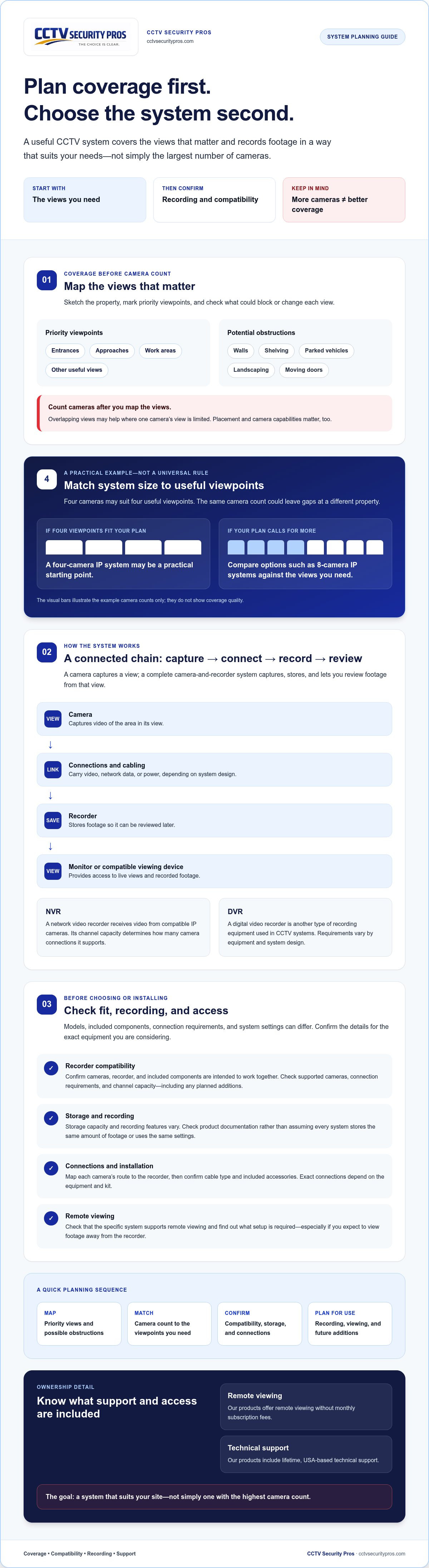
A camera captures a view; a complete camera-and-recorder system captures, stores, and lets you review footage from that view. Keep this in mind when comparing cctv security camera systems. A camera alone may not include the recording and review functions you expect.
Which areas need camera coverage?
Sketch the property and mark priority viewpoints, such as entrances, approaches, work areas, or other places where seeing activity would be useful. Then check for potential obstructions, including walls, shelving, parked vehicles, landscaping, or doors that change position. Overlapping views can help cover areas where one camera’s view is limited, but placement and camera capabilities matter too.
Count cameras only after you’ve mapped the views. Four cameras may suit four useful viewpoints, but the same number could leave gaps at a different property. Aim for purposeful coverage rather than a particular camera count.
Who benefits from a professionally specified system?
Homeowners and businesses can use recorded footage for everyday review, incident documentation, and general site oversight. Start by considering how people use the space and what they may need to see later. A homeowner might prioritize entry points, while a business may also want views of work areas. For complete perimeter safety, physical security at these doors is just as crucial as video surveillance, with resources like napleslocksmithcompany.com helping property owners assess locks and access hardware alongside camera coverage. The right plan depends on the layout and recording needs.
If four viewpoints cover your needs, a four-camera IP system may be a practical starting point. If your coverage plan calls for more, compare options such as our 8-camera IP systems against the views you actually need. We can help you compare system options and clarify questions about fit, so you can choose based on coverage rather than camera count alone.
How CCTV Security Cameras, IP Cameras, and Recorders Work Together
A CCTV system works as a chain: cameras capture video, connections carry it to recording equipment, and a viewing device lets you check live or saved footage. In an IP system, cameras and the recorder communicate over a network. Compatibility depends on the models and system design, so confirm that the cameras, recorder, and included components are intended to work together before buying.
A camera sends video to a compatible recorder, where footage can be stored and reviewed later. Storage capacity and recording features vary. Check the product documentation for details instead of assuming every system stores the same amount of footage or uses the same settings.
What does an NVR do in an IP camera system?
A network video recorder (NVR) receives video from compatible IP cameras and organizes recordings for review. Its channel capacity determines how many camera connections it supports. Match that capacity to your current camera count and any planned additions, and check the recorder documentation for supported cameras and connection requirements. We offer IP camera recorders for buyers comparing recorder options.
How do cameras, cabling, and viewing fit together?
Cabling connects system components, but the exact connections depend on the equipment and kit. A cable may carry video, network data, or power, depending on the system design. Map the route from each camera to the recorder, then confirm the cable type and included accessories before installation. Our security camera cables and connections can help you review connection options.
A monitor or other compatible viewing device provides access to live views and recorded footage. Remote viewing may also be available, but check that the specific system supports it and find out what setup is required. This is especially important if you expect to view footage away from the recorder.
These checks make it easier to compare cctv security camera systems based on how the components work together, not just on camera count. If you’re weighing camera and recorder options, you can browse our security camera systems and contact us with questions. Our lifetime, USA-based technical support can help you understand system components and compatibility.
How to Compare CCTV Security Camera Systems for Your Needs
Compare systems against how you’ll use them, not just their camera count. A useful shortlist accounts for the views you need, the recorder and connections included, how footage is stored, what support is available, and whether the ownership model suits you. Use product documentation to confirm details. Image quality, night performance, and weather resistance can vary by camera model.
Coverage: List priority viewpoints, such as entrances or work areas. Count the views you need, not rooms or square footage alone.
Camera type: Consider the mounting location and required view. Check image quality, night performance, and weather resistance for the exact model.
Recorder fit: Confirm the recorder supports the cameras, has enough channels, and can accommodate any planned additions.
Storage: Check the included recording equipment, storage details, and available recording settings. Don’t assume every system retains the same amount of footage.
Support and ownership: Ask what warranty and technical support apply, whether remote viewing is supported, and whether any recurring service or storage fees are involved.
How many cameras does the property actually need?
Count priority viewpoints rather than rooms or total property size. A four-camera arrangement may suit a smaller set of clear, useful views. If you expect to cover more areas or expand later, check the recorder’s channel capacity and system compatibility before choosing. Our 8-camera IP systems offer a larger system size to compare against your coverage plan.
What should you compare beyond camera count?
Look at how the equipment works as a complete setup. Confirm camera and recorder compatibility, included connections, and what you’d need to add if you expand. If you already have a system, check whether its cameras, cabling, or recorder can be reused with the equipment you’re considering. Compatibility depends on the specific components.
Also confirm whether the system supports remote viewing and what setup it requires. Check warranty and support terms, and distinguish a one-time equipment purchase from recurring services or storage arrangements. These vary by provider and system. Our products include a three-year warranty and lifetime, USA-based technical support. Remote viewing is available without a monthly subscription fee. Ask us if you’d like help comparing options or clarifying system fit.
Before choosing among cctv security camera systems, verify the specifications that matter to your site instead of relying on a general category description. You can explore our security camera options as you build your shortlist.
How to Plan Installation, Recording, and Long-Term Use
A smooth setup starts before equipment is mounted. Plan the views you need, confirm that cameras and recorder are compatible, map cable routes, decide how footage should be recorded, and test access after setup. Installation complexity depends on the property and chosen equipment. A layout with long cable routes, multiple structures, or limited recorder placement options may need more planning.
Before installation, confirm the camera views, mounting locations, cable routes, recorder position, compatible components, recording needs, and viewing access. This checklist helps surface practical questions early. If you’re not installing the system yourself, ask about installation options or whether you can be connected with a qualified installation partner. Availability and arrangements can vary.
What should you check before installation?
List each priority view and note where a camera could be mounted without an obvious obstruction. Plan cable paths from those locations to the recorder, and choose a recorder location that works for the connections and the way you’ll use the system. Compare your plan with the system instructions. Check which components are included, what connections are needed, and whether the cameras and recorder are compatible. Our security camera cables and connections page can help you review connection options.
How can you make recording and remote viewing useful?
Decide who needs to view footage and how they’ll review it. One person may check saved recordings at the recorder, while another may need access from a compatible device. Remote viewing availability and setup steps depend on the system, so check the product instructions before purchase. Consider how you want footage recorded, and review the system’s storage details rather than assuming all equipment retains footage in the same way.
After setup, follow the product instructions to confirm that each camera shows the intended view, the recorder captures footage, and authorized users can access live or saved video as expected. Testing can reveal a misplaced camera, an unconnected component, or an access step that needs attention. We provide lifetime, USA-based technical support for our products if you need help understanding setup or operation.
Planning ahead makes cctv security camera systems easier to install and use. If you’re weighing installation questions or system options, talk with us before you choose.
Choose a CCTV Security Camera System with Support You Can Rely On
You’ve mapped the views, considered the recorder and connections, and identified your recording and access needs. Use those requirements to narrow your shortlist to systems that fit the property and the people who’ll use them. A suitable choice should meet your coverage needs without making setup, support, or ongoing costs a surprise.
What ownership, warranty, and support questions should you ask?
Before choosing, confirm what equipment is included, which warranty applies, and what technical support covers. Ask whether storage or optional services carry a recurring fee, and separate those costs from the price of owning the hardware. Subscription arrangements vary, so check the terms for the specific system.
Our products carry a three-year warranty and include lifetime, USA-based technical support. Our systems offer remote viewing without monthly subscription fees. Before purchase, verify the specific system’s included equipment and remote-viewing setup.
How can we help you choose?
We can help you compare options against your camera views, recorder fit, and plans for future expansion. If four useful viewpoints cover your needs, a four-camera IP system may be a practical starting point. If your coverage plan calls for more, we can discuss larger system options. Focus on equipment that fits your property, not simply the largest camera count.
Installation is another point to clarify. We can discuss whether installation through our partner network may be available for your needs, but confirm the details before making plans. Our lifetime technical support is available for product questions after purchase.
Tell us about your property, the views you need, and how you plan to review footage. We can help you identify suitable cctv security camera systems and answer questions as you compare them.
Choose a System That Fits, Then Move Forward with Confidence
The right cctv security camera systems start with useful camera views, compatible recording equipment, and a setup that suits how you’ll review footage. Compare systems by coverage and recorder fit, then confirm the details that affect day-to-day use, including storage, remote viewing, warranty, and support.
Our products include a three-year warranty and lifetime, USA-based technical support. Our systems also offer remote viewing without monthly subscription fees. We can help you discuss your property’s coverage needs and compare suitable equipment, so you can make an informed choice.
A clear plan makes choosing a system easier. Contact CCTV Security Pros to discuss your coverage needs and compare CCTV security camera systems.
Compare systems using a written acceptance checklist
Before asking for quotes, specify what the finished system must demonstrate. A practical checklist gives the buyer and installer a shared definition of completion. It also makes comparisons more meaningful when equipment packages use different cameras or recorder models.
| Decision | What to document |
|---|---|
| Check 1 | List required views and expected detail. |
| Check 2 | State retention and authorized user needs. |
| Check 3 | Include day, night, playback and export tests. |
Record the outcome of each check with the equipment proposal. If a required function has not been demonstrated, ask for clarification before treating it as included. This short decision record is useful when the system is installed, expanded or handed to a different manager.
Turn the plan into a complete equipment list
After defining the required views, compare security camera systems. Match each camera to a recorder channel, a compatible power connection and a documented cable route. Keep the installation materials, storage assumptions and required user functions on the same list so a missing component is easier to spot before ordering.
Use our security camera buying guide for the next planning decision. These guides provide background for comparing the actual equipment rather than choosing solely by a camera count or a resolution label.
Bring the list together in the custom security camera system builder, or send the property layout and viewing goals with a free system quote request. Include the mounting locations, approximate subject distances and any existing equipment you want to keep. That information makes the proposed configuration more specific to the property.
Before accepting the installation, practice the tasks the owner will perform: checking a live view, finding a recorded event and preserving a usable export. Save the camera schedule, equipment model numbers and support information with the project records. Use the technical support center for model-specific setup resources and ask for help when a required function needs clarification.
Real products to compare for your project
The following are current CCTV Security Pros products. Use the linked product specifications to confirm the complete configuration and required features for your property.
SureVision 16-camera 4K bullet system
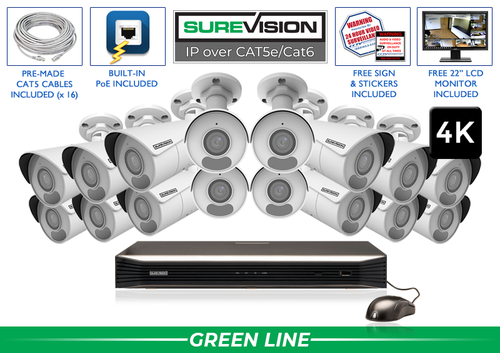
The SV-16IPBIR8-N combines 16 4K bullet cameras with an NVR. It provides a starting point for a coordinated multi-camera project. Review the current included storage, cables and accessories, then match the complete configuration to the site plan and required retention.
SureVision 4K black vandal dome camera
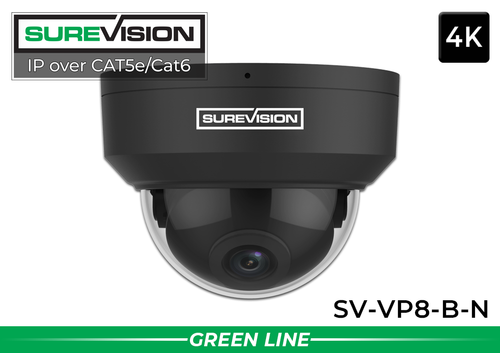
The SV-VP8-B-N provides an 8MP image in a black vandal-resistant dome housing with audio. Compare its documented lens, mounting and environmental specifications with the installation location. Test the completed dome assembly under the property’s normal nighttime lighting.
Frequently Asked Questions
What is included in a CCTV security camera system?
A complete CCTV system typically includes cameras, recording equipment, and the connections needed to link them, although exact contents vary by system. An IP setup commonly pairs network cameras with an NVR, while other configurations may use a DVR. A monitor or compatible device lets you view footage. Before buying, check the product listing for included cameras, recorder, cabling, storage details, and any additional components you may need.
How many security cameras do I need for my property?
The number depends on the viewpoints you want to monitor, not simply the property’s size or number of rooms. Map entrances, approaches, and other priority areas, then account for obstructions that could limit a camera’s view. A four-camera system may suit a smaller set of useful viewpoints. For broader coverage, compare larger systems and confirm that the recorder supports your planned camera count.
Are IP camera systems better than other CCTV systems?
IP camera systems aren’t automatically the better choice for every property. They use network-based cameras and recorder components, and may suit buyers looking for an IP setup or planning a compatible expansion. If you already own cameras, cabling, or a recorder, check whether those components work with the system you’re considering. Compare the equipment, recording needs, and compatibility rather than choosing by technology label alone.
Can I view CCTV cameras remotely without a monthly fee?
CCTV Security Pros offers remote viewing without monthly subscription fees on its systems. Remote access still depends on the selected system and its setup requirements, so check the product information before purchase. Distinguish remote viewing from optional services or storage plans, which may have separate terms and costs. Confirm how you’ll access footage and what equipment or connection setup the system requires.
Do CCTV security camera systems need an NVR?
Not all CCTV systems need an NVR. IP camera systems generally use an NVR to receive and record video from compatible network cameras. Other system types may use a DVR instead. The right recorder depends on the camera technology and system design. Check recorder compatibility and channel capacity before choosing, especially if you plan to add cameras later. Some cameras may be sold individually, so verify what recording equipment is included.
What should I check before buying a CCTV camera system?
Start with the views you need, then confirm the camera count, recorder compatibility, connections, storage details, and expansion options. Check model-specific specifications for image quality, night performance, and weather resistance rather than assuming these are the same across a product range. Ask what the warranty covers, what technical support includes, whether remote viewing is available, and whether any service or storage option has recurring fees.
Does CCTV Security Pros offer installation and technical support?
We offer lifetime, USA-based technical support, and our products carry a three-year warranty. Professional installation may be available through our partner network, but confirm availability for your project before making plans. Share your camera views and system requirements, and we can help you compare equipment.