Choosing the Right NVR for IP Cameras: A Complete Guide
Nov 26, 2026
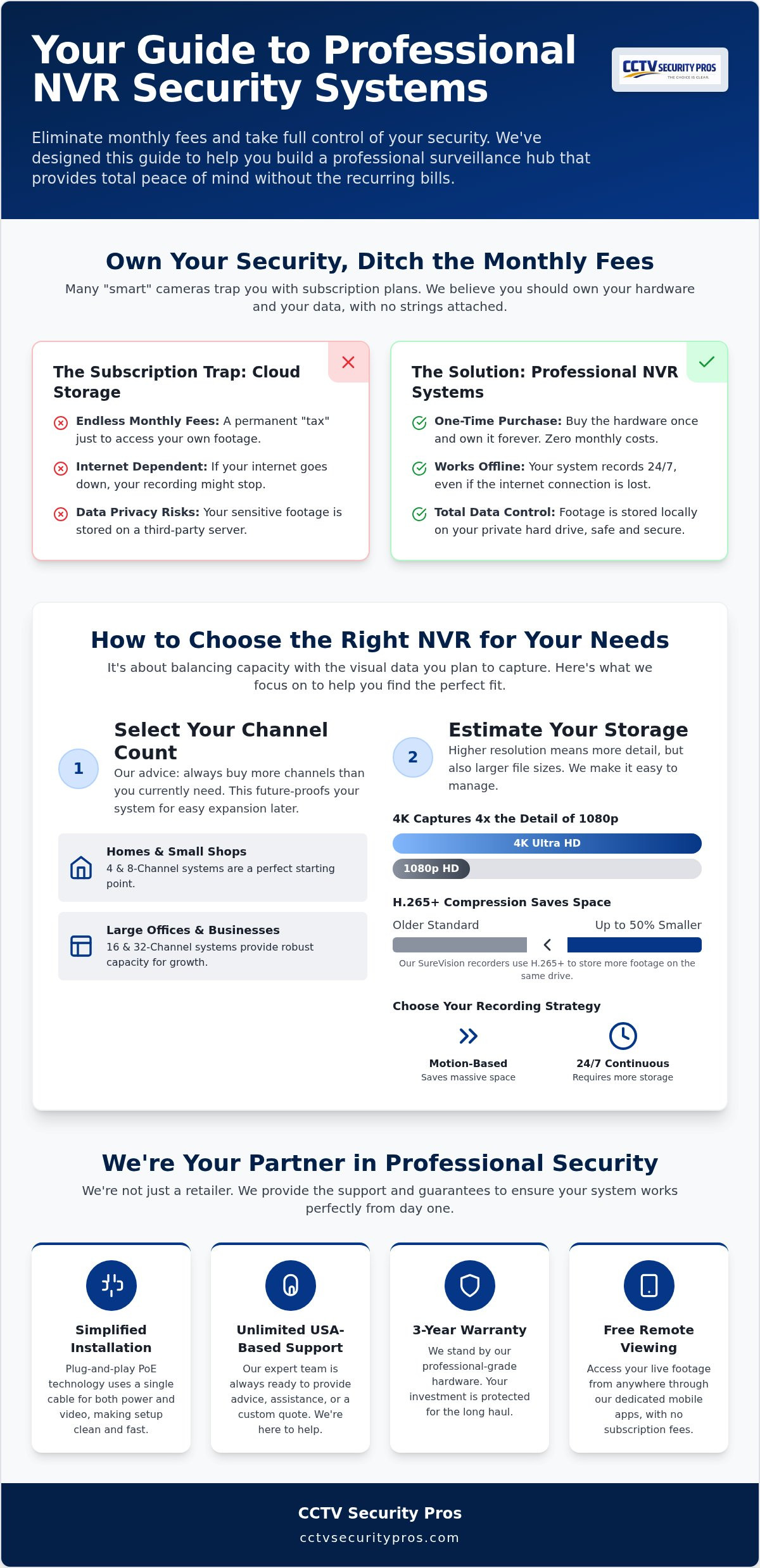
Why are you still paying a monthly "tax" just to access your own security footage? Many homeowners and business owners fall into the trap of expensive cloud subscriptions because they fear the technical hurdles of managing local storage. When you choose professional network video recorders for IP cameras, you're reclaiming control over your data while eliminating those recurring fees for good. We understand that the anxiety of buying incompatible hardware or the confusion over bandwidth calculations can be overwhelming, but it doesn't have to be.
Choose an NVR by checking the camera list, required recording modes, storage target and operator workflow together. Record channel count, incoming bandwidth, powered connections and playback limits separately. This guide explains what to compare before purchase and what to test after installation. CCTV Security Pros can help review the proposed configuration when you provide the camera models and planned views.
Key Takeaways
- Understand the technical advantages of network video recorders for IP cameras, specifically how they process high-definition data locally to ensure superior image quality.
- Learn how to size your system correctly by selecting an NVR with enough channels to support your current needs while leaving room for future expansion.
- Discover how to match your recorder’s resolution capabilities with 4K cameras to ensure you never lose critical detail during a security event.
- See how plug-and-play PoE technology simplifies the installation process, allowing you to set up a professional-grade system without complex networking knowledge.
- Find out how to eliminate monthly storage fees forever while benefiting from our unlimited USA-based technical support and a three-year warranty.
What are Network Video Recorders for IP Cameras?
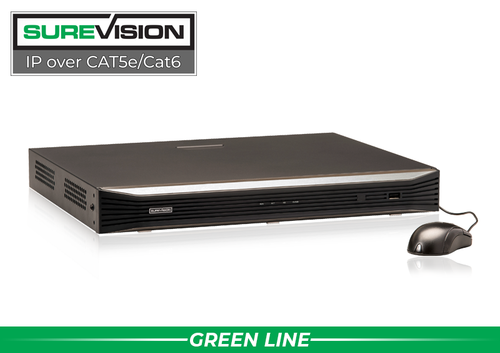
An NVR receives and stores video from compatible IP cameras. Local recording can operate without internet service when the cameras, network path, recorder and storage remain powered and functional. For mixed-brand equipment, verify the exact models, firmware and shared ONVIF profiles. Confirm required video, audio, event and PTZ functions individually; a general compatibility label does not establish support for every feature.
NVR vs. DVR: Why IP Systems are the Standard
The shift from Digital Video Recorders (DVR) to NVR technology represents a massive leap in clarity and convenience. In an older DVR system, the recorder does the heavy lifting of converting analog signals into digital files. With NVRs, your IP cameras process the video themselves. This allows for significantly higher resolutions, including 4K and 8MP, which traditional analog systems simply cannot match. We've found that our customers prefer the simplified cabling of NVRs. A single Ethernet cable, known as Power over Ethernet or PoE, handles both power and video data. It's a cleaner, faster installation that is much easier to scale as your security needs grow.
The 'No Monthly Fee' Advantage
Many big-box "smart" cameras lure you in with low hardware prices, only to trap you with recurring cloud storage fees. We believe you should own your data and your hardware. Our SureVision IP recorders offer a one-time equipment purchase with zero monthly costs. You get professional-grade hardware that records locally to high-capacity hard drives. This setup isn't just more affordable over time; it's also more secure. You can still enjoy free remote viewing through our dedicated mobile apps without ever paying for a subscription plan.
At CCTV Security Pros, we're very good at ensuring our customers feel confident in their choice. We provide unlimited customer support and a 3-year warranty on all our recorders to ensure your investment is protected for the long haul. If you're unsure about compatibility or bandwidth requirements, our team is always willing to talk to you to provide advice, assistance, or a custom quote. We view ourselves as your partner in security, not just a retailer.
How to Determine Your NVR Requirements
Start with the current camera list and likely additions, then verify each capacity limit. Channel count describes supported camera connections; powered ports and PoE budget describe how compatible cameras can receive power. Incoming bandwidth, supported recording modes, storage and simultaneous playback impose additional limits. Match the full planned workload to the exact recorder specification and test the saved result.
Choosing the Right Channel Count
Choose enough channels for the planned cameras and leave capacity for realistic additions when useful. For six cameras, an eight-channel model may provide spare channels, while a compatible 16-channel option may allow a larger future layout. Confirm powered ports, PoE budget, bandwidth, recording modes and storage before treating the spare channels as usable expansion capacity. While 4 and 8-channel systems are perfect for residences or small shops, larger offices often require the capacity found in 16 or 32-channel systems. You can read more about the benefits of scaling up to a 16-camera system to see if it's the right move for your property.
Estimating Your Storage Needs (Terabytes)
Compression, resolution, frame rate, bitrate and scene activity affect both image quality and storage consumption. Compare supported codecs on the selected cameras and recorder, then review saved footage at the proposed settings. Use measured or realistic average bitrates for retention planning and confirm the actual recording history after installation.
- Motion-based recording: This saves massive amounts of space by only triggering the recorder when activity is detected.
- 24/7 continuous recording: This provides a complete, uninterrupted record of every second but requires much larger hard drive capacities.
Resolution and bandwidth also play a critical role in your system's performance. Compare recording support with simultaneous live-view and playback decoding limits. A recorder may receive and save a stream at settings different from those supported in a multi-camera display. Add the planned stream bitrates, check incoming bandwidth and the network path, and test the operator’s required views and exports. No recorder specification alone guarantees that the rest of the local network will remain uncongested. If the math for storage days or bandwidth feels complicated, don't worry. Our team is always willing to talk to you to provide advice or a custom quote. We're here as your partner in security to make sure you get the right SureVision IP recorders for your specific needs. We pride ourselves on providing unlimited customer support to help you through every step of the sizing process.
Step-by-Step Guide: Selecting and Setting Up Your NVR
Compatible plug-and-play equipment can simplify setup, while installation still requires secure activation, camera aiming, recording schedules and user permissions. Bench-test the selected cameras and NVR before mounting, then repeat live-view, recording, playback and export tests after the final cable runs are connected. Ask for support when the required function or setup step is unclear.
Selection Checklist for Your Business
Choosing the right network video recorders for IP cameras is the foundation of a reliable security plan. Before you begin mounting hardware, you need a solid strategy to ensure compatibility and longevity.
- Step 1: Match your camera technology to a SureVision IP recorder.
- Step 2: Determine if you need built-in PoE ports. Smaller systems benefit from recorders with integrated ports, while larger installations might require an external PoE switch to manage power distribution.
- Step 3: Verify the number of hard drive bays. If you're recording 4K footage from multiple cameras, you'll want a unit with at least two bays to accommodate high-capacity drives for long-term archiving.
Basic Setup and Configuration
We strongly recommend performing a bench test. Connect all cameras to your recorder on a table before you climb any ladders. It's much easier to configure settings when everything is within arm's reach. Once you've confirmed every camera is communicating, follow these steps:
- Connect the NVR to your router using a standard Ethernet cable to enable remote viewing access.
- Install your hard drive and use the NVR menu to format it for its first use.
- Configure smart motion detection. This is a powerful tool to reduce false alerts from wind or shadows while saving valuable storage space.
- Download our free remote viewing app on your iPhone or Android device for secure, instant access to your live feeds from anywhere in the world.
Our team is always willing to talk to you to provide advice, assistance, or a custom quote if you're unsure which model fits your facility. We're here to be your partner in security from the initial selection through the life of your system. Similarly, if your facility also hosts corporate gatherings or conferences that require complex audiovisual production, Straight Street Event Services provides specialized technical solutions for live and hybrid environments.
Shop Our Professional Network Video Recorders for IP Cameras
Maximizing Your Investment with Professional Hardware
For continuous recording, compare the exact recorder’s documented recording workload, storage support, operating temperature and installation requirements. Use appropriate drives and ventilation, and review device and storage health routinely. Neither professional branding nor a higher price guarantees that equipment cannot overheat, lose a connection or develop a drive fault. Verify the intended camera streams and playback workflow on the proposed configuration.
The SureVision Difference
Our SureVision line represents the pinnacle of commercial-grade surveillance. These recorders aren't just about storage; they're about intelligence. With built-in features like perimeter protection and intrusion detection, your NVR becomes a proactive guard for your property. Whether you're installing a single unit or a complete 8-camera IP system, you're getting hardware designed for longevity. We ensure every component can withstand the rigors of constant use, providing a stable platform for your security data.
Why USA-Based Support Matters
Security is a high-stakes industry where timing is everything. If you're having trouble with your networking or app setup, you shouldn't have to wait days for an email response or navigate a complex automated phone tree. Our team is based right here in New Jersey. We understand the specific needs of American business owners and homeowners. We provide unlimited customer support for the life of your equipment, and we're very good at it. From the initial configuration to troubleshooting years down the road, we're your partner in security.
We protect your bottom line with a 3-year warranty and a commitment to being helpful and accessible. We're always willing to talk to you to provide advice, assistance, or a custom quote. If you're ready to design a system that works without monthly fees or technical headaches, just give us a call. We're here to help you secure what matters most and ensure your investment provides peace of mind for years to come.
Secure Your Future with a Professional NVR Solution
Building a high-performance surveillance system doesn't have to be a technical burden. By selecting the right network video recorders for IP cameras, you're investing in a solution that offers superior 4K clarity and total data ownership. We've seen how the right channel count and storage strategy can transform a simple setup into a robust security hub that grows with your needs. You're no longer tethered to cloud subscriptions or worried about bandwidth bottlenecks.
At CCTV Security Pros, we're dedicated to your long-term success. We provide a 3-year warranty on all equipment and unlimited lifetime USA technical support to ensure you're never left without an expert to call. We're very good at helping our customers navigate the complexities of installation and remote viewing setup. You can rest easy knowing there are no monthly subscription fees ever.
Our team is always willing to talk to you to provide advice, assistance, or a custom quote for your specific project. We look forward to being your partner in security and helping you achieve professional results with total confidence.
Reserve expansion capacity without confusing channels and ports
A recorder can have more supported camera channels than built-in powered ports. Confirm both figures, along with recording bandwidth and storage support. Expansion planning should account for the entire path from the new camera to the saved video.
| Decision | What to document |
|---|---|
| Check 1 | Count available recording channels. |
| Check 2 | Identify additional compatible PoE ports if required. |
| Check 3 | Recalculate storage and viewing workload after expansion. |
Record the outcome of each check with the equipment proposal. If a required function has not been demonstrated, ask for clarification before treating it as included. This short decision record is useful when the system is installed, expanded or handed to a different manager. For organizations that also require ongoing support for their broader network switches, workstations, and company technology, ITS Canada Inc provides managed IT services to keep business infrastructure running reliably.
Turn the plan into a complete equipment list
After defining the required views, compare SureVision NVR recorders. Match each camera to a recorder channel, a compatible power connection and a documented cable route. Keep the installation materials, storage assumptions and required user functions on the same list so a missing component is easier to spot before ordering.
Use our NVR selection guide for the next planning decision. These guides provide background for comparing the actual equipment rather than choosing solely by a camera count or a resolution label.
Bring the list together in the custom security camera system builder, or send the property layout and viewing goals with a free system quote request. Include the mounting locations, approximate subject distances and any existing equipment you want to keep. That information makes the proposed configuration more specific to the property.
Before accepting the installation, practice the tasks the owner will perform: checking a live view, finding a recorded event and preserving a usable export. Save the camera schedule, equipment model numbers and support information with the project records. Use the technical support center for model-specific setup resources and ask for help when a required function needs clarification.
Real products to compare for your project
The following are current CCTV Security Pros products. Use the linked product specifications to confirm the complete configuration and required features for your property.
SureVision 16-channel 4K PoE NVR
The SV-NVR2P16-N supports a compatible IP camera system with local recording and built-in PoE connectivity. Check the selected storage configuration, recording workload and supported camera functions against the project requirements. Review recording and playback specifications separately.
SureVision 16-camera 4K bullet system
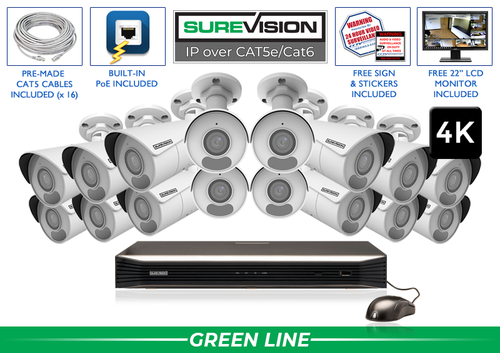
The SV-16IPBIR8-N combines 16 4K bullet cameras with an NVR. It provides a starting point for a coordinated multi-camera project. Review the current included storage, cables and accessories, then match the complete configuration to the site plan and required retention.
Frequently Asked Questions
Can I use any IP camera with any NVR recorder?
Compatibility isn't guaranteed across all brands, though the industry-standard ONVIF protocol makes communication between different manufacturers possible. To ensure that advanced features like motion detection, PTZ controls, and smart analytics work perfectly, it's best to use cameras and network video recorders for IP cameras from the same manufacturer. We always encourage you to call our USA-based team to verify compatibility before you make a purchase.
Do I need an internet connection for my NVR to record video?
You don't need an active internet connection for your NVR to record and store video data locally. The system creates its own internal network where cameras send data directly to the recorder via Ethernet cables. You only need an internet connection if you want to access your system remotely through our free mobile app or receive instant alerts on your smartphone while you're away from the property.
What is the difference between a PoE NVR and a non-PoE NVR?
A Power over Ethernet (PoE) NVR features built-in ports that provide both power and data to your cameras through a single cable, which simplifies the installation process. A non-PoE NVR lacks these integrated ports, requiring you to use an external PoE switch to power your cameras before the video data reaches the recorder. We're very good at helping you determine which setup is more efficient for your specific building layout.
How many days of video can a 2TB hard drive hold on an NVR?
A 2TB hard drive typically stores about 10 to 14 days of continuous footage for a 4-camera system recording at 1080p resolution. If you upgrade to 4K cameras, the storage duration will decrease because the file sizes are much larger. Our SureVision recorders utilize H.265+ compression to save space, but our team is always willing to talk to you to provide a more precise calculation based on your camera count and resolution settings.
Can I access my NVR remotely without paying a monthly fee?
Yes, you can access your network video recorders for IP cameras remotely without ever paying a monthly subscription fee. We provide free, secure remote viewing apps for both iPhone and Android devices with every system we sell. Because your footage is stored locally on your own hard drive rather than a corporate cloud server, you own your data and avoid the "subscription trap" common with consumer-grade cameras.
What happens to my NVR footage if the power goes out?
All previously recorded footage remains safely stored on your NVR's internal hard drive during a power outage. While the system will stop recording new video until power is restored, our recorders are designed to reboot and resume operation automatically once the electricity comes back on. We provide unlimited customer support to help you configure these settings, and we often recommend a battery backup (UPS) to keep your security active during brief interruptions.