
Best CCTV Cameras and Systems: 2026 Top Security Picks
Nov 26, 2026
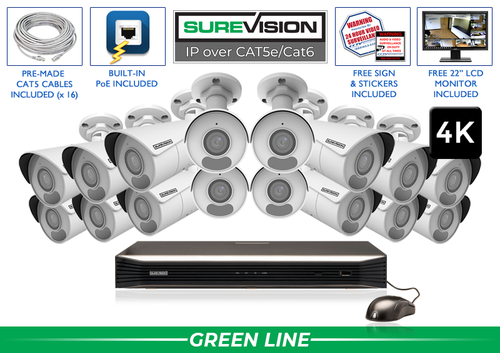
What if the best CCTV system for your property isn’t the one with the most cameras? The best cctv cameras and systems are the ones that cover the areas you care about, work smoothly with their recording equipment, and fit the way you want to manage footage. Choosing separate components can make those decisions feel complicated, especially when you’re also weighing ongoing fees and long-term support.
It’s reasonable to want clear coverage without paying for features or complexity you don’t need. We bring cameras, recorders, and connections together in coordinated systems, including IP camera systems with NVRs and options using DVRs. Remote viewing is available without monthly subscription fees, and our customers receive lifetime technical support based in the USA, plus a three-year product warranty.
In this guide, we’ll help you match camera types and placement to your property, understand how cameras and recorders work together, and compare recording and ownership considerations. You’ll also see what to look for in long-term support, so you can choose a system that fits your priorities now and remains practical to manage over time.
Key Takeaways
- The best cctv cameras and systems are matched to your property’s coverage, recording, access, and ownership needs, not chosen by camera quality alone.
- Understand how IP cameras, NVRs, DVRs, and cabling work together before selecting equipment.
- Compare fixed-view and PTZ cameras by where you’ll place them and how you want to monitor the area.
- Plan camera placement and recording around the areas you need to cover and who will access the footage.
- Factor in ongoing ownership: remote viewing without monthly subscription fees, a three-year product warranty, and lifetime technical support can shape your decision.
What Makes a CCTV Camera System the Best Fit for Your Property?
Camera quality alone doesn’t determine whether a CCTV system suits your property. A capable camera can still leave a critical entrance outside its view, capture little useful detail in poor lighting, or create a recording setup that’s awkward to manage. The best cctv cameras and systems match four practical needs: the areas you want covered, how footage is recorded, who can access it, and what ownership looks like over time.
Start by identifying priority locations and the events you want to see. A home may focus on entrances, a driveway, or shared outdoor spaces. A business may also need views of work areas, customer-facing spaces, and exterior approaches. Both settings benefit from clear coverage, but operating hours, the number of people who need access, and how footage will be reviewed can differ.
Start with the areas and events you need to monitor
Sketch a simple map before comparing cameras. Mark entrances, shared spaces, work areas, and approaches from outside, then note the hours you want to monitor and who needs live or recorded access. This helps distinguish three goals: identifying a person or event, keeping general awareness of activity, and reviewing what happened after an incident.
Useful footage also depends on conditions at each location. Distance can make identification harder; low light may affect what details are visible; and walls, foliage, vehicles, or other obstructions can block a view. Camera position matters, too. A doorway view may prioritize faces, while a wider view of a shared area may focus on general activity. Plan each camera around its purpose rather than expecting one angle to do everything.
What does a complete CCTV system include?
A complete CCTV system is a coordinated set of cameras, a recorder, connections, and a way to view live video and recorded footage. Each component has a role: cameras capture scenes, connections carry video, and the recorder manages footage for later review. The viewing method gives authorized users a way to check what’s happening or revisit an event.
Matching these components from the outset can make installation and day-to-day operation more straightforward than selecting cameras in isolation. CCTV Security Pros offers complete 8-camera IP systems alongside individual equipment. Consider how the system will be used, what areas it must cover, and how many people need access. Remote viewing without monthly subscription fees, lifetime technical support, and a three-year product warranty are also relevant ownership considerations when comparing a system’s long-term fit.
How IP Cameras, Recorders, and Connections Work Together
A CCTV camera captures video, but the recorder and connections determine how that video reaches you and whether you can review it later. Live viewing shows what a camera is capturing now. Recorded footage is saved by the recorder for later playback. The two functions work together, but they aren’t interchangeable: seeing a live view doesn’t by itself explain how footage is being stored.
In a networked setup, IP camera systems send digital video over a network connection to a compatible Network Video Recorder, or NVR. The NVR manages recording from connected cameras and provides a way to view live feeds and saved footage. A camera may also connect to a network for viewing, but the system’s intended configuration determines how recording and access are handled. Match the cameras and recorder as a system rather than assuming separate components will work together automatically.
IP cameras and NVRs: understanding the networked system
An NVR is the recording hub for an IP camera setup. As you compare components, consider how many cameras the recorder is intended to support and how you want to access footage. Compatibility matters because cameras, recorder, and connections must be configured to work as one system. Our network video recorders are one part of the complete equipment options we offer.
Power over Ethernet, or PoE, is one way a system can connect an IP camera: a compatible Ethernet connection carries both video data and power. That can reduce the number of separate connections needed at the camera, but not every system uses the same arrangement. The camera, recorder, and cabling must support the chosen configuration.
DVRs, cables, and system connections
A Digital Video Recorder, or DVR, is generally used in a different recording approach from an NVR. A DVR works with compatible camera connections and processes video for recording, while an NVR records video sent digitally over a network. In either design, the recorder is central to saving and reviewing footage, but the connection type and compatible components differ.
Cabling is part of the system design, not an afterthought. The right connection depends on the camera and recorder setup, the property layout, and how cables will be routed. A coordinated system helps keep equipment choices aligned from camera to recorder. If you’re comparing complete configurations, you can explore our CCTV system options and see how cameras, recorders, and connections come together.
Which CCTV Camera Types and System Setups Suit Different Needs?
No camera style is right for every location. Choose based on where the camera will sit, how visible you want it to be, and whether its view needs to stay fixed or change during monitoring. The best cctv cameras and systems pair each camera with a clear coverage role and a connection plan that suits the property.
Dome, bullet, and PTZ cameras compared
Dome and bullet cameras are fixed-view options: once positioned, they monitor a set area. PTZ cameras can be panned, tilted, and zoomed by an operator, making them useful when someone needs to adjust the view while monitoring. None is automatically best. Think about placement, viewing direction, and whether the camera should be prominent or less visually conspicuous.
| Camera type | Typical placement consideration | Monitoring priority |
|---|---|---|
| Dome | Often suited to ceilings or other locations where a compact housing is preferred. | A fixed view across an indoor or covered area. |
| Bullet | Its visible, directional housing can make the viewing direction apparent. | A fixed view aimed at a specific approach or area. |
| PTZ | Useful where an operator needs to adjust the camera’s direction during monitoring. | Changing the view across areas, rather than relying only on a fixed angle. |
Before settling on a camera, consider what could block its view and whether it needs to monitor one defined area or be actively repositioned. A PTZ camera’s adjustable view is not the same as having multiple fixed cameras covering separate areas at once.
Choosing between wired, wireless, and multi-camera systems
Wired IP systems use physical connections as part of the camera and recorder setup. This approach makes cable routing and installation planning important, particularly when cameras are spread across a property. Wireless systems can reduce the need for video cabling at camera locations, but they still depend on a suitable connection and power arrangement. The practical choice depends on the site layout, network access, and how the complete system will be configured.
For broader coverage, a coordinated multi-camera system can simplify component selection by bringing cameras and recording equipment together as a planned setup. Consider the areas each camera will cover and how footage will be accessed, rather than choosing a camera count in isolation. Our eight-camera IP systems offer one complete-system option to consider when planning coverage across several areas.
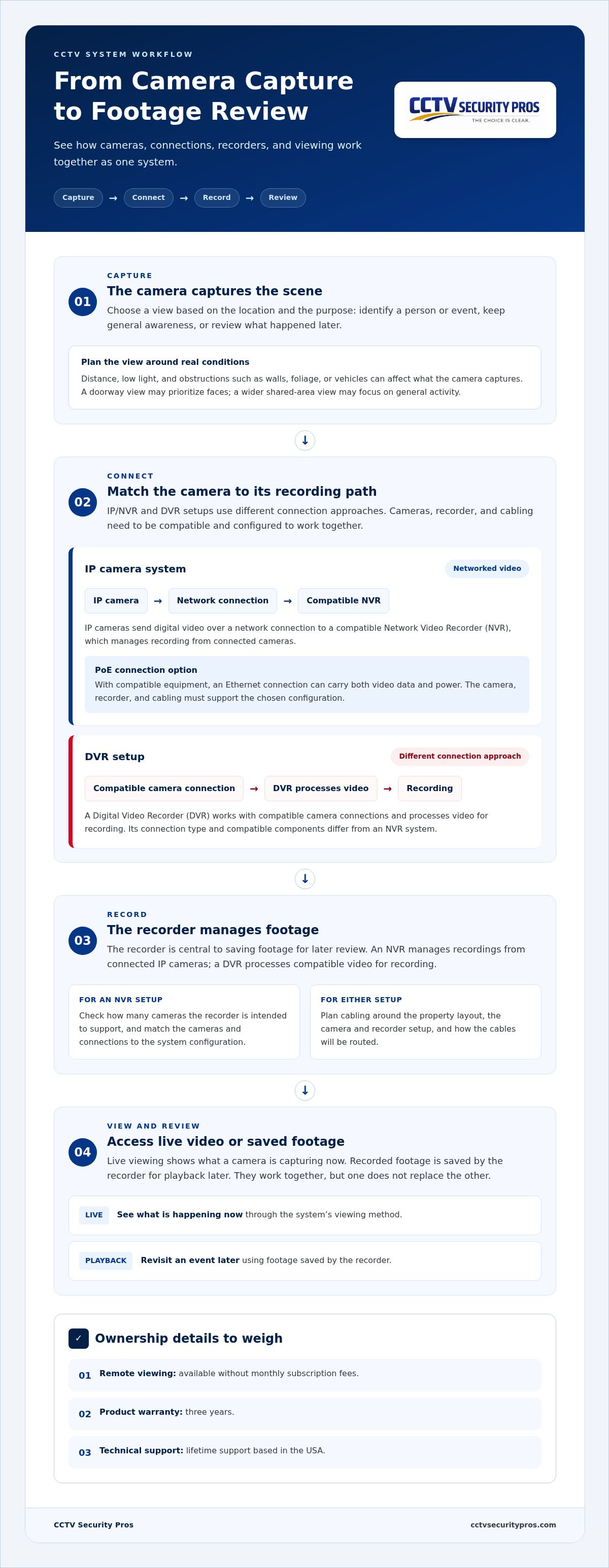
How to Evaluate a CCTV System Before You Choose
A clear selection process makes it easier to compare complete systems instead of getting distracted by individual camera features. Use these five steps to connect your coverage goals with camera placement, recording, access, and long-term ownership.
- Define coverage. List the entrances, shared spaces, work areas, and exterior approaches you want to monitor. Decide what each view needs to show, such as general activity or details you may need to review later.
- Assess placement. Note lighting conditions, distance, and anything that could obstruct a camera’s view. Think about how monitoring needs change during operating hours or after dark, and identify any gaps in your planned coverage.
- Choose camera types. Match each location to a suitable camera and viewing approach. A fixed-view camera may suit a defined entrance, while an actively adjustable PTZ camera may fit a location where an operator needs to change the view.
- Plan recording and access. Select recording equipment alongside the cameras, then decide how you’ll review saved footage and who needs access to live or recorded video. A system should suit the way you expect to use footage, not just capture it.
- Review ownership. Consider warranty coverage, technical support, and whether remote viewing comes with recurring subscription fees. These details affect the experience of managing the system after installation.
Plan coverage, recording, and access
Walk through your coverage plan as if you were reviewing an incident. Would the camera views show the areas that matter? Could poor lighting or an obstruction limit what you can see? Decide whether footage will be checked occasionally, reviewed regularly, or accessed by more than one person. These answers help shape the recording setup and the access arrangement.
Camera selection and recording needs belong in the same decision. A coordinated camera-and-recorder system helps reduce uncertainty about how components fit together. At CCTV Security Pros, we offer complete professional systems and lifetime technical support based in the USA, so help continues beyond the initial selection.
Check warranty, support, and recurring fees
Review the warranty and support available with the equipment, not just the camera specifications. Our systems include a three-year product warranty and lifetime technical support based in the USA. Remote viewing with our systems has no monthly subscription fee, a useful ownership detail to weigh when comparing long-term costs and system management.
Following these steps helps narrow the options to the best cctv cameras and systems for your property, without adding complexity that doesn’t serve your monitoring priorities.
Choose a CCTV System with the Right Hardware and Ongoing Support
A well-matched CCTV system brings the full plan together: coverage goals, camera types, recorder, connections, user access, and ownership. Choose these components as a coordinated setup, so the cameras serve the areas you care about and the recorder fits how you’ll review footage. The best cctv cameras and systems aren’t defined by one feature. They’re built around your property and practical to manage.
Match the system category to your coverage plan
Use your coverage map to guide the camera count and equipment category. A home focused on a few entrances may need a different setup from a business monitoring several work areas and exterior approaches. No camera count fits every property. Placement and viewing goals matter just as much.
We offer professional-grade cameras and complete systems designed as coordinated hardware choices, including eight-camera IP system options. Compare each system by its camera placement, recorder, connections, and access needs. This gives you a clearer basis for choosing than camera count alone.
Make the next step straightforward
Long-term ownership matters alongside the hardware. Our systems include a three-year product warranty and lifetime technical support based in the USA. We’re proud to provide unlimited customer support, so you can count on help with your system beyond the initial selection. Remote viewing is also available without monthly subscription fees.
We’re ready to discuss your coverage requirements and help you request pricing for a system that fits. Installation is available through our partner network. At CCTV Security Pros, we aim to make each step clear, from selecting cameras and recording equipment to understanding the support behind your system.
Explore our CCTV systems or request a quote.
Choose a System That Fits Your Property
The right CCTV setup starts with your coverage plan, not a camera spec sheet. Match camera types and placement to the areas you need to monitor, then choose compatible recording equipment and connections. Consider who needs live or recorded access, how footage will be used, and what support and ownership will look like over time. Those decisions help you find the best cctv cameras and systems for your property without adding unnecessary complexity.
At CCTV Security Pros, we bring professional-grade cameras and complete systems together, with lifetime technical support based in the USA, a three-year product warranty, and remote viewing without monthly subscription fees. You can build a system around your priorities and have support beyond the initial selection.
A clear plan makes choosing easier. Start with the areas that matter most, and we’ll help you take the next step toward a system that fits.
Coordinate cameras and recorders before comparing packages
A camera and recorder can each look suitable in isolation while leaving gaps in the combined system. Build the shortlist around a complete configuration that includes the recording path, power, storage and review tools. Give every component a defined role in the design.
| Decision | What to document |
|---|---|
| Check 1 | Map cameras to recorder channels and powered ports. |
| Check 2 | Check the recording workload at the proposed settings. |
| Check 3 | Confirm the functions staff need for incident review. |
Record the outcome of each check with the equipment proposal. If a required function has not been demonstrated, ask for clarification before treating it as included. This short decision record is useful when the system is installed, expanded or handed to a different manager.
Turn the plan into a complete equipment list
After defining the required views, compare security camera systems. Match each camera to a recorder channel, a compatible power connection and a documented cable route. Keep the installation materials, storage assumptions and required user functions on the same list so a missing component is easier to spot before ordering.
Use our NVR selection guide for the next planning decision. These guides provide background for comparing the actual equipment rather than choosing solely by a camera count or a resolution label.
Bring the list together in the custom security camera system builder, or send the property layout and viewing goals with a free system quote request. Include the mounting locations, approximate subject distances and any existing equipment you want to keep. That information makes the proposed configuration more specific to the property.
Before accepting the installation, practice the tasks the owner will perform: checking a live view, finding a recorded event and preserving a usable export. Save the camera schedule, equipment model numbers and support information with the project records. Use the technical support center for model-specific setup resources and ask for help when a required function needs clarification.
Real products to compare for your project
The following are current CCTV Security Pros products. Use the linked product specifications to confirm the complete configuration and required features for your property.
SureVision 16-camera 4K bullet system
The SV-16IPBIR8-N combines 16 4K bullet cameras with an NVR. It provides a starting point for a coordinated multi-camera project. Review the current included storage, cables and accessories, then match the complete configuration to the site plan and required retention.
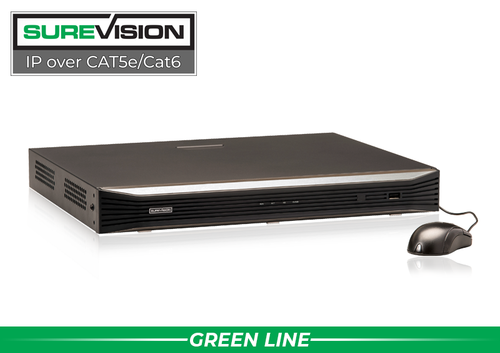
SureVision 16-channel 4K PoE NVR
The SV-NVR2P16-N supports a compatible IP camera system with local recording and built-in PoE connectivity. Check the selected storage configuration, recording workload and supported camera functions against the project requirements. Review recording and playback specifications separately.
Frequently Asked Questions
What is the difference between an IP camera system and a DVR system?
An IP camera system uses network cameras that send digital video to a compatible Network Video Recorder (NVR). A DVR system records video from compatible cameras through its connection setup, commonly using a Digital Video Recorder (DVR). The difference affects which cameras, recorder, and connections work together. Choose a complete configuration based on your property and recording needs, rather than assuming IP cameras and DVR equipment are interchangeable.
Are CCTV camera systems available without monthly fees?
Yes. CCTV Security Pros offers camera systems with no monthly subscription fees for remote viewing. This equipment-ownership approach suits customers who want remote access without a recurring viewing subscription. As you compare systems, consider the cameras, recorder, connections, and how you’ll review footage. Our team is also here with unlimited customer support to help make system selection and ownership clearer.
How many cameras do I need for my property?
The right number depends on the areas you want to monitor and the views each camera can provide. Map entrances, shared spaces, work areas, and exterior approaches, then account for distance, lighting, and obstructions that could create coverage gaps. A camera count alone doesn’t guarantee useful coverage. We offer complete systems with different camera counts, helping you compare options against your property’s coverage plan and monitoring priorities.
Can I view my CCTV cameras remotely without a subscription?
Yes. CCTV Security Pros provides remote viewing without monthly subscription fees. Remote viewing lets you check your cameras through the system’s viewing setup, while the recorder manages saved footage for later review. The cameras, recorder, connections, and viewing method need to work together. Consider who needs access and whether they need live video, recorded footage, or both.
What is the difference between an NVR and a DVR?
An NVR, or Network Video Recorder, records video sent digitally from compatible IP cameras over a network connection. A DVR, or Digital Video Recorder, records video through its compatible camera connection setup. Both manage recorded footage, but they are designed for different system configurations. Choose a recorder alongside the cameras and connections so the components are suited to work together as a complete system.
Are wired or wireless CCTV cameras better for a security system?
Neither connection approach is best for every property. Wired systems use physical connections, so cable routing and camera placement are part of installation planning. Wireless setups can reduce video cabling at camera locations, but still depend on a suitable network connection and power arrangement. Compare your property layout, network access, and system design. The best fit is the approach that supports your coverage and recording plans.
Do CCTV camera systems include technical support and a warranty?
CCTV Security Pros customers receive lifetime technical support based in the USA and a three-year product warranty. We’re proud to provide unlimited customer support, helping customers beyond the initial system selection. As you compare options, consider these ownership benefits alongside camera coverage, recorder compatibility, connections, and remote access. Ongoing support can make managing a complete system more straightforward over time.