
Parking Lot Security Camera Systems: A Practical Design Guide
Posted by CCTV Security Pros on Oct 7, 2026
Build a Parking Lot Camera System Around the Details That Matter
Plan clear views of entrances, parking rows and pedestrian routes. Learn where fixed cameras, optical-zoom PTZ cameras and dedicated plate capture fit into a practical outdoor surveillance system.
Updated October 7, 2026 · CCTV Security Pros
What makes a good parking lot camera system?
A useful parking lot system combines continuous fixed views of priority areas with cameras selected for specific detail requirements. Start with the lot layout, viewing distances and nighttime conditions; then choose lenses, mounting positions, network connections and recording storage. Camera count alone does not tell you whether the footage will answer your questions.
Start with a site plan and a viewing goal
Mark vehicle entrances and exits, pedestrian paths, payment stations, building doors and isolated parking rows on a simple map. Include trees, signs, parked delivery vehicles and other objects that may block a camera. Walk the property during the day and after dark; the same location can look very different under headlights and pole lighting.
Give every proposed view a specific purpose. An overview might show where a vehicle traveled. A tighter entrance view might help distinguish a person or vehicle. A plate-capture view needs a suitable angle, distance and exposure for a defined lane. These are different tasks, and one wide image rarely performs all of them equally well.
For each position, record the mounting location, target distance, available lighting and route back to the network. That information makes a custom equipment recommendation much more useful than choosing a kit solely by the number of spaces in the lot.
Use fixed cameras for continuous coverage
Fixed bullet cameras are a practical option for building perimeters, walkways and broad parking-area views. They keep recording the same scene while staff review another camera. A wide-angle lens suits an overview; a narrower or adjustable lens may be a better match when a particular gate or distant area needs more detail.
A 4K camera records a higher-resolution image than a comparable 1080p camera, but distance and field of view still matter. Spreading the image across a very large area leaves fewer pixels on each person or vehicle. Digital zoom enlarges the recorded image; it cannot recover detail the camera never captured.
Set mounting height around the intended evidence and the actual site. A high position can improve an overview while producing an unhelpfully steep view of faces or plates. Test a temporary position before committing to permanent mounting and cable routes.
Add a PTZ where active viewing adds value
A pan-tilt-zoom camera lets an authorized operator redirect the view and use optical zoom to inspect a selected part of the lot. It can be helpful at a gate, yard or large property where staff actively investigate activity from a control room or supported app.
Keep fixed cameras on critical zones. A PTZ observes the direction it is pointing at that moment, so a patrol or tracking movement can leave another area outside its view. Auto tracking also depends on the model, configuration, lighting and scene; it is an aid to monitoring, not a promise that every event will be followed.
Treat license plate capture as its own design task
Decide whether you need an image a person can read or automated license plate recognition that extracts plate characters. Ask for a camera and compatible system that support the specific task. An ordinary overview camera may show a vehicle clearly while its plate is too small, blurred or overexposed to read.
At an entrance or exit, assess lane width, vehicle speed, viewing angle, capture distance and nighttime illumination. Headlights and reflective plates make exposure especially important. Test actual moving vehicles in both directions, including after dark, and inspect the recording rather than relying only on the live view.
Place an overview camera alongside a dedicated capture view when you also need context about the vehicle and surrounding activity. This keeps the design focused on both identification detail and the sequence of events.
Plan outdoor power, cabling and protection
PoE can carry power and data over one Ethernet cable to a compatible camera. Verify the required PoE standard and power budget for every model, particularly PTZ units, rather than assuming any recorder port will power any camera.
Remote poles and detached structures may need an engineered network extension, local switching or a different backhaul arrangement. Use cable, enclosures, mounting hardware and surge protection appropriate to the installation. A weather-rated camera does not make an exposed connector or unsuitable cable weatherproof.
Check the exact camera's operating-temperature range and environmental rating against the site. Have a qualified installer handle mounting, outdoor electrical work and grounding requirements. Leave access for cleaning, adjustment and future service.
Size recording storage and test the finished system
A local SureVision NVR stores footage on installed surveillance hard drives. Required capacity depends on the number of cameras, configured bitrate, recording schedule and desired retention period. Specify those requirements before choosing a drive; no fixed capacity guarantees a particular number of days for every parking lot.
Confirm the NVR's supported camera resolution, incoming bandwidth, channels and playback capabilities. Protect the recorder from unauthorized access and arrange backup power where continuity is important. Local recording can continue without an internet connection when cameras, recorder and the local network remain powered and functioning; remote viewing depends on connectivity.
Before accepting the installation, walk each pedestrian route, drive through each capture lane and export sample recordings. Check timestamps, focus, night glare, blind spots and whether staff can find an event. Repeat these checks after changes to landscaping, lighting or the parking layout.
Your planning priorities
SureVision products to consider for your parking lot
These products are available from CCTV Security Pros. Match each model to the viewing task and confirm the final recorder, power, mounting and storage configuration before ordering.
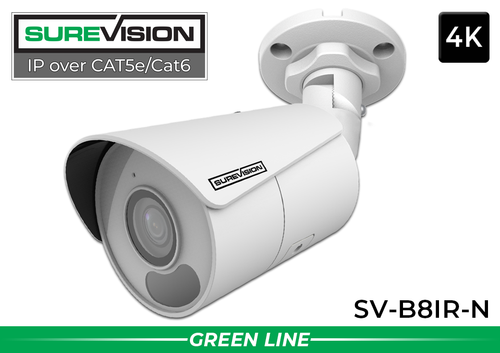
SureVision SV-B8IR-N 4K Bullet IP Camera
This 8MP camera has a fixed 2.8mm wide-angle lens and infrared night vision. Consider it for an overview of walkways, building approaches and nearby parking areas. Its broad view should be planned separately from a dedicated license-plate capture view.
View product details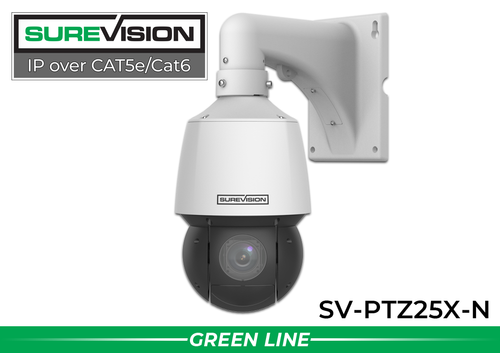
SureVision SV-PTZ25X-N 4MP 25X PTZ Camera
This 4MP model provides a 4.8–120mm motorized lens, 25X optical zoom and supported auto tracking. Consider it when staff need to reposition the view and inspect a selected area more closely. Pair it with fixed cameras for continuous coverage of critical zones.
View product detailsParking lot security camera questions
How many cameras does a parking lot need?
There is no reliable camera count based only on the number of parking spaces. Entrances, obstructions, target distances and the detail required determine the layout. Map the views first, then choose the camera count and recorder capacity.
Will a 4K parking lot camera read every license plate?
No. Plate readability depends on pixels on the plate, viewing angle, motion, focus and exposure. Reliable plate capture should be designed and tested for a defined lane rather than assumed from the resolution label.
Do SureVision systems require monthly cloud storage?
SureVision systems can record locally to an NVR without required monthly cloud-storage fees. Account for equipment, installation, connectivity, power and maintenance when comparing total ownership costs.
Can one PTZ replace all the fixed cameras?
A PTZ can inspect different areas, but it cannot provide a continuous view in every direction at once. Fixed cameras remain useful where an entrance, walkway or payment area must stay in frame.
Plan Your Parking Lot Surveillance System
Send CCTV Security Pros a site sketch, approximate viewing distances and your recording goals. Our team can help match cameras, an NVR, storage and accessories to the areas you need to see.
Get a Free System Quote Shop SureVision CamerasSeparate parking-lot overview, people and vehicle detail
A parking lot usually needs several kinds of evidence. A wide view establishes where a vehicle traveled or where an incident happened. A pedestrian view may need to show a person approaching an entrance. A plate view is a separate, tightly controlled task. Assign these jobs before deciding whether a fixed camera or a PTZ belongs at a particular position.
| Viewing task | Design approach | Field test |
|---|---|---|
| Parking rows | Fixed views with overlap around obstructions | Park a tall vehicle in the nearest row and check the area behind it. |
| Pedestrian route | A view selected around the walking path and expected distance | Record a person walking toward and away from the building. |
| Vehicle entrance | A controlled view of the approach and exit | Test the fastest normal vehicle movement after dark. |
| Plate detail | A dedicated plate-capture setup when readable plates are required | Review the recorded plate under headlights and changing light. |
Read the license plate camera guide when plate evidence is a project requirement. For wider observation, our auto-tracking PTZ guide explains where moving cameras add value. Keep fixed coverage on critical areas because a PTZ may be looking elsewhere when an event begins.
Turn the site survey into a buildable outdoor plan
Mark poles, buildings, trench routes, landscaped areas and the nearest protected equipment location. Measure the cable route, including vertical travel and the path into a building, rather than the straight-line distance on an aerial image. A pole that provides a good view may still need additional power, networking, grounding and permission from the property owner.
Ask the installer to document the mounting surface, available power, network connection, weather protection and service access for each position. Add photographs facing both toward and away from the intended camera view. These make it easier to identify backlighting, reflective signs and branches that might enter the image after seasonal growth.
Review outdoor camera selection alongside the actual SureVision IP camera models. Then stage a nighttime walk and drive test using the final recording settings. Inspect saved video, pause on the moving subject and verify that the information is usable at the intended distance. A bright live image by itself does not demonstrate readable detail on a moving vehicle.
What to record at the final system check
Keep the acceptance check simple enough that the owner can repeat it later. Use the final camera positions and recording settings, and include the lighting and activity that make the important views difficult. A recorded test gives a useful baseline for future troubleshooting.
- Confirm that each camera name matches its actual location and purpose.
- Review a saved daytime event and, where relevant, a nighttime event with a moving subject.
- Check the recording history against the agreed retention goal after a representative operating period.
- Test the permissions and playback functions of an ordinary user account.
- Export a short sample and check it on the device that will be used for review.
- Record any unresolved issue and the person responsible for correcting it.
Repeat the relevant checks after a camera is moved, a major display or obstruction changes, or recording settings are adjusted. This keeps the system aligned with the property’s current needs and makes maintenance more predictable.
Turn the plan into a complete equipment list
After defining the required views, compare SureVision IP cameras. Match each camera to a recorder channel, a compatible power connection and a documented cable route. Keep the installation materials, storage assumptions and required user functions on the same list so a missing component is easier to spot before ordering.
Use our license plate camera guide for the next planning decision and the auto-tracking PTZ guide for the related technical detail. These guides provide background for comparing the actual equipment rather than choosing solely by a camera count or a resolution label.
Bring the list together in the custom security camera system builder, or send the property layout and viewing goals with a free system quote request. Include the mounting locations, approximate subject distances and any existing equipment you want to keep. That information makes the proposed configuration more specific to the property.
Before accepting the installation, practice the tasks the owner will perform: checking a live view, finding a recorded event and preserving a usable export. Save the camera schedule, equipment model numbers and support information with the project records. Use the technical support center for model-specific setup resources and ask for help when a required function needs clarification.
