
Auto Tracking PTZ Cameras: Complete 2026 Guide
Posted by Gregory Derouanna, MBA on Jul 30, 2026
Auto Tracking PTZ Cameras: The Complete 2026 Guide
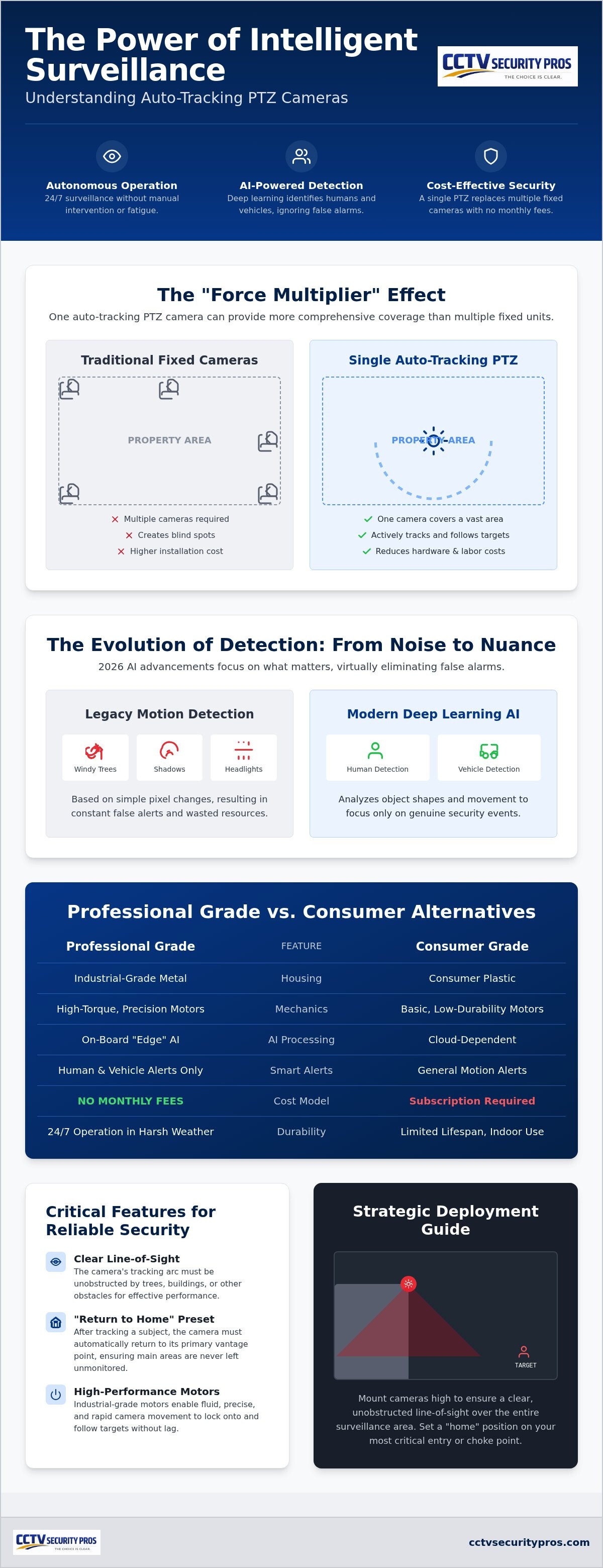
An auto tracking PTZ camera can detect a person or vehicle, follow the subject as it moves, and use optical zoom to preserve useful detail—all without requiring an operator to steer the camera continuously. This guide explains how the technology works, where it performs best, what to look for, and how to combine it with fixed cameras and an NVR for dependable coverage.
What Is an Auto Tracking PTZ Camera?
A PTZ security camera can pan from side to side, tilt up and down, and zoom toward distant activity. An auto tracking PTZ camera adds onboard video analytics that can identify a target and move the camera automatically to keep that target in view.
Older PTZ cameras often depended on a person using a joystick or software controls. Modern AI-enabled models can begin tracking when a person or vehicle crosses a virtual line, enters an intrusion zone, or triggers another programmed rule. When the event ends, the camera can return to a preset home position or resume a patrol pattern.
What the camera can do automatically
- Detect motion inside a selected area.
- Classify a target as a person or vehicle when supported by the model.
- Pan and tilt to keep the selected subject near the center of the image.
- Use optical zoom to capture a closer view as the subject moves.
- Record the event to a compatible local NVR.
- Return to a home preset after tracking ends.
This active response makes an AI tracking camera especially useful where a fixed camera might show that something happened but not capture enough detail to understand the event.
How AI Auto Tracking Works
The most useful auto tracking systems combine a motorized PTZ assembly with edge-based video analytics. “Edge-based” means the camera evaluates the video locally instead of relying entirely on a distant cloud service. That local processing helps the camera react quickly and can reduce unnecessary alerts caused by shifting shadows, leaves, rain or small animals.
Smart triggers improve accuracy
Instead of commanding the camera to chase every pixel change, a professional setup uses defined rules. A line-crossing rule can watch a property boundary. An intrusion zone can focus on a loading dock, gate or rear entrance. Human and vehicle filtering can reduce alerts from ordinary environmental movement.
The exact rules, classifications and tracking behavior vary by camera and recorder, so compatibility matters. If you want a ready-to-configure example, see the SureVision 10X PTZ IP security camera with auto tracking.
Auto Tracking PTZ Cameras vs. Fixed Security Cameras
PTZ and fixed cameras solve different surveillance problems. The strongest design often uses both: fixed bullet or dome cameras maintain continuous coverage, while the PTZ provides movement, active tracking and zoomed detail.
| Capability | Auto Tracking PTZ Camera | Fixed Camera |
|---|---|---|
| Viewing direction | Changes automatically or by remote control | Remains pointed at one defined area |
| Close-up detail | Strong when optical zoom is available | Depends on lens choice and camera placement |
| Continuous overview | Limited while the camera is tracking elsewhere | Excellent for a dedicated entrance, aisle or perimeter view |
| Best role | Following activity across large, open spaces | Maintaining constant evidence of critical areas |
| Typical system design | One or more strategic tracking cameras | Multiple planned views with intentional overlap |
Features to Compare Before Buying an Auto Tracking PTZ Camera
1. Optical zoom—not just digital zoom
Optical zoom changes the lens focal length to bring a distant subject closer without simply enlarging the existing pixels. Digital zoom crops and magnifies the image, which can quickly reduce useful detail. Compare optical zoom range based on the distances and identification needs at your property.

For large properties where long-distance detail is the priority, this professional 4MP outdoor PTZ camera provides 25X optical zoom, PoE+ connectivity and long-range infrared night vision. Pair it with a compatible NVR for local recording and playback.
View the 25X PTZ Camera2. Human and vehicle classification
Basic motion detection reacts to image changes. AI classification can help the camera focus on the types of activity that matter most. Look for adjustable human and vehicle rules, detection zones and sensitivity settings.
3. Low-light and infrared performance
Tracking is only valuable when the camera can see the subject. Evaluate the camera’s infrared range, low-light sensor performance and the lighting conditions at the actual installation site. A published maximum range is not a guarantee of identification at that distance; weather, angle, target size and ambient light all affect results.
4. Presets, patrols and return-to-home behavior
Presets let you save important viewing positions such as a gate, entrance or loading area. A reliable return-to-home setting ensures the camera goes back to its primary view after a tracking event or manual override.
5. Weather resistance and motor durability
Outdoor PTZ cameras move repeatedly and must withstand the local environment. Use a model rated for the intended location and mount it according to the manufacturer’s instructions. Commercial-grade housings and dependable motors are especially important for 24/7 applications.
6. NVR and smart-event compatibility
A camera may provide video through a general protocol while some advanced analytics require closer camera-recorder compatibility. Confirm support for tracking events, smart search, notifications, presets and playback before combining equipment from different manufacturers. Our security camera buyer’s guide explains how cameras, recorders, storage and key system features work together.
Best Locations for Auto Tracking PTZ Cameras
Auto tracking works best when the camera has a clear view and enough open space to follow a target. Common commercial applications include:
Smaller spaces, narrow hallways and single-door views often benefit more from a correctly selected fixed camera. For a larger commercial layout, review our business security camera systems or ask us to help combine fixed and PTZ cameras in one customized system.
Auto Tracking PTZ Installation and Setup Checklist
- Define the surveillance goal. Decide whether you need general awareness, event verification, facial detail, vehicle detail or perimeter tracking.
- Map obstructions. Trees, poles, signs, rooflines and parked trucks can interrupt tracking or block important views.
- Choose a useful mounting angle. Mount high enough to reduce tampering, but avoid an excessively steep angle that mainly captures the tops of heads and vehicles.
- Confirm power and network requirements. PTZ models may require PoE+ or another specified power method. Follow the product requirements rather than assuming standard PoE is sufficient.
- Create detection rules. Draw lines or zones around your property—not public roads, sidewalks or neighboring areas that would create unnecessary tracking.
- Set the home preset. Choose the most important default view and configure the delay before the camera returns.
- Test day and night. Walk and drive through the detection area at different distances, speeds and lighting conditions.
- Verify recording and alerts. Confirm that the NVR saves the full event and that authorized users can retrieve video remotely.
NVR Recording, Remote Viewing and Privacy
A compatible network video recorder provides private local storage and a central place to manage cameras, playback and users. Depending on the system and storage capacity, you can record continuously, by motion, or through selected smart events. Local recording also lets you retain control of your video without making cloud storage a requirement.
With a properly configured SureVision system, authorized users can view live video and recordings from a phone, tablet or computer without a required monthly viewing fee. You can also manually control compatible PTZ movement when you want to inspect a specific area.
Before selecting a recorder, compare channel capacity, storage needs, camera resolution, incoming bandwidth and smart-event compatibility. Explore SureVision NVR recorders for local recording options designed for professional IP camera systems.
Why Choose CCTV Security Pros?
CCTV Security Pros has helped protect businesses, government facilities and homes since 2008. We build professional wired surveillance systems around the property—not just a generic box of cameras. That means you can combine auto tracking PTZ, bullet, dome, wide-angle and other camera types with the right NVR and storage for your application.
- No required monthly fees for local recording or standard remote viewing.
- Free USA-based support before and after the sale.
- 3-year warranty on our professional equipment.
- Customized system options for business, government and home properties.
- 75,000+ customers served with real guidance from surveillance professionals.
Frequently Asked Questions
Can an auto tracking PTZ camera follow more than one person?
A PTZ lens points in one direction, so it typically follows one selected target at a time. The camera may detect multiple subjects, but its tracking rules determine which one receives priority. Fixed overview cameras help preserve evidence when people move in different directions.
Does auto tracking work at night?
It can work in low light or darkness when the camera has suitable infrared or low-light capability and the target remains visible enough for classification. Effective tracking distance varies with the camera, lighting, weather, angle and scene.
Does an auto tracking PTZ camera require an NVR?
The camera may perform tracking on its own, but a compatible NVR is recommended for dependable local recording, playback, user management, remote access and smart-event search. Confirm camera-recorder feature compatibility before buying.
Are there monthly fees for auto tracking?
CCTV Security Pros offers professional auto tracking camera and NVR options with no required monthly fee for the built-in tracking features, local recording or standard remote viewing.
Can the camera ignore animals, leaves and rain?
Human and vehicle classification can reduce many false events, but no analytics system eliminates every false alert. Correct placement, detection zones, target-size settings and sensitivity adjustments are important.
Can I control the PTZ camera manually?
Yes. Compatible systems let authorized users control pan, tilt and zoom from an NVR interface or remote viewing software. After manual control ends, the camera can return to its home preset according to its settings.
How high should an auto tracking PTZ camera be mounted?
There is no universal height. The best position balances tamper resistance, line of sight, detection distance and a useful viewing angle. Test the proposed view before finalizing the mount and avoid placing the camera so high that subjects are seen only from above.
Can one PTZ camera replace several fixed cameras?
A PTZ can cover and inspect a large area, but it cannot watch every direction simultaneously. It may reduce the number of cameras needed for active detail in some layouts, yet fixed cameras remain the safest choice for uninterrupted coverage of critical points.
Need Help Choosing the Right PTZ Camera?
Tell us what you need to cover and how far the important views are. We’ll help you select an auto tracking PTZ camera, compatible NVR and fixed cameras for complete coverage—without required monthly fees.
Shop Auto Tracking PTZ Cameras