
School Security Camera Systems: A Practical Campus Planning Guide
Posted by CCTV Security Pros on Oct 27, 2026
Plan Campus Cameras Around Clear Views and Responsible Use
A useful school camera system combines well-chosen views, reliable recording and a clear process for access and incident review. Bring school leadership, facilities, IT and privacy staff into the plan before selecting equipment.
Updated October 7, 2026 · CCTV Security Pros
What belongs in a school camera plan?
Define which approved areas need coverage, what detail is required, how long footage must be kept and who may use it. Then match cameras, network capacity and recording equipment to those requirements. Surveillance should support the school's broader safety procedures and response plan.
Start with the campus workflow
Map visitor arrivals, student entrances, delivery access, bus areas, parking and movement between buildings. Identify the approved common areas where video would help staff review an incident. A single camera layout should account for arrival, dismissal, normal classes and after-hours use.
Give each view a practical objective. An entrance view may need to show an arriving person clearly. A hallway view may need to establish movement between doors. An exterior overview may provide context across a larger area. Those tasks require different framing and sometimes separate cameras.
Review existing equipment before replacing it. Document camera models, cable condition, recorder capacity and known blind spots. A phased project can address the most important gaps first while preserving useful equipment that remains compatible with the plan.
Choose positions for useful recorded detail
Test proposed entrance views with the door open and closed and with people moving through the scene. Bright windows or daylight behind a subject can reduce useful detail. In long corridors, consider distance and obstructions rather than assuming a wide camera at one end will show everything clearly.
Vandal-resistant dome cameras can suit appropriate common areas and accessible mounting positions. Fixed bullet cameras may be useful for outdoor approaches or building perimeters. The housing shape does not determine the image quality; the lens, sensor, settings and placement matter together.
For parking or a large field, a PTZ can supplement fixed views when authorized staff need to change direction and zoom. Keep fixed cameras on locations that need continuous coverage, because a PTZ can be looking somewhere else during an event.
Set privacy and footage procedures before installation
Have the district's responsible administrators and legal or privacy staff approve camera locations, audio settings, retention and disclosure procedures. Classroom recording requires a separate policy and legal review; this planning guide does not assume cameras belong in every classroom.
The U.S. Department of Education explains that a video can be an education record when it directly relates to a student and is maintained by the school or a party acting for it, subject to applicable exclusions. Context matters. Its official FAQs on photos and videos under FERPA are a useful starting point for the district's review.
Decide who may view live cameras, review recordings, export clips and respond to requests. Use approved procedures for sharing footage; do not assume that technical access to a recorder establishes permission to disclose its recordings.
Coordinate the camera network with IT
PoE can simplify compatible IP camera connections by carrying power and data over one Ethernet cable. Verify each camera's power needs and the capacity of the recorder or switch. Long cable routes and separate buildings may need additional network infrastructure.
Work with IT on camera-network design, authorized remote access, account permissions and software updates. Name cameras by a clear campus convention and synchronize their timestamps. Staff should be able to identify a location without remembering a camera number.
Plan backup power around all the devices needed to keep recording, including the NVR and any intermediate switches. A recorder with backup power cannot receive a camera feed if a required upstream device has lost power.
Size storage to the district's approved requirements
Specify the required recording schedule and retention period before choosing drive capacity. Storage depends on camera count, bitrate, resolution, frame rate and compression. A standard drive size does not guarantee a fixed number of days for every campus.
A SureVision NVR records compatible IP cameras to installed local storage. Verify its channels, incoming bandwidth, supported resolutions, playback limits and expansion capacity. Local recording can avoid required monthly cloud-storage fees, while the district remains responsible for protecting and maintaining the equipment.
Follow district procedures to preserve important footage before routine overwrite. Keep the recorder in an appropriately secured, ventilated location and include storage-health checks in maintenance responsibilities.
Test the system with the staff who will use it
Commission cameras under daytime, evening and after-hours lighting. Check a moving subject in the recording, not only a still live image. Review outdoor glare, hallway obstructions, camera names and timestamps.
Ask authorized staff to locate and export a sample event involving several views. Confirm that the export plays as expected and that personnel understand how to preserve it under district policy. Document whom to contact for a camera outage or failed recorder.
Repeat checks after building work, lighting changes or seasonal growth around exterior cameras. Clear responsibility for these checks is part of keeping the system useful over time.
Your planning priorities
SureVision products for school system planning
These products are available from CCTV Security Pros. Match each model to the viewing task and confirm the final recorder, power, mounting and storage configuration before ordering.
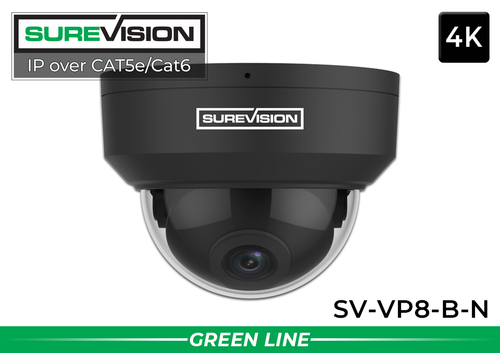
SureVision SV-VP8-B-N 4K Black Vandal Dome IP Camera
This 8MP vandal-resistant dome can be considered for appropriate entrances and approved common areas. Confirm its viewing angle, mounting and environmental specifications for each location; configure audio and other features according to district policy.
View product details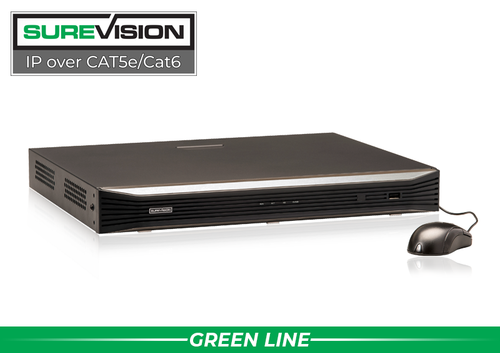
SureVision SV-NVR2P16-N 16-Channel PoE NVR
A local recorder for up to 16 compatible IP camera channels. It can be considered for a smaller building or a defined part of a larger project when its recording and network limits fit the design. Select storage around the district's retention requirements.
View product detailsSchool security camera questions
Do school cameras have to be 4K?
Resolution should match the viewing task. A higher-resolution image can provide more detail, but distance, lens choice, lighting and motion still determine whether the recording is useful.
How long should a school retain recordings?
Use the district's approved retention requirements and relevant legal guidance. Storage should be calculated to support that plan and checked after installation; this guide does not prescribe a universal retention period.
Can administrators view cameras remotely?
Compatible systems can support remote viewing. The district should approve the users, devices, network configuration and permitted use before access is enabled.
Can cameras replace other school safety measures?
No. Cameras support awareness and incident review. Visitor procedures, access control, trained personnel and response planning remain part of the school's overall safety approach.
Build a Camera Plan for Your Campus
Share approved coverage areas, the site layout, existing infrastructure and recording requirements. CCTV Security Pros can help the project team match cameras, recorders and storage to the plan.
Get a Free System Quote Shop SureVision CamerasBuild a campus camera schedule that staff can use
A campus plan should connect a specific camera view with a specific operational purpose. Start with arrival and dismissal routes, visitor entrances, circulation areas and other locations approved by the district. Document why each view is needed, who can review it and who is responsible for maintaining it. Include the district’s privacy and records staff before deciding how to handle sensitive locations.
| Campus task | Planning question | Acceptance exercise |
|---|---|---|
| Visitor entry | Can staff review the approach and entry as one sequence? | Walk the visitor route during bright daylight. |
| Arrival and dismissal | Are moving vehicles and pedestrians visible at the required detail? | Record the route during the normal traffic pattern. |
| Incident review | Can authorized staff find the correct camera and time? | Locate a staged event using an ordinary incident report. |
| Record preservation | Who may export footage and how is the request logged? | Export a sample and confirm authorized playback. |
Camera technology is only one part of the plan. Use the commercial surveillance planning guide for infrastructure questions, and confirm education-specific legal and policy obligations through the district’s own review process.
Prepare a procurement and handover packet
List camera locations, recorder capacity, storage assumptions, network responsibilities and installation tasks in the purchase specification. Separate required functions from optional features so proposals can be compared fairly. A quoted camera count should map back to the schedule of views, not substitute for that schedule.
Compare 32-camera IP systems or larger configurations only after the school has established its coverage and expansion needs. Include any required equipment documentation in the purchasing process. The purchase order information page provides a starting point for ordering questions; the district still needs to confirm its own purchasing and approval requirements.
At handover, test saved recordings, user permissions, retention settings and incident exports with the people who will use them. Keep a record of equipment models and support contacts. Revisit the plan after room repurposing, construction, a change in student routes or a major lighting change. This keeps the design tied to the actual campus instead of an outdated floor plan.
What to record at the final system check
Keep the acceptance check simple enough that the owner can repeat it later. Use the final camera positions and recording settings, and include the lighting and activity that make the important views difficult. A recorded test gives a useful baseline for future troubleshooting.
- Confirm that each camera name matches its actual location and purpose.
- Review a saved daytime event and, where relevant, a nighttime event with a moving subject.
- Check the recording history against the agreed retention goal after a representative operating period.
- Test the permissions and playback functions of an ordinary user account.
- Export a short sample and check it on the device that will be used for review.
- Record any unresolved issue and the person responsible for correcting it.
Repeat the relevant checks after a camera is moved, a major display or obstruction changes, or recording settings are adjusted. This keeps the system aligned with the property’s current needs and makes maintenance more predictable.
Turn the plan into a complete equipment list
After defining the required views, compare 32-camera IP systems. Match each camera to a recorder channel, a compatible power connection and a documented cable route. Keep the installation materials, storage assumptions and required user functions on the same list so a missing component is easier to spot before ordering.
Use our commercial camera planning guide for the next planning decision and the NVR selection guide for the related technical detail. These guides provide background for comparing the actual equipment rather than choosing solely by a camera count or a resolution label.
Bring the list together in the custom security camera system builder, or send the property layout and viewing goals with a free system quote request. Include the mounting locations, approximate subject distances and any existing equipment you want to keep. That information makes the proposed configuration more specific to the property.
Before accepting the installation, practice the tasks the owner will perform: checking a live view, finding a recorded event and preserving a usable export. Save the camera schedule, equipment model numbers and support information with the project records. Use the technical support center for model-specific setup resources and ask for help when a required function needs clarification.
