
Security Camera Systems for Property Management: A Planning Guide
Posted by CCTV Security Pros on Oct 27, 2026
Practical Camera Coverage for the Properties You Manage
Plan useful views of entrances, common areas and parking facilities, with recording and access procedures your team can manage across staff changes and multiple locations.
Updated October 7, 2026 · CCTV Security Pros
What should property managers prioritize?
Prioritize clearly defined common-area views, reliable recording and accountable access. Each property needs its own camera plan, retention goal and incident-review process. A camera system is most useful when the people responsible for the property know what it records, how to retrieve footage and who may access it.
Plan each property before choosing a kit
An apartment building, retail strip and mixed-use property have different layouts and daily activity. Mark building entrances, vehicle access points, shared circulation areas, parcel locations and maintenance spaces on a site plan. Identify which locations generate the most requests for incident review.
Choose a specific task for every view: identify the route someone took through a common area, review a delivery at a parcel room or establish which vehicle entered a gate. Use the task to choose the lens and mounting position. An attractive wide overview may not capture enough detail for a distant doorway.
There is no standard camera count for a building with a particular number of units. Multiple entrances, disconnected buildings, landscaping and enclosed corridors all affect the design. Walk the site during the day and after dark before finalizing positions.
Balance entrance detail with common-area context
Entrances often need more than a broad view of the lobby. Consider the direction people approach, the camera height and the contrast between exterior daylight and interior lighting. Review a moving person in the recorded image to check whether the view answers the intended question.
In mailrooms or parcel areas, decide whether the priority is the doorway, the shelving or the handoff point. Furniture and stacked packages can obstruct the camera. In hallways and shared rooms, place equipment where routine cleaning and maintenance will remain practical.
Plan views around approved common areas and the property's privacy policies. Avoid inadvertently aiming into neighboring homes or private spaces. Have the responsible property team review the final views and any audio settings before use.
Treat parking and vehicle entrances separately
Parking-area overview cameras can show movement and the context of an incident. A vehicle entrance may need a separate, narrower capture view if plate detail is important. Resolution alone does not establish plate readability: distance, angle, speed and nighttime exposure all matter.
A PTZ camera can help staff inspect selected areas of a large site, but it watches only where it is pointed. Keep fixed views on the locations that need continuous coverage. Test nighttime performance with the actual pole lighting, headlights and parked vehicles present.
Match outdoor cameras, connections and mounts to the location's weather and temperature conditions. If equipment is on a remote pole or detached building, account for power and network service in the installation plan.
Choose recording around your incident-reporting process
Some incidents are reported immediately; others surface later through a resident, tenant or vendor. Set the retention goal before choosing the NVR's drive capacity. Calculate storage using the planned camera count, bitrate and recording schedule, then verify the actual history available after commissioning.
Local NVR recording gives the property an on-site copy of the video without required monthly cloud storage for compatible SureVision systems. It still needs protected equipment, appropriate access controls and maintenance. Important clips should be exported before routine recordings overwrite them.
For several properties, decide whether recording will remain local at each site and how authorized staff will access the locations. Confirm the supported viewing software and permissions with the final equipment configuration. Do not assume every model offers the same multi-site management features.
Build an access process that survives staff changes
Decide who can view live video, search recordings, export clips and change settings. Use the permissions available on the selected system and keep responsibility documented. Give contractors or temporary staff only the access approved for their role.
Include camera access in employee onboarding and offboarding. When a manager leaves or an outside vendor's work ends, review their accounts promptly. Record who is responsible for requests for footage and for preserving relevant incidents under the property's procedures.
Remote viewing is convenient, but it depends on connectivity and secure configuration. Work with the responsible IT team on remote access and keep supported firmware and software current. A local NVR does not remove the need to protect networked equipment.
Budget for installation and ongoing care
Compare the full project, including cameras, recorder, storage, cable routes, mounting hardware, network equipment and installation labor. Account for connectivity, power and maintenance even when the core recording system has no required cloud subscription.
Reserve capacity for realistic future additions. More units or buildings may require extra channels, bandwidth, PoE power and drive capacity. Check those resources together before promising that a system can expand.
At handover, verify camera names, timestamps, image quality and clip exports. Set a recurring staff check for camera outages, blocked views, dirty lenses and recording history. Review coverage when landscaping, parking arrangements or common-area layouts change.
Your planning priorities
SureVision products for property management
These products are available from CCTV Security Pros. Match each model to the viewing task and confirm the final recorder, power, mounting and storage configuration before ordering.
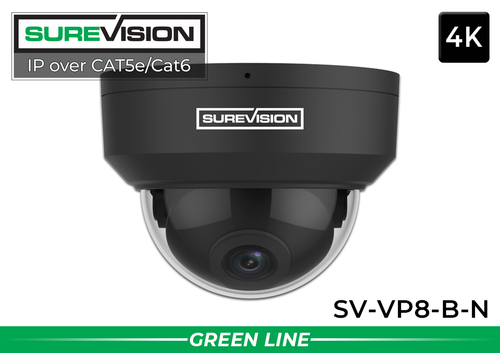
SureVision SV-VP8-B-N 4K Black Vandal Dome IP Camera
This 8MP vandal-resistant dome is a candidate for suitable building entrances, hallways and common areas. Its compact form can work where a projecting bullet camera would be less convenient. Verify the viewing angle and mounting requirements for each position.
View product details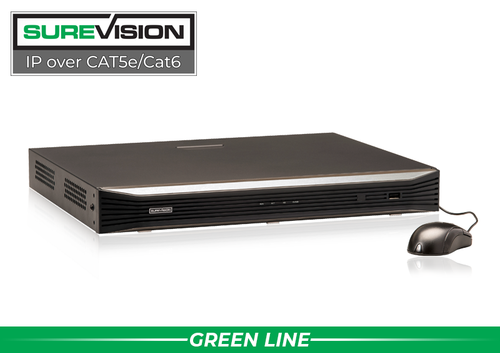
SureVision SV-NVR2P16-N 16-Channel PoE NVR
This recorder supports up to 16 compatible IP camera channels and local hard-drive recording. Consider it for a property whose planned camera count and recording workload fit the published limits. Choose storage for the actual retention goal and leave appropriate room for growth.
View product detailsProperty management camera questions
How many cameras does an apartment building need?
Count the required views, not the apartments. Separate entrances, parcel locations, corridors, parking areas and obstructions determine the camera layout. Review a site plan before selecting a package.
Can I view several properties remotely?
Compatible systems and software can support remote viewing, but available multi-site functions and permissions depend on the chosen equipment. Confirm the required workflow before purchasing and configure access through the responsible property or IT team.
Do I need to store every camera for the same number of days?
Set retention according to the property's operational requirements and applicable policies. The system's available recording options and drive capacity should support the approved plan; verify retention after installation.
Will a camera system guarantee fewer incidents?
No system can guarantee that. A well-designed layout can support awareness and incident review, while lighting, access procedures, maintenance and staff response remain important parts of property management.
Plan Surveillance for Your Property Portfolio
Share the site layouts, priority areas, access needs and desired recording history. CCTV Security Pros can help you choose cameras, NVRs and storage suited to each property.
Get a Free System Quote Shop SureVision CamerasBuild a repeatable plan across different properties
A property manager can standardize camera names, account roles and review procedures without forcing every building into the same camera package. Begin with an individual map for each address. Record common entrances, parcel areas, elevator approaches, vehicle access and maintenance routes, then identify the responsible manager and approved purpose for every view.
| Property area | Useful design question | Operational owner |
|---|---|---|
| Main entrance | Can reviewers connect an approach with an entry event? | Property manager or designated security staff. |
| Parcel area | Does the view show the handoff without unnecessary private information? | Staff responsible for parcel complaints. |
| Vehicle access | Is the objective traffic overview or plate detail? | Manager responsible for parking incidents. |
| Shared service area | How will contractors and maintenance access be reviewed? | Facilities or maintenance lead. |
Keep the coverage review tied to the building’s rules and applicable privacy requirements. Our commercial camera planning guide provides a framework for hardware, storage and access, while the license plate camera guide addresses vehicle-entry detail.
Plan staff turnover and equipment changes in advance
A shared administrator password becomes difficult to control when staff move between properties. Where supported, create individual accounts with the permissions needed for each role. Keep a record of who can view live video, review recordings, export footage or change settings. Remove access when responsibilities change and keep account recovery under the organization’s control.
Give each camera a location name that a new employee can understand. “Building B—west entrance” is more useful than an unexplained channel number. Keep recorder location, equipment model numbers, approved retention settings and support information in the property’s handover file. Store security-sensitive account details separately from ordinary equipment documentation.
For a new building, use the custom system builder to assemble a proposed configuration, or send floor plans through the free quote request. For an existing property, test camera views again after landscaping, lighting or access-control changes. A standardized quarterly review of recording, permissions and export procedures helps identify problems before a resident or tenant reports an incident.
What to record at the final system check
Keep the acceptance check simple enough that the owner can repeat it later. Use the final camera positions and recording settings, and include the lighting and activity that make the important views difficult. A recorded test gives a useful baseline for future troubleshooting.
- Confirm that each camera name matches its actual location and purpose.
- Review a saved daytime event and, where relevant, a nighttime event with a moving subject.
- Check the recording history against the agreed retention goal after a representative operating period.
- Test the permissions and playback functions of an ordinary user account.
- Export a short sample and check it on the device that will be used for review.
- Record any unresolved issue and the person responsible for correcting it.
Repeat the relevant checks after a camera is moved, a major display or obstruction changes, or recording settings are adjusted. This keeps the system aligned with the property’s current needs and makes maintenance more predictable.
Turn the plan into a complete equipment list
After defining the required views, compare security camera systems. Match each camera to a recorder channel, a compatible power connection and a documented cable route. Keep the installation materials, storage assumptions and required user functions on the same list so a missing component is easier to spot before ordering.
Use our commercial camera planning guide for the next planning decision and the outdoor camera guide for the related technical detail. These guides provide background for comparing the actual equipment rather than choosing solely by a camera count or a resolution label.
Bring the list together in the custom security camera system builder, or send the property layout and viewing goals with a free system quote request. Include the mounting locations, approximate subject distances and any existing equipment you want to keep. That information makes the proposed configuration more specific to the property.
Before accepting the installation, practice the tasks the owner will perform: checking a live view, finding a recorded event and preserving a usable export. Save the camera schedule, equipment model numbers and support information with the project records. Use the technical support center for model-specific setup resources and ask for help when a required function needs clarification.
