
No-Subscription Security Camera Systems: What to Check Before Buying
Posted by CCTV Security Pros on Oct 27, 2026
Know What Is Included Before You Buy
A no-subscription system can record locally and provide supported remote viewing without a required monthly cloud plan. Compare the actual features, storage and ownership costs so the system fits your property.
Updated October 7, 2026 · CCTV Security Pros
Can security cameras work without a subscription?
Yes. Compatible cameras and a local NVR can record to installed hard drives without a monthly cloud-storage plan. Check recording, playback, exports, alerts and remote access individually, because the phrase no subscription does not tell you everything about a system's capabilities or costs.
Separate the equipment from the services
Camera hardware, local recording, remote access and professional monitoring are different parts of a security offering. A system may include some functions while charging for others. Ask what remains available without a subscription and whether any feature depends on a trial or optional service.
SureVision systems are built around local NVR recording with no required monthly cloud-storage fees. Supported remote-viewing tools let authorized users access compatible equipment. That does not mean a staffed monitoring service is included.
Check the recording and playback you actually need
Decide whether the property needs continuous recording, event recording or a combination. Confirm that the camera and recorder support the intended schedule and that events can be found and exported in a useful format.
Storage capacity determines how much history fits at the selected recording rate. Camera count, bitrate, compression and schedule all affect retention. A drive included with a kit should be checked against your requirements rather than assumed to hold a fixed number of days.
Ask for a practical workflow: find a sample event, review the surrounding footage and export it. These everyday tasks are more useful buying criteria than a long list of features that staff will never use.
Understand remote viewing and internet dependence
A compatible local system can keep recording during an internet outage if its cameras, recorder and local network remain powered and functional. Viewing it from outside the property normally still needs an internet connection.
Confirm support for the phones and computers your team uses, the available permissions and any limits on simultaneous viewing. Features such as PTZ control, audio and intelligent alerts depend on the selected equipment and configuration.
Set up remote access using supported instructions and appropriate account security. No subscription does not mean no need for passwords, software updates or responsible network configuration.
Compare total ownership cost
Include cameras, NVR, drives, cabling, mounting accessories, installation and any network upgrades in the upfront budget. Power, internet service and maintenance remain operating expenses even when the camera system does not require a cloud plan.
If comparing an alternative with monthly fees, use the same camera count, retention goal and feature requirements. Consider optional off-site storage, professional monitoring or managed support separately. A fair comparison looks at what each option provides over the period you expect to use it.
Choose cameras for the property, then choose the package
Map entrances, paths and priority areas before selecting a kit. Wide-angle fixed cameras can provide useful overviews, but distant detail or plate capture may need different equipment. Higher resolution does not remove the need for a suitable lens and mounting position.
Verify recorder channels, incoming bandwidth, PoE power and supported drive capacity. If expansion is likely, reserve room in each of those resources. A well-matched system is easier to maintain than a package chosen only for its headline camera count.
Your planning priorities
SureVision options with local NVR recording
These products are available from CCTV Security Pros. Match each model to the viewing task and confirm the final recorder, power, mounting and storage configuration before ordering.
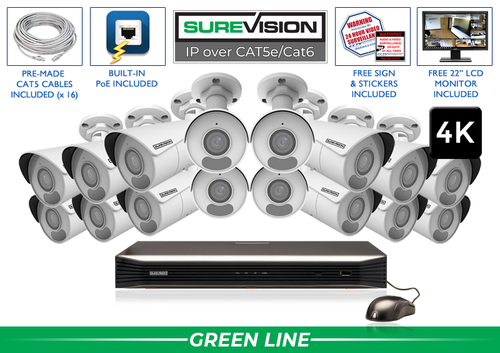
SureVision SV-16IPBIR8-N 16-Camera 4K System
A matched starting point with 16 SureVision 4K bullet cameras and a 16-channel NVR. Review drive and cable selections, then confirm that the fixed wide-angle camera layout fits the property.
View product details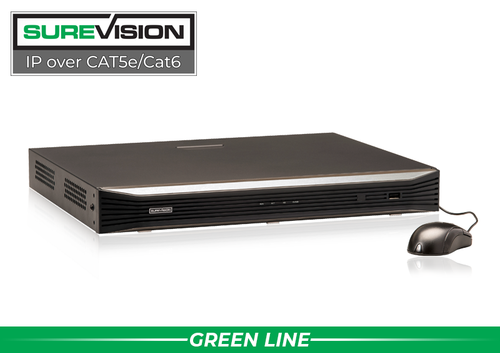
SureVision SV-NVR2P16-N 16-Channel PoE NVR
Consider this local recorder for up to 16 compatible IP cameras when its recording workload and power specifications fit the project. Select supported storage based on the recording history you need.
View product detailsNo-subscription system questions
Do I lose remote viewing without a cloud plan?
Not with a compatible system that includes remote access. Confirm the specific app or software and its supported functions before purchasing.
Does no monthly fee mean no ongoing cost?
No. Power, connectivity, maintenance and eventual equipment replacement still need to be budgeted. Optional monitoring or off-site services may have separate charges.
Is a local system automatically more private?
Physical control of recordings can be useful, but the recorder, accounts, remote connections and exports still need protection. Local storage alone does not guarantee privacy.
Choose a System with Clear Ownership Costs
Share your camera layout, recording goals and required remote-viewing features. CCTV Security Pros can help you select compatible equipment and understand what the system includes.
Get a Free System Quote Shop SureVision CamerasCompare ownership costs using the same functions
A fair cost comparison begins with the features the property actually needs. Write down the number of cameras, recording retention, remote users, alerts and export requirements. Then compare complete configurations. A hardware-only price and a bundled cloud-service price do not describe the same purchase until installation, storage and required services are included.
| Cost category | Local recording questions | Service-plan questions |
|---|---|---|
| Equipment | Which cameras, recorder and drives are included? | Is hardware purchased, leased or included in a contract? |
| Recording | What capacity supports the required retention? | What retention and recording modes does the plan include? |
| Remote access | Which app functions are included? | Are users, cameras or advanced features billed separately? |
| Ongoing care | How will replacement drives and maintenance be handled? | What happens if a subscription changes or ends? |
As an illustration, an optional service costing $20 per month totals $1,200 over 60 months before taxes or price changes. This is arithmetic for comparing a quoted service, not a claim about a specific competitor’s price. Add that figure only if the service is required for the functions you need.
Verify the no-subscription workflow before purchase
Ask for a demonstration of live viewing, recorded playback and export using the intended hardware and app. Confirm what continues locally if the internet connection is unavailable, and what requires an active connection between the property and your remote device. Local recording and remote access are related but distinct functions.
For a coordinated wired setup, compare complete security camera systems and SureVision NVR recorders. The wired security camera guide explains the cameras, cabling and recording path, while the NVR buying guide helps connect retention goals to storage capacity.
Make the included functions part of the written equipment proposal. The system builder is useful for organizing a configuration, and a tailored quote can clarify which components are needed. No required recording subscription can be an advantage, while equipment, internet access and maintenance remain ordinary ownership costs to plan for.
What to record at the final system check
Keep the acceptance check simple enough that the owner can repeat it later. Use the final camera positions and recording settings, and include the lighting and activity that make the important views difficult. A recorded test gives a useful baseline for future troubleshooting.
- Confirm that each camera name matches its actual location and purpose.
- Review a saved daytime event and, where relevant, a nighttime event with a moving subject.
- Check the recording history against the agreed retention goal after a representative operating period.
- Test the permissions and playback functions of an ordinary user account.
- Export a short sample and check it on the device that will be used for review.
- Record any unresolved issue and the person responsible for correcting it.
Repeat the relevant checks after a camera is moved, a major display or obstruction changes, or recording settings are adjusted. This keeps the system aligned with the property’s current needs and makes maintenance more predictable.
Turn the plan into a complete equipment list
After defining the required views, compare security camera systems. Match each camera to a recorder channel, a compatible power connection and a documented cable route. Keep the installation materials, storage assumptions and required user functions on the same list so a missing component is easier to spot before ordering.
Use our wired camera guide for the next planning decision and the NVR selection guide for the related technical detail. These guides provide background for comparing the actual equipment rather than choosing solely by a camera count or a resolution label.
Bring the list together in the custom security camera system builder, or send the property layout and viewing goals with a free system quote request. Include the mounting locations, approximate subject distances and any existing equipment you want to keep. That information makes the proposed configuration more specific to the property.
Before accepting the installation, practice the tasks the owner will perform: checking a live view, finding a recorded event and preserving a usable export. Save the camera schedule, equipment model numbers and support information with the project records. Use the technical support center for model-specific setup resources and ask for help when a required function needs clarification.
