
Security Camera Systems with a 3-Year Warranty: A Buyer’s Checklist
Posted by CCTV Security Pros on Oct 27, 2026
Look Beyond the Warranty Length
A three-year warranty is useful, but the written terms, support process and installation requirements tell you how the coverage will work in practice. Review the complete ownership picture before choosing a camera system.
Updated October 7, 2026 · CCTV Security Pros
What should you check in a camera warranty?
Confirm which products are covered, when coverage begins, how a claim is handled and which costs remain yours. Warranty coverage, the initial return window and technical support are separate subjects. Keep the current written terms with your order records.
Distinguish warranty coverage from returns and support
A product warranty addresses covered equipment problems under its terms. A satisfaction-return period covers a different situation: returning a purchase within the stated initial window. Technical support helps with questions and troubleshooting, but it is not automatically an on-site service or a replacement promise.
CCTV Security Pros advertises a three-year product warranty and unlimited support. Its current return and warranty information explains the return process and related conditions. Review that page and ask about anything specific to your order before purchasing.
Ask practical questions before ordering
Confirm the coverage for cameras, recorder, included drives and accessories. Ask how to report a fault, whether authorization is required before shipping equipment and what documentation is needed. Keep model numbers, serial information and the original purchase record organized.
Clarify responsibility for shipping, removal and reinstallation, especially when cameras will be mounted in difficult-to-reach locations. Do not assume that a product warranty covers labor, business interruption or lost footage. For a critical site, plan how coverage will be maintained while equipment is serviced.
If transferability, advance replacement or a special project requirement matters, get a specific written answer. The length of the warranty alone does not establish those terms.
Choose suitable equipment and installation
A long warranty does not make every camera suitable for every environment. Check operating temperature, weather protection, lens choice and mounting requirements for the actual location. Protect connectors and use suitable power and cabling.
Match the NVR's supported channels, resolution, bandwidth and storage to the selected cameras. Compatibility should include the specific functions needed, such as analytics, audio or PTZ controls. Avoid relying only on a broad compatibility label.
Keep maintenance and troubleshooting straightforward
Record camera locations and label the cable runs. Use descriptive camera names and retain an approved configuration record. When a problem occurs, note the affected equipment, symptoms and any recent changes before contacting support.
Check recordings, storage health and lens cleanliness routinely. Test exports before an incident makes them urgent. A warranty is valuable protection for covered equipment issues, but it does not replace checking that the system is producing useful video.
Compare total value over the life of the system
Compare the equipment, installation, storage, available help and ownership costs together. A cheaper package may be a poor fit if it lacks the required views or recording capacity; a more expensive package is not automatically better if its extra functions will go unused.
SureVision local recording can avoid required monthly cloud-storage fees. Include power, connectivity and maintenance in the budget, and confirm any optional service charges separately. Select support arrangements that fit the people who will operate the system.
Your planning priorities
SureVision equipment to compare with the warranty terms
These products are available from CCTV Security Pros. Match each model to the viewing task and confirm the final recorder, power, mounting and storage configuration before ordering.
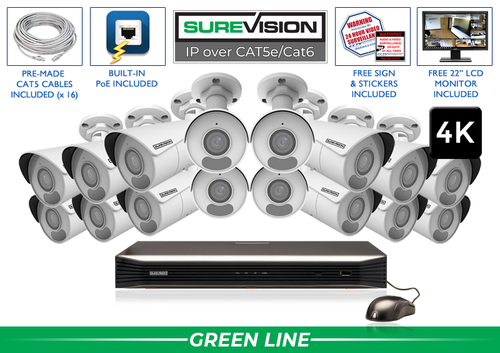
SureVision SV-16IPBIR8-N 16-Camera 4K System
A complete starting point with 16 4K bullet cameras and a 16-channel NVR. Review the available storage and cabling options and confirm the included equipment and coverage on the final quote.
View product details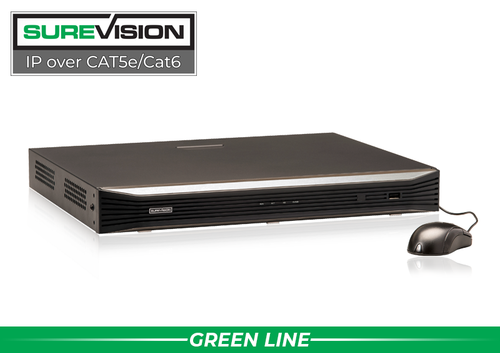
SureVision SV-NVR2P16-N 16-Channel PoE NVR
Consider this recorder for a compatible IP system whose recording workload fits its specifications. Verify storage choices and support requirements alongside the warranty, rather than selecting a recorder by channel count alone.
View product detailsCamera warranty questions
Does a three-year warranty mean the equipment lasts only three years?
No. Warranty duration is a coverage term, not a precise prediction of service life. Actual life depends on the equipment, installation, environment and maintenance.
Is technical support the same as an on-site service contract?
No. Ask what assistance is included and whether any on-site work has to be arranged separately. Do not assume that phone or remote support includes installation labor.
Should I send equipment back immediately if it stops working?
Contact support and follow the current authorization process first. Troubleshooting may identify a connection or configuration issue, and returns generally require the supplier's stated procedure.
Choose Equipment with a Clear Support Plan
CCTV Security Pros can help you compare camera systems, confirm the equipment on your quote and understand the available warranty and support process.
Get a Free System Quote Shop SureVision CamerasUse a warranty checklist alongside the equipment list
A three-year warranty is easier to evaluate when its practical terms are clear. Keep the written policy with the order and ask which products, parts and remedies it covers. Distinguish a product warranty from a return window, installation workmanship, accidental damage and technical support. These may be handled under different policies or by different parties.
| Question | Information to retain |
|---|---|
| When does coverage start? | The applicable start date and proof of purchase. |
| How is a fault handled? | Troubleshooting steps and the return-authorization process. |
| What must be sent back? | The component, accessories and documentation requested by support. |
| Who covers associated costs? | Shipping, removal, reinstallation and any project-specific responsibilities. |
| How will operations continue? | Whether the site needs a spare or temporary coverage plan. |
Ask these questions while comparing security camera system packages. They help turn a warranty duration into a clear service process without assuming every possible expense is covered.
Reduce downtime with a useful support record
Maintain a camera schedule, model and serial numbers, purchase records, cable labels and photographs of the completed installation. If a picture disappears, note whether the camera still receives power, whether other channels work and what changed immediately before the issue. A clear symptom description helps support narrow the cause.
A critical doorway may justify a planned spare camera or an alternate view. That is an operational decision based on the consequence of losing coverage, separate from the length of the warranty. Include the person responsible for diagnosing problems and the person authorized to approve replacement equipment in the handover.
Use the USA-based technical support guide to understand the support role and the setup and technical support center for practical resources. For a new project, the free quote request lets you discuss hardware suitability and the details that need clarification before ordering. Retain the final written terms with the equipment records.
What to record at the final system check
Keep the acceptance check simple enough that the owner can repeat it later. Use the final camera positions and recording settings, and include the lighting and activity that make the important views difficult. A recorded test gives a useful baseline for future troubleshooting.
- Confirm that each camera name matches its actual location and purpose.
- Review a saved daytime event and, where relevant, a nighttime event with a moving subject.
- Check the recording history against the agreed retention goal after a representative operating period.
- Test the permissions and playback functions of an ordinary user account.
- Export a short sample and check it on the device that will be used for review.
- Record any unresolved issue and the person responsible for correcting it.
Repeat the relevant checks after a camera is moved, a major display or obstruction changes, or recording settings are adjusted. This keeps the system aligned with the property’s current needs and makes maintenance more predictable.
Turn the plan into a complete equipment list
After defining the required views, compare security camera systems. Match each camera to a recorder channel, a compatible power connection and a documented cable route. Keep the installation materials, storage assumptions and required user functions on the same list so a missing component is easier to spot before ordering.
Use our USA-based support guide for the next planning decision and the security camera buying guide for the related technical detail. These guides provide background for comparing the actual equipment rather than choosing solely by a camera count or a resolution label.
Bring the list together in the custom security camera system builder, or send the property layout and viewing goals with a free system quote request. Include the mounting locations, approximate subject distances and any existing equipment you want to keep. That information makes the proposed configuration more specific to the property.
Before accepting the installation, practice the tasks the owner will perform: checking a live view, finding a recorded event and preserving a usable export. Save the camera schedule, equipment model numbers and support information with the project records. Use the technical support center for model-specific setup resources and ask for help when a required function needs clarification.
