
Local Storage Security Camera Systems: Recording and Ownership Guide
Posted by CCTV Security Pros on Oct 7, 2026
Keep Your Camera Recordings on Equipment You Control
Learn how local NVR storage works, what determines retention and how remote viewing fits into a system that records at your property. Compare ownership costs and plan protection for the footage you need.
Updated October 7, 2026 · CCTV Security Pros
What is a local storage camera system?
A local storage system records video to equipment at the property, such as an NVR with installed surveillance hard drives. Recording can remain on the local network while supported remote access lets authorized users view cameras from elsewhere. Local recording and remote viewing are related features, but they are not the same thing.
How the recording path works
In an IP camera system, cameras send video over the network to a compatible Network Video Recorder. The NVR writes configured streams to its installed drives and provides tools for live viewing, playback and export. Compatible PoE ports or switches can also supply power over the camera's Ethernet cable.
A DVR typically records cameras connected over coaxial cabling, while an NVR is designed primarily for network-based IP cameras. Choose the recorder to match the cameras and connections you intend to use. A change from coax to IP may require a broader installation plan rather than a recorder swap alone.
Some cameras also support on-camera memory cards. Whether those are useful as primary storage or a secondary option depends on the model, endurance requirements and supported recovery workflow. Verify the feature rather than assuming every camera records independently.
Understand what an internet outage changes
When cameras, the NVR and the local network remain powered and working, a correctly configured local system can keep recording without an internet connection. That is different from a power outage or a broken camera-network connection, either of which may interrupt the recording path.
Remote viewing from outside the property normally needs working internet connectivity. A system can therefore be recording successfully on site even when a remote phone cannot reach it. During setup, learn how to check recording locally and how the system reports device or storage problems.
Plan backup power for the complete recording path, not just the NVR. Include the switches or other powered network devices that the cameras depend on.
Calculate retention from the recording workload
Retention is the amount of history the recorder can keep before older footage is overwritten under its configured recording policy. Drive capacity is only part of the calculation. Camera count, bitrate, compression, frame rate, audio and recording schedule all affect the amount written each day.
As a planning example, an aggregate video bitrate of 16 megabits per second is about 173 gigabytes per day in decimal units before overhead. At that constant rate, 30 days of video is roughly 5.2 terabytes. Real requirements can differ because streams vary, storage has overhead and settings change.
Use estimates to select a sensible capacity, then check actual retention once the system is recording. Choose supported surveillance drives and confirm the NVR's drive-bay and capacity limits. Avoid assuming a kit's included drive meets every business's retention goal.
Compare ownership costs fairly
SureVision systems can record locally without required monthly cloud-storage fees. That can make budgeting straightforward when the property wants to purchase its recording equipment and choose its storage capacity.
Compare the whole project: cameras, recorder, drives, installation, networking, electricity, connectivity and ongoing maintenance. If evaluating a cloud or hybrid option, also compare its subscription term, recording quality, retention, export options and off-site protection. There is no universal cost winner independent of the requirements.
Local recording is not automatically uncompressed or higher quality than every cloud system. The camera settings and recording configuration determine the stored image. Test the footage at the detail level your site needs.
Protect local footage and preserve important events
On-site storage gives you control of the recording hardware, but it can still be affected by theft, fire, drive failure, unauthorized access or accidental deletion. Put the recorder in an appropriately secured and ventilated location, restrict access and keep supported software current.
Define who can view live cameras, search recordings, export clips and change settings. Review accounts when staff responsibilities change. Remote-access features should be configured through the supported process and your organization's network policies.
Export important incidents before routine overwrite and store them according to your organization's procedures. If off-site copies or redundancy are required, confirm an appropriate supported workflow. Redundant drives, where supported, do not replace a separate backup of important evidence.
Check the system after installation
Confirm that every required camera records on the correct schedule and that timestamps agree. Find a sample event, play it back and export it. Check the result on the device that will be used to review or share the footage.
Measure the oldest available recording after the system has run long enough to establish normal retention. If the result falls short, revisit bitrate, recording schedules or supported drive capacity rather than reducing quality without checking the effect on evidence.
Assign routine checks for storage health, offline cameras and blocked views. A local system is easier to manage when responsibility is clear and staff know where to get help.
Your planning priorities
SureVision products for local recording
These products are available from CCTV Security Pros. Match each model to the viewing task and confirm the final recorder, power, mounting and storage configuration before ordering.
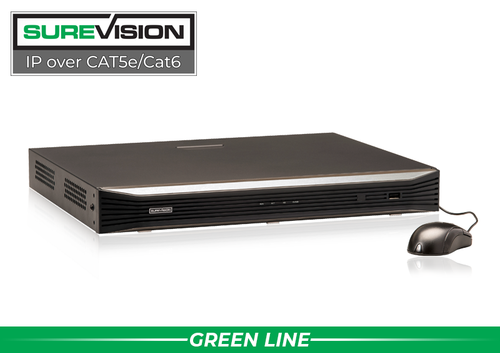
SureVision SV-NVR2P16-N 16-Channel PoE NVR
This recorder manages up to 16 compatible IP camera channels and records to local surveillance storage. Check incoming bandwidth, supported camera settings and drive options against the proposed system. Retention depends on the installed capacity and recording configuration.
View product details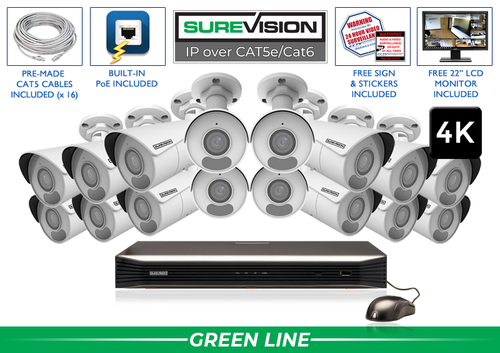
SureVision SV-16IPBIR8-N 16-Camera 4K System
This package combines 16 SureVision 4K bullet cameras with a 16-channel NVR. Consider it when the camera layout calls for these fixed wide-angle views, then select storage and cable options around the property. It provides a starting point for a matched camera-and-recorder system.
View product detailsLocal storage camera questions
Can I use local recording and still view cameras on my phone?
Yes, compatible systems support both. Video can be stored locally while authorized users access supported remote-viewing functions. Remote access still needs suitable connectivity and configuration.
Does local storage guarantee privacy?
No. Physical control is helpful, but accounts, remote access, network configuration and the recorder's location still need protection. Apply the same care to exported clips as to the original recording.
How many days will a 4TB drive hold?
There is no single answer without the camera count, bitrate and schedule. Estimate the daily recording workload and allow for system overhead; then verify the available history after the system is in use.
Does a local NVR require a monthly cloud plan?
SureVision local NVR recording does not require a monthly cloud-storage plan. Other services or ownership costs should be evaluated separately according to the selected system and installation.
Choose the Right Recording and Storage Plan
Tell CCTV Security Pros how many cameras you need, the detail you want and the history you must retain. Our team can help match a SureVision NVR and compatible storage to your project.
Get a Free System Quote Shop SureVision CamerasSeparate retention, backup and preserved incident files
Local recording keeps footage on storage at the property, but several different storage jobs may be involved. Routine recording maintains the rolling history. An exported incident file preserves a selected event. A separately configured backup, where supported, provides another copy. These functions should be planned and tested individually.
| Storage job | Purpose | Question to verify |
|---|---|---|
| Rolling recording | Maintain recent history for everyday review | What is the measured retention at the final settings? |
| Incident export | Preserve an event beyond normal overwrite | Who exports it, where is it kept and can it be played? |
| Redundancy where supported | Reduce a specified hardware failure risk | Which failures does the selected configuration address? |
| Separate backup where supported | Keep an additional copy in another location | How is copying performed and how is restoration tested? |
The NVR selection guide explains recorder and capacity questions. Compare SureVision NVR models by their actual storage support rather than assuming that every recorder offers the same drive bays, redundancy or backup options.
Measure storage use after the system is operating
A storage estimate becomes more useful when it is checked against the installed cameras. Record the final resolution, frame rate, codec, bitrate settings and recording schedule. Observe a representative period that includes the busy and quiet times the property experiences. Scene activity and recording configuration can change consumption significantly.
For constant average bitrate, one camera recording at 4 Mbps uses roughly 43.2 GB per day in decimal units before additional overhead. Eight cameras at that rate use about 345.6 GB per day. This calculation provides a starting point, not a guaranteed retention period for a particular drive. Leave room for overhead and confirm the recorder’s measured recording history.
Protect the recorder from casual access and assign responsibility for storage-health checks. An internet outage is different from loss of power, a failed switch or a damaged drive; each affects a different part of the recording path. The wired camera system guide helps explain that path, and the support center provides resources for the equipment you use.
What to record at the final system check
Keep the acceptance check simple enough that the owner can repeat it later. Use the final camera positions and recording settings, and include the lighting and activity that make the important views difficult. A recorded test gives a useful baseline for future troubleshooting.
- Confirm that each camera name matches its actual location and purpose.
- Review a saved daytime event and, where relevant, a nighttime event with a moving subject.
- Check the recording history against the agreed retention goal after a representative operating period.
- Test the permissions and playback functions of an ordinary user account.
- Export a short sample and check it on the device that will be used for review.
- Record any unresolved issue and the person responsible for correcting it.
Repeat the relevant checks after a camera is moved, a major display or obstruction changes, or recording settings are adjusted. This keeps the system aligned with the property’s current needs and makes maintenance more predictable.
Turn the plan into a complete equipment list
After defining the required views, compare SureVision NVR recorders. Match each camera to a recorder channel, a compatible power connection and a documented cable route. Keep the installation materials, storage assumptions and required user functions on the same list so a missing component is easier to spot before ordering.
Use our NVR selection guide for the next planning decision and the wired camera guide for the related technical detail. These guides provide background for comparing the actual equipment rather than choosing solely by a camera count or a resolution label.
Bring the list together in the custom security camera system builder, or send the property layout and viewing goals with a free system quote request. Include the mounting locations, approximate subject distances and any existing equipment you want to keep. That information makes the proposed configuration more specific to the property.
Before accepting the installation, practice the tasks the owner will perform: checking a live view, finding a recorded event and preserving a usable export. Save the camera schedule, equipment model numbers and support information with the project records. Use the technical support center for model-specific setup resources and ask for help when a required function needs clarification.
