
Warehouse Security Camera Systems: Coverage and Recording Guide
Posted by CCTV Security Pros on Oct 14, 2026
See the Journey from Receiving to Shipping
Plan warehouse camera views around the movement of inventory, vehicles and people. Clear views of handoff points, useful aisle coverage and dependable recording help your team review what happened.
Updated October 7, 2026 · CCTV Security Pros
Where should warehouse cameras go?
Start with receiving doors, shipping bays, controlled entrances and high-value inventory areas. Add aisle and yard views based on obstructions and investigation needs. Place cameras so an event can be followed between useful views, rather than relying only on a high, wide overview of the entire warehouse.
Map the inventory handoff points
Think through a normal delivery from arrival to departure. A vehicle approaches the site, a door opens, goods are unloaded, staff move the stock and an order later leaves through shipping. Mark those transitions on a floor plan. Video is most useful when the team can establish where and when a transfer occurred.
Assign a goal to each view. A dock overview can show the sequence of loading activity, while a closer view may help document the condition of a pallet at a defined checkpoint. A high-resolution camera cannot be assumed to read every small label across a busy loading bay.
List the investigations that recur at your business, such as missing cartons, disputed deliveries or damage discovered after dispatch. Use those examples to decide which views deserve priority and to build realistic acceptance tests.
Design aisle views around racks and changing stock
Tall shelving, seasonal inventory and parked forklifts can create large blind spots. Walk each aisle with the racks stocked, and consider what the view will look like when temporary pallets are placed at the aisle entrance. A floor plan without those obstructions can give a misleading impression of coverage.
Use a wide view where scene context matters and a tighter view where a specific doorway or work position needs detail. Consider looking along selected aisles rather than aiming one very wide camera across the tops of several racks. Verify the result from the proposed mounting height.
Recheck coverage after a rack move or a major stock change. The same camera can still be working electrically while its view has become much less useful.
Test open docks, night shifts and moving subjects
Loading areas combine indoor shadows with bright outdoor light. Review the image with dock doors open and closed, and with a person or pallet moving through the transition. Available image settings may help, but the selected camera and mounting angle still have to fit the scene.
For night shifts, inspect recorded motion under the warehouse's real lighting. A bright, still image does not guarantee a sharp moving subject. Infrared illumination can help in low light, but reflective surfaces and nearby objects may change the result.
Outdoor cameras should be chosen using their documented temperature and environmental specifications. Protect cable connections, use appropriate enclosures and consider how staff will clean lenses or remove cobwebs safely.
Keep important areas in frame continuously
Fixed cameras suit receiving doors, restricted cages, packing stations and other locations that need an uninterrupted view. PTZ cameras can supplement them in a yard or large open area when an operator needs to turn and zoom toward an event.
A PTZ should not be counted as several simultaneous fixed views. While it is inspecting one truck, it may be facing away from another bay. Keep the recording goal for each location clear when deciding where an adjustable camera adds value.
Cameras support incident review and operational oversight. They do not replace pedestrian separation, training, machinery safeguards or the facility's safety procedures.
Size the NVR for the real workload
Choose the recorder alongside the camera layout. Check channel capacity, incoming recording bandwidth, supported resolutions, PoE capacity and drive bays. If expansion is expected, reserve enough of all those resources rather than only leaving unused channels.
Set a retention goal based on how quickly delivery or inventory disputes are usually reported and on the business's requirements. Then estimate storage using camera bitrates and recording schedules. Continuous recording can help reconstruct a sequence across multiple views, while event-based recording depends on reliable detection and configuration.
Choose compatible surveillance hard drives within the selected NVR's supported capacity. Confirm actual retention after installation rather than relying on a generic promise of 30 or 60 days.
Make it easy for staff to find and preserve an event
Name cameras after recognizable locations such as Receiving Door 2 or West Packing Lane. Synchronize the system time so staff can follow an event between views. Agree who can review recordings, export clips and change settings; shared administrator credentials make responsibility harder to manage.
During handover, ask the people who will use the system to locate a sample delivery, switch between the relevant cameras and export the recording. Verify that the exported file plays correctly and shows the expected time period.
Keep the NVR protected from unauthorized access, and plan backup power for the necessary network components. Schedule checks for offline cameras, storage health, blocked views and dirty lenses. A straightforward check routine helps prevent an unnoticed recording gap.
Your planning priorities
Real SureVision options for warehouse projects
These products are available from CCTV Security Pros. Match each model to the viewing task and confirm the final recorder, power, mounting and storage configuration before ordering.
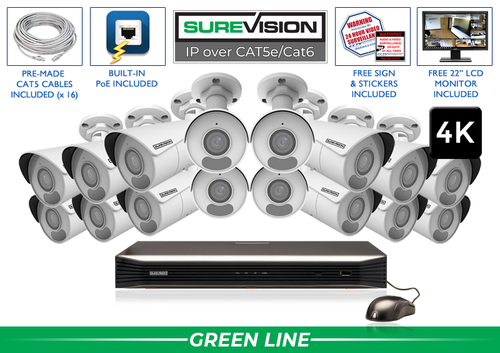
SureVision SV-16IPBIR8-N 16-Camera 4K System
This system pairs 16 SureVision 4K bullet cameras with a 16-channel NVR. It is a useful starting point when the planned layout calls for that many fixed wide-angle views. Review the available drive, cable and accessory choices; the package size alone does not establish complete coverage or retention.
View product details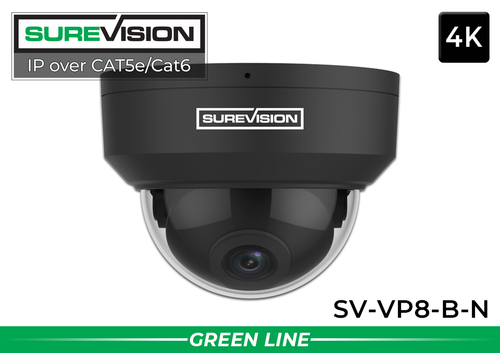
SureVision SV-VP8-B-N 4K Black Vandal Dome IP Camera
Consider this 8MP vandal-resistant dome for suitable entrances, corridors and accessible mounting positions where a compact housing is useful. Match its lens and environmental specifications to the location, and confirm compatibility with the selected recorder.
View product detailsWarehouse camera system questions
How many cameras do I need for a warehouse?
Start with the operational layout. Docks, aisle obstructions, entrances and investigation goals matter more than square footage alone. A small facility with many enclosed rooms may require more separate views than a larger open space.
Can cameras read shipping labels?
That depends on label size, camera distance, lens, lighting and motion. If label detail matters, design and test a close view of a specific handoff point. Do not assume an overhead overview will capture readable labels.
Is PoE useful in a warehouse?
Yes, compatible PoE cameras use one Ethernet connection for power and data. Long runs, power budgets, cable protection and links between buildings still need a proper network design.
Can staff review footage remotely?
Supported SureVision systems offer remote viewing through compatible apps or software. Remote access needs appropriate connectivity, configuration and user permissions; the NVR can also store recordings locally without required monthly cloud storage.
Build a Warehouse System Around Your Workflow
Send a floor plan showing racks, dock doors, entrances and priority work areas. CCTV Security Pros can help match the views, recorder and storage to your warehouse.
Get a Free System Quote Shop SureVision CamerasFollow the inventory journey when selecting camera views
Warehouse coverage becomes easier to plan when you follow a pallet from arrival to dispatch. Mark unloading, receiving inspection, staging, put-away, picking, packing and outbound handoff. The purpose is to connect events across those locations. A wide overhead view may explain movement, while a second view at a controlled handoff point captures the detail needed for a disputed shipment.
| Process | Camera objective | Common obstruction |
|---|---|---|
| Receiving | Show the condition and handling of arriving goods | A raised dock door, vehicle body or temporary pallet. |
| Rack aisle | Follow movement through an assigned aisle | Stock that extends beyond a shelf edge. |
| Packing | Document the packing or dispatch handoff | Hands, boxes or the operator blocking a steep overhead view. |
| Outbound staging | Connect prepared goods to a collection event | Several loads staged in front of the camera. |
Document which goals require readable identifiers. Package labels and faces need adequate image size, lighting and viewing angle; a general aisle camera may not satisfy both. Our 4K camera guide explains the relationship between resolution and the detail within the scene.
Plan recording around delayed incident reports
A shipment discrepancy may be reported well after the delivery leaves the building. Agree on the retention goal with the team that handles claims, inventory and customer service. Include weekends and the normal delay between a delivery and the discovery of a problem. Then estimate capacity using the final number of cameras and measured recording rates.
When comparing 16-camera systems and 32-camera systems, account for recorder growth as well as the initial views. Adding a camera consumes a channel, recording bandwidth and storage. Adding a display or extra remote users changes the viewing workload. A channel count alone does not describe every performance limit.
Create an example incident and ask a supervisor to follow it from the dock to the relevant aisle. Review the recorded timestamps and export the sequence from more than one camera. The NVR selection guide helps frame the recorder questions, and the system builder can organize cameras, storage and cable quantities into one reviewable equipment list.
What to record at the final system check
Keep the acceptance check simple enough that the owner can repeat it later. Use the final camera positions and recording settings, and include the lighting and activity that make the important views difficult. A recorded test gives a useful baseline for future troubleshooting.
- Confirm that each camera name matches its actual location and purpose.
- Review a saved daytime event and, where relevant, a nighttime event with a moving subject.
- Check the recording history against the agreed retention goal after a representative operating period.
- Test the permissions and playback functions of an ordinary user account.
- Export a short sample and check it on the device that will be used for review.
- Record any unresolved issue and the person responsible for correcting it.
Repeat the relevant checks after a camera is moved, a major display or obstruction changes, or recording settings are adjusted. This keeps the system aligned with the property’s current needs and makes maintenance more predictable.
Turn the plan into a complete equipment list
After defining the required views, compare 16-camera IP systems. Match each camera to a recorder channel, a compatible power connection and a documented cable route. Keep the installation materials, storage assumptions and required user functions on the same list so a missing component is easier to spot before ordering.
Use our commercial camera planning guide for the next planning decision and the NVR selection guide for the related technical detail. These guides provide background for comparing the actual equipment rather than choosing solely by a camera count or a resolution label.
Bring the list together in the custom security camera system builder, or send the property layout and viewing goals with a free system quote request. Include the mounting locations, approximate subject distances and any existing equipment you want to keep. That information makes the proposed configuration more specific to the property.
Before accepting the installation, practice the tasks the owner will perform: checking a live view, finding a recorded event and preserving a usable export. Save the camera schedule, equipment model numbers and support information with the project records. Use the technical support center for model-specific setup resources and ask for help when a required function needs clarification.
