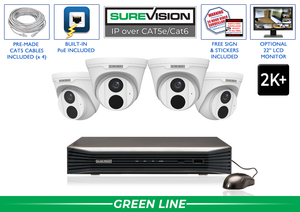
- SureVision PoE IP Security Camera Systems -
Professional PoE IP Security Camera Systems with NVR
Build your SureVision PoE security camera system with 4MP or 4K IP cameras , a compatible SureVision NVR and your choice of storage. One network cable carries power and video to each supported camera. Choose night vision, audio and AI human and vehicle detection on select models, with local recording, remote viewing and no required monthly fees.

Build a SureVision PoE Security Camera System Around Your Property
A SureVision IP security camera system combines compatible wired cameras, NVR recording and local video storage. Power over Ethernet lets supported cameras receive power and transmit video through one Ethernet cable, simplifying installation without relying on Wi-Fi reception at each camera.
Start with the views you need, then choose camera styles, lenses, recorder capacity and storage to match. Our U.S.-based team can help you compare packages or customize a system for your business, home or larger facility.
What to Look for in a Complete PoE Camera System
Compare the full equipment list on each product page. Camera count, NVR model, hard-drive capacity, cables, switches and monitors can vary between packages.
Compatible IP Cameras
Match each camera’s housing, lens, resolution and features to its location. A system can combine different supported camera styles instead of using the same camera for every view.
NVR Recording
The network video recorder manages supported cameras, recording, playback and footage exports. Check its channel count, incoming bandwidth and supported camera resolutions.
Local Video Storage
Surveillance hard drives store footage at your property. Choose capacity around camera settings, recording schedules and the number of days you want to retain.
Power and Connectivity
Cameras receive power from compatible built-in NVR PoE ports or separate PoE equipment. Confirm the required switches, cable runs and power capacity for your selected configuration.
Choose Your SureVision System Size
Count the views you need rather than choosing by square footage alone. A doorway close-up and a broad parking-area overview may require separate cameras, even when they cover nearby locations.
| Camera Count | Plan the Views | Check Before Ordering |
|---|---|---|
| 2–4 cameras | Prioritize specific entrances, approaches or interior areas. | Included recorder channels and room for additional cameras. |
| 8 cameras | Balance close-up views with wider coverage across multiple areas. | Camera placement, cable routes, storage and expansion capacity. |
| 16 cameras | Assign a clear purpose to each interior and exterior view. | NVR bandwidth, available channels and desired recording retention. |
| 24–32 cameras | Organize coverage by area and identify critical recording locations. | PoE switching, network connections, storage and user access. |
| 64 cameras | Plan camera groups, network connections and monitoring responsibilities. | Recorder limits, switch capacity, network bandwidth and retention targets. |
NVR Channels and PoE Ports Are Different
Channels describe how many cameras the recorder can support, subject to its other limits. Built-in PoE ports are physical connections that can power compatible cameras. A recorder’s channel count does not necessarily equal its number of powered ports.
Some configurations connect cameras through separate PoE switches. When expanding, check open channels, incoming bandwidth, supported camera resolution, PoE power and storage together. Compare SureVision NVR recorders or ask our team to review the full configuration.
Mix Compatible Cameras for Better Coverage
A front entrance may need a different lens and mounting style from a loading dock or interior hallway. Choose from compatible SureVision IP cameras to build the views your property needs.
- Bullet cameras: Directional housings for defined views along entrances, driveways and building edges.
- Turret and dome cameras: Compact mounting options for walls, ceilings and soffits. Check each model’s weather and impact-resistance ratings.
- Varifocal cameras: Adjustable lenses let you refine the field of view within the model’s supported range.
- PTZ cameras: Pan, tilt and zoom cameras help inspect different areas. Use fixed cameras where a view must remain recorded while the PTZ points elsewhere.
- Specialty cameras: Consider panoramic views, active deterrence or other specialized features when a standard fixed camera does not meet the task.
Choosing 4MP or 4K PoE Cameras
4MP cameras can provide detailed video for many everyday surveillance views. 4K cameras provide approximately eight megapixels, offering more pixels for reviewing finer detail when the scene and recording settings support it.
Choose resolution alongside lens, lighting, target distance and subject movement. A wide overview is useful for following activity, while a narrower view can concentrate detail on a doorway or gate. Higher resolution may increase bandwidth and storage requirements; the actual requirements depend on recording settings.
Night Vision, Audio and SureVision AI Features
Infrared illumination supports black-and-white nighttime video. Selected cameras provide color images using available ambient light or integrated white lights. Check important views after dark for reflections, glare and useful subject detail.
Human and vehicle detection can help filter motion events on compatible equipment. Available alerts, search functions and analytics depend on the camera, NVR and configuration. Explore our SureVision AI security camera guide when comparing these capabilities.
Selected models also offer microphones, two-way communication, warning lights or sirens. A microphone alone does not provide two-way talk. Confirm the specific audio and deterrence features you need, and use recording functions in accordance with applicable requirements.
Local Recording, Storage and Remote Viewing
SureVision systems store video on compatible local NVR storage without a required monthly cloud-storage subscription for standard recording. A properly configured local system can continue recording without internet service, provided power and the local camera connections remain available.
Off-site viewing and internet-dependent notifications require connectivity. Set up individual authorized users and appropriate permissions, then confirm live viewing, playback and footage exports before relying on the system.
Retention depends on camera count, bitrate, compression, frame rate and recording schedule. Use our NVR storage calculator for an estimate, then confirm the selected recorder’s supported drives and total capacity.
Plan the Installation Before Ordering
- Map the views: Mark each camera location and decide whether it needs an overview or a closer identification view.
- Plan cable routes: Measure distances and confirm the cable, PoE equipment and operating modes supported by the selected models.
- Protect connections: Choose suitable mounting accessories and weather protection for exposed equipment.
- Position the recorder: Allow for ventilation, reliable power and controlled access.
- Test before final mounting: Confirm camera angles, daytime and nighttime images, recording, playback and remote access.
Find setup guides and product resources in our technical support and setup center. For an existing coax installation, compare HD-over-coax CCTV systems before deciding to replace the wiring.
SureVision PoE System Questions
What is the difference between an IP system and a PoE system?
IP cameras transmit video over a network. PoE is a way to supply power over Ethernet cabling, so a compatible PoE IP camera uses one cable for power and network data. Not all IP cameras use PoE.
Can I customize a package with different camera styles?
Compatible camera styles can be combined to match different locations. Ask our team to confirm the selected cameras, recorder, power requirements and features before ordering. Package contents and pricing depend on the configuration.
Does a 32-channel NVR have 32 PoE ports?
Not necessarily. Channel capacity and physical PoE ports are separate specifications. Some cameras may connect through compatible external PoE switches. Check the exact NVR and system equipment list.
Can I add more cameras later?
Yes, when the recorder has available channels and sufficient bandwidth, with compatible camera support, power and storage. Plan these requirements together rather than relying on open channel count alone.
How many days of video will the hard drive store?
There is no single retention period for a given hard-drive capacity. Camera count, bitrate and recording schedules can change storage use substantially. Estimate capacity for your intended settings and check actual retention after setup.
Do SureVision systems require monthly fees?
Standard local NVR recording and compatible included remote-viewing tools do not require a monthly subscription. Internet connectivity and optional third-party services are separate.
Are these systems suitable for business or government projects?
SureVision configurations can support business, home and larger facility requirements. For projects with procurement standards, confirm the selected models and required documentation. Review our NDAA-compliant surveillance equipment information when planning applicable projects.
Get Help Choosing Your SureVision System
Tell us your camera count, the areas you want to monitor and whether you have existing equipment. We’ll help you compare cameras, NVR capacity, storage and accessories for your project.